
Wayback Machinekoobas.hobune.stream
May JUN Jul
Previous capture 13 Next capture
2021 2022 2023
1 capture
13 Jun 22 - 13 Jun 22
sparklines
Close Help
  • Products
  • Solutions
  • Made with Unity
  • Learning
  • Support & Services
  • Community
  • Asset Store
  • Get Unity

UNITY ACCOUNT

You need a Unity Account to shop in the Online and Asset Stores, participate in the Unity Community and manage your license portfolio. Login Create account
  • Blog
  • Forums
  • Answers
  • Evangelists
  • User Groups
  • Beta Program
  • Advisory Panel

Navigation

  • Home
  • Products
  • Solutions
  • Made with Unity
  • Learning
  • Support & Services
  • Community
    • Blog
    • Forums
    • Answers
    • Evangelists
    • User Groups
    • Beta Program
    • Advisory Panel

Unity account

You need a Unity Account to shop in the Online and Asset Stores, participate in the Unity Community and manage your license portfolio. Login Create account

Language

  • Chinese
  • Spanish
  • Japanese
  • Korean
  • Portuguese
  • Ask a question
  • Spaces
    • Default
    • Help Room
    • META
    • Moderators
    • Topics
    • Questions
    • Users
    • Badges
  • Home /
avatar image
0
Question by Ixadias · Jan 12, 2013 at 05:04 AM · textcolorguilayoutguistyleselectiongrid

GUILayout.SelectionGrid with GUIStyle ignores textColor
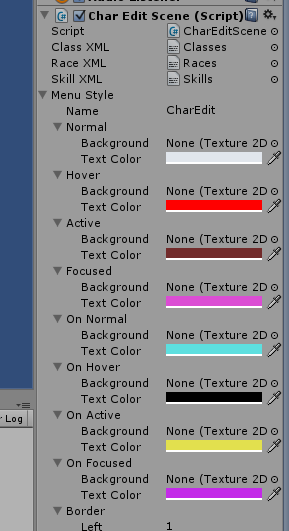
alt text

Ok, I have a GUILayout.SelectionGrid going that seems to work fine except for one thing. It only ever uses the Normal state for textColor, regardless of whatever I'm doing to the buttons in the selectionGrid. I don't know if I'm doing something wrong, or if GUIStyle doesn't play nice with selection grids or what. I've set up the style using the Unity editor, and assigned it in the following code (where raceSelected is an int, races is a string array, and menuStyle is my GUIStyle obj):

 GUILayout.BeginArea(new Rect(65, 5, 150, 550));
 raceSelected = GUILayout.SelectionGrid(raceSelected, races, 1, menuStyle, null);
 GUILayout.EndArea();
example.png (24.8 kB)
Comment
Add comment
10 |3000 characters needed characters left characters exceeded
▼
  • Viewable by all users
  • Viewable by moderators
  • Viewable by moderators and the original poster
  • Advanced visibility
Viewable by all users

2 Replies

· Add your reply
  • Sort: 
avatar image
1

Answer by nsejosh · Jan 15, 2013 at 07:04 PM

Try setting the Background texture- I've noticed that Text Color is ignored unless there's a background texture for the state

Comment
Add comment · Show 1 · Share
10 |3000 characters needed characters left characters exceeded
▼
  • Viewable by all users
  • Viewable by moderators
  • Viewable by moderators and the original poster
  • Advanced visibility
Viewable by all users
avatar image JoeStrout · May 18, 2014 at 01:19 PM 0
Share

THAT'S IT!!! I just spent the last 20 $$anonymous$$utes beating my head against this same thing! Thanks for pointing out what now seems fairly obvious... Unity uses the presence of the background image to know whether to apply or ignore the text color as well!

avatar image
0

Answer by frogsbo · Jun 09, 2014 at 07:41 AM

custom grid:

Problem with that, is it uses 1 draw call per button, very slow, for like 10x10 buttons is 100 draw calls. here is a button using whatever texture you want, it returns number of button clicked on your texture:

   function OnGUI(){
             var gridpixels = 20;//pixels per grid square
             var gidxsquares = 12;//num squares in x direction
             if (GUI.Button(Rect(320,10,240,60),fctbutton,GUIStyle.none))
     {
             var xpos = Input.mousePosition.x - 320 ;
             var ypos = Screen.height - Input.mousePosition.y -10;
             
             var result =  Mathf.Floor(xpos / gridpixels) + Mathf.Floor(ypos / gridpixels)*gidxsquares + 1;//plus 1 at end for not zero first square
             //
             print (result);
     }    

}

Comment
Add comment · Share
10 |3000 characters needed characters left characters exceeded
▼
  • Viewable by all users
  • Viewable by moderators
  • Viewable by moderators and the original poster
  • Advanced visibility
Viewable by all users

Your answer

Hint: You can notify a user about this post by typing @username

Up to 2 attachments (including images) can be used with a maximum of 524.3 kB each and 1.0 MB total.

Follow this Question

Answers Answers and Comments

11 People are following this question.

avatar image avatar image avatar image avatar image avatar image avatar image avatar image avatar image avatar image avatar image avatar image

Related Questions

How can I change Toolbar/SelectionGrid selected item's text color? 1 Answer

Styling an individual button in SelectionGrid 0 Answers

Inserting text into GUILayout Box? 3 Answers

Replacing transparency of text with a solid color? 1 Answer

FPS problem with Multi-Colored text on Unity 5 uGUI via Rich Text 0 Answers


Enterprise
Social Q&A

Social
Subscribe on YouTube social-youtube Follow on LinkedIn social-linkedin Follow on Twitter social-twitter Follow on Facebook social-facebook Follow on Instagram social-instagram

Footer

  • Purchase
    • Products
    • Subscription
    • Asset Store
    • Unity Gear
    • Resellers
  • Education
    • Students
    • Educators
    • Certification
    • Learn
    • Center of Excellence
  • Download
    • Unity
    • Beta Program
  • Unity Labs
    • Labs
    • Publications
  • Resources
    • Learn platform
    • Community
    • Documentation
    • Unity QA
    • FAQ
    • Services Status
    • Connect
  • About Unity
    • About Us
    • Blog
    • Events
    • Careers
    • Contact
    • Press
    • Partners
    • Affiliates
    • Security
Copyright © 2020 Unity Technologies
  • Legal
  • Privacy Policy
  • Cookies
  • Do Not Sell My Personal Information
  • Cookies Settings
"Unity", Unity logos, and other Unity trademarks are trademarks or registered trademarks of Unity Technologies or its affiliates in the U.S. and elsewhere (more info here). Other names or brands are trademarks of their respective owners.
  • Anonymous
  • Sign in
  • Create
  • Ask a question
  • Spaces
  • Default
  • Help Room
  • META
  • Moderators
  • Explore
  • Topics
  • Questions
  • Users
  • Badges
