
Wayback Machinekoobas.hobune.stream
May JUN Jul
Previous capture 13 Next capture
2021 2022 2023
1 capture
13 Jun 22 - 13 Jun 22
sparklines
Close Help
  • Products
  • Solutions
  • Made with Unity
  • Learning
  • Support & Services
  • Community
  • Asset Store
  • Get Unity

UNITY ACCOUNT

You need a Unity Account to shop in the Online and Asset Stores, participate in the Unity Community and manage your license portfolio. Login Create account
  • Blog
  • Forums
  • Answers
  • Evangelists
  • User Groups
  • Beta Program
  • Advisory Panel

Navigation

  • Home
  • Products
  • Solutions
  • Made with Unity
  • Learning
  • Support & Services
  • Community
    • Blog
    • Forums
    • Answers
    • Evangelists
    • User Groups
    • Beta Program
    • Advisory Panel

Unity account

You need a Unity Account to shop in the Online and Asset Stores, participate in the Unity Community and manage your license portfolio. Login Create account

Language

  • Chinese
  • Spanish
  • Japanese
  • Korean
  • Portuguese
  • Ask a question
  • Spaces
    • Default
    • Help Room
    • META
    • Moderators
    • Topics
    • Questions
    • Users
    • Badges
  • Home /
avatar image
0
Question by vuong_vin · Dec 23, 2014 at 08:11 AM · panoramacamera script

Panorama reset position/angle.

Hello all,

I'm doing with panorama scene for ipad. I used default script MouseOrbit for my camera to interactive panorama. But my problem is, when i touch in ipad's screen, camera alway reset position/angle (0,0,0 - example). It is not continue from existing position/angle.

Could you let me know scrip do fix it? Thanks.

THANKS.

Comment
Add comment · Show 7
10 |3000 characters needed characters left characters exceeded
▼
  • Viewable by all users
  • Viewable by moderators
  • Viewable by moderators and the original poster
  • Advanced visibility
Viewable by all users
avatar image tanoshimi · Dec 23, 2014 at 08:17 AM 1
Share

Please post your current script, and what you have done to adapt it for touch.

avatar image vuong_vin · Dec 23, 2014 at 09:13 AM 0
Share

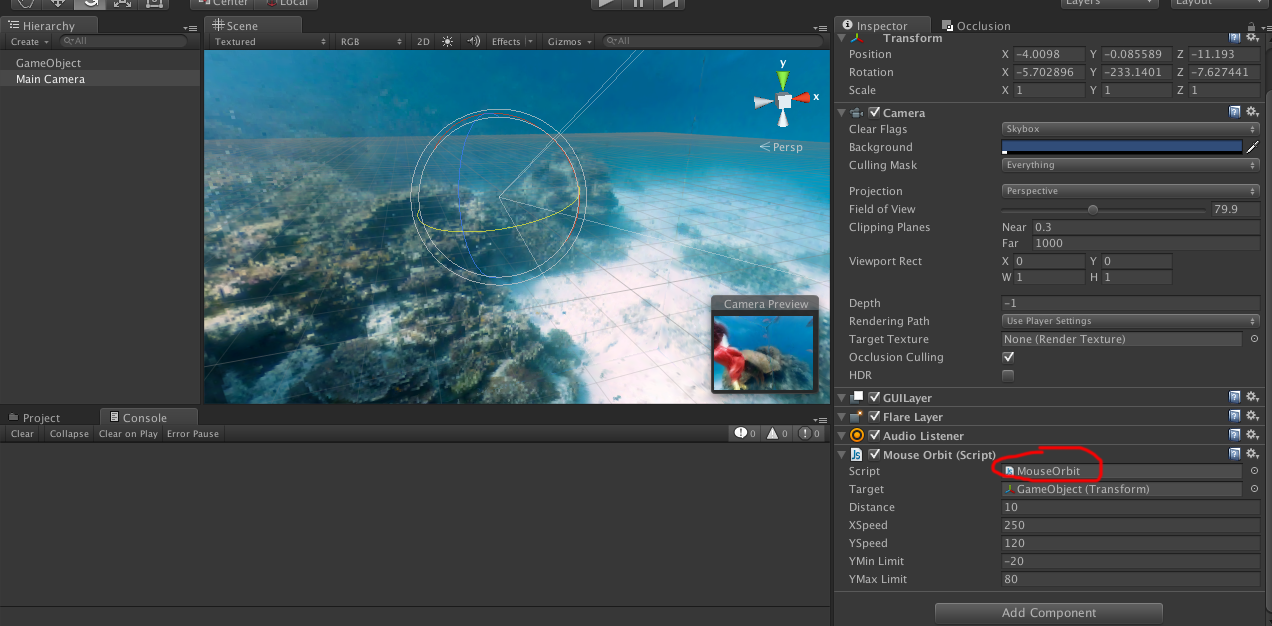
Very basic. $$anonymous$$y scene have a camera, a skybox with panorama material. I added $$anonymous$$ouseOrbit script (in Standard Assect) to my $$anonymous$$ain Camera. After build and run in iPad, any screen touch - my camera alway reset position/angle. :(

avatar image HarshadK · Dec 23, 2014 at 09:20 AM 1
Share

@quenhoai2003 few things to note:

  • Do not post comments as answer.

  • @tanoshimi has asked for the current script you are using, without which it is not possible for us to tell why the position/angle is resetting.

avatar image vuong_vin · Dec 23, 2014 at 02:10 PM 0
Share

@Harshad$$anonymous$$ Thanks for your re$$anonymous$$d. I will note it. I'm not sure about your commend but now i post my screenshot and script i used. alt text
 var target : Transform;
 var distance = 10.0;
 
 var xSpeed = 250.0;
 var ySpeed = 120.0;
 
 var y$$anonymous$$inLimit = -20;
 var y$$anonymous$$axLimit = 80;
 
 private var x = 0.0;
 private var y = 0.0;
 
 @script AddComponent$$anonymous$$enu("Camera-Control/$$anonymous$$ouse Orbit")
 
 function Start () {
     var angles = transform.eulerAngles;
     x = angles.y;
     y = angles.x;
 
     // $$anonymous$$ake the rigid body not change rotation
        if (GetComponent.<Rigidbody>())
         GetComponent.<Rigidbody>().freezeRotation = true;
 }
 
 function LateUpdate () {
     if (target) {
         x += Input.GetAxis("$$anonymous$$ouse X") * xSpeed * 0.02;
         y -= Input.GetAxis("$$anonymous$$ouse Y") * ySpeed * 0.02;
          
          y = ClampAngle(y, y$$anonymous$$inLimit, y$$anonymous$$axLimit);
                 
         var rotation = Quaternion.Euler(y, x, 0);
         var position = rotation * Vector3(0.0, 0.0, -distance) + target.position;
         
         transform.rotation = rotation;
         transform.position = position;
     }
 }
 
 static function ClampAngle (angle : float, $$anonymous$$ : float, max : float) {
     if (angle < -360)
         angle += 360;
     if (angle > 360)
         angle -= 360;
     return $$anonymous$$athf.Clamp (angle, $$anonymous$$, max);
 }

Hope it is correct @tanoshimi commend.

Thanks all.

screen shot 2014-12-23 at 9.03.24 pm.png (429.0 kB)
avatar image hav_ngs_ru · Dec 25, 2014 at 05:40 PM 1
Share

try to Debug.Log your Input.GetAxis() values in LateUpdate. And x and Y too. How they behave at touch moment?

Show more comments

0 Replies

· Add your reply
  • Sort: 

Your answer

Hint: You can notify a user about this post by typing @username

Up to 2 attachments (including images) can be used with a maximum of 524.3 kB each and 1.0 MB total.

Follow this Question

Answers Answers and Comments

27 People are following this question.

avatar image avatar image avatar image avatar image avatar image avatar image avatar image avatar image avatar image avatar image avatar image avatar image avatar image avatar image avatar image avatar image avatar image avatar image avatar image avatar image avatar image avatar image avatar image avatar image avatar image avatar image avatar image

Related Questions

Interactive 360 panoramas camera script 1 Answer

Best solution for interactive panorama? 2 Answers

Lines on 360 image? 1 Answer

On looking to far up or down Random Rotation bug 1 Answer

Mapping hi-resolution image to an object 2 Answers


Enterprise
Social Q&A

Social
Subscribe on YouTube social-youtube Follow on LinkedIn social-linkedin Follow on Twitter social-twitter Follow on Facebook social-facebook Follow on Instagram social-instagram

Footer

  • Purchase
    • Products
    • Subscription
    • Asset Store
    • Unity Gear
    • Resellers
  • Education
    • Students
    • Educators
    • Certification
    • Learn
    • Center of Excellence
  • Download
    • Unity
    • Beta Program
  • Unity Labs
    • Labs
    • Publications
  • Resources
    • Learn platform
    • Community
    • Documentation
    • Unity QA
    • FAQ
    • Services Status
    • Connect
  • About Unity
    • About Us
    • Blog
    • Events
    • Careers
    • Contact
    • Press
    • Partners
    • Affiliates
    • Security
Copyright © 2020 Unity Technologies
  • Legal
  • Privacy Policy
  • Cookies
  • Do Not Sell My Personal Information
  • Cookies Settings
"Unity", Unity logos, and other Unity trademarks are trademarks or registered trademarks of Unity Technologies or its affiliates in the U.S. and elsewhere (more info here). Other names or brands are trademarks of their respective owners.
  • Anonymous
  • Sign in
  • Create
  • Ask a question
  • Spaces
  • Default
  • Help Room
  • META
  • Moderators
  • Explore
  • Topics
  • Questions
  • Users
  • Badges
