koobas.hobune.stream


Where is the downloaded asset directory ?
I've downloaded an asset from asset store. But i do not want import it yet. Where can i find the unitypakage downloaded? where's the directory ?

I'm pretty sure that depends to which directory you saved it when downloading. You can check your downloads folder or open the downloads list of your web browser - you can open the file in the saved folder by right clicking on the downloaded item and selecting "open directory" or something along those lines.. To import the asset to unity the easiest way is probably to drag the asset into the project view of unity..

No! I downloaded with asset store in unity. But the directory of my web browser doesn't have it.

On Windows, it saves the files here:
C:/Users/(your user name)/AppData(hidden)/Roaming/Unity/Asset Store


In Unity 2017.2.0f3, its C:\Users\(your user name)\AppData(hidden)\Roa$$anonymous$$g\Unity\Asset Store-5.x (or %AppData%\Unity\Asset Store-5.x)
It is located in hidden folder(Documents and Setting > Application Data > Unity).

I was looking for this as well. It also answered a few other questions I had, like: If an Asset is just a 3D model, how do I get to the model. I think the answer to this is: Open a new project with any 3D model selected as an included asset into the empty project then go into the created project folder and the 3D model file will show up there under assets then models. One could as well just create a full empty project then go to: C:/Users/(your user name)/AppData(hidden)/Roaming/Unity/Asset Store as stated in answers, include the asset into the empty project, again go into your saved project folder and all open 3D files from an included asset will be available to you. Good luck knowing which downloaded asset holds the files you are looking for. I found that hard myself, for there is little telling of what the asset has in it, other then the name of the asset it's self. My suggestion for that would be to create an empty project with most to all assets checked in the create empty project wizard, with a name like "opened-assets-project-v001" Then look for any and all 3D object file, as well as any other file like image, and C# files in the created project folder. Thank you to the one with the previous answer. I hope others find what I found out from it just as useful.

You have to create a new project then go back to Unity and import the asset to the new project.

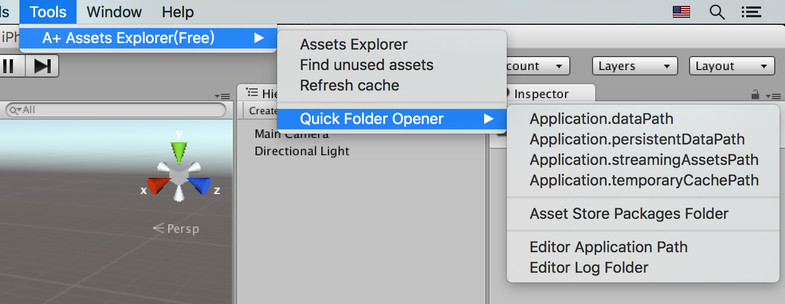
There is a free tool in Asset Store can open the Asset Store packages folder https://www.assetstore.unity3d.com/en/#!/content/68761