
Wayback Machinekoobas.hobune.stream
May JUN Jul
Previous capture 13 Next capture
2021 2022 2023
1 capture
13 Jun 22 - 13 Jun 22
sparklines
Close Help
  • Products
  • Solutions
  • Made with Unity
  • Learning
  • Support & Services
  • Community
  • Asset Store
  • Get Unity

UNITY ACCOUNT

You need a Unity Account to shop in the Online and Asset Stores, participate in the Unity Community and manage your license portfolio. Login Create account
  • Blog
  • Forums
  • Answers
  • Evangelists
  • User Groups
  • Beta Program
  • Advisory Panel

Navigation

  • Home
  • Products
  • Solutions
  • Made with Unity
  • Learning
  • Support & Services
  • Community
    • Blog
    • Forums
    • Answers
    • Evangelists
    • User Groups
    • Beta Program
    • Advisory Panel

Unity account

You need a Unity Account to shop in the Online and Asset Stores, participate in the Unity Community and manage your license portfolio. Login Create account

Language

  • Chinese
  • Spanish
  • Japanese
  • Korean
  • Portuguese
  • Ask a question
  • Spaces
    • Default
    • Help Room
    • META
    • Moderators
    • Topics
    • Questions
    • Users
    • Badges
  • Home /
avatar image
1
Question by jsunandmax · Jan 15, 2013 at 06:38 PM · textureterrainuvstretching

stretching UV's on terrain

Has anyone solved the problem of stretching UV's on vertical surfaces generated by heightmaps on terrain? I'm sure we are all well-aware of the issue, correct? When the offset between vertices is large (surface becomes vertical, like a cliff wall) but the UV allocation is constant you get big ugly stretched textures. Here is an example:
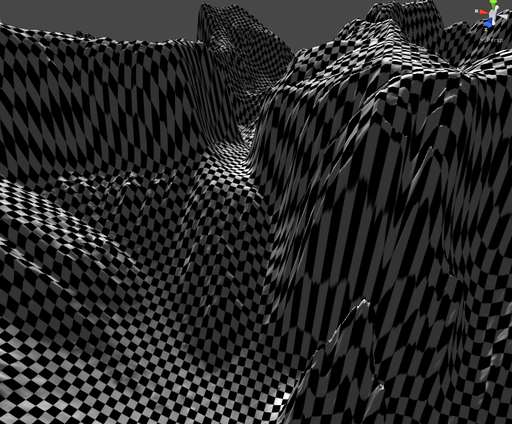
alt text

thanks in advance!

streaking.jpg (41.6 kB)
Comment
Add comment · Show 1
10 |3000 characters needed characters left characters exceeded
▼
  • Viewable by all users
  • Viewable by moderators
  • Viewable by moderators and the original poster
  • Advanced visibility
Viewable by all users
avatar image jsunandmax · Jan 15, 2013 at 07:47 PM 0
Share

Thanks but that wont work for me for a couple reasons; mostly due to current dependance on Splatmaps for multi-texture allocation and vertex colors are used for something else. Good resource and there might be something there my engineers can use, so thanks!

To be clear, ideally someone has an artist-friendly solution :)

looks like others have posted this problem without sufficient resolution:

http://answers.unity3d.com/questions/11966/terrain-editor-painting-textures-on-wallscliffs-or.html The answer to this guy was "cover them up w/ objects"....:)

2 Replies

· Add your reply
  • Sort: 
avatar image
0

Answer by Jessy · Jan 15, 2013 at 06:49 PM

Somebody at least made an attempt.

http://forum.unity3d.com/threads/86022-Triplanar-Projection-Shaders-on-the-Asset-Store.

Comment
Add comment · Share
10 |3000 characters needed characters left characters exceeded
▼
  • Viewable by all users
  • Viewable by moderators
  • Viewable by moderators and the original poster
  • Advanced visibility
Viewable by all users
avatar image
0

Answer by ravingbots · Sep 03, 2015 at 01:50 AM

I wrote a shader that eliminates stretched textures on vertical surfaces of Unity terrain:

  • a tutorial: http://ravingbots.com/2015/09/02/how-to-improve-unity-terrain-texturing/

  • the shader: https://www.assetstore.unity3d.com/en/#!/content/44225

Comment
Add comment · Share
10 |3000 characters needed characters left characters exceeded
▼
  • Viewable by all users
  • Viewable by moderators
  • Viewable by moderators and the original poster
  • Advanced visibility
Viewable by all users

Your answer

Hint: You can notify a user about this post by typing @username

Up to 2 attachments (including images) can be used with a maximum of 524.3 kB each and 1.0 MB total.

Follow this Question

Answers Answers and Comments

10 People are following this question.

avatar image avatar image avatar image avatar image avatar image avatar image avatar image avatar image avatar image avatar image

Related Questions

Assigning UV Map to model at runtime 0 Answers

Terrain for Unity iPhone 3 Answers

How do I go about texturing a flat-shaded generated mesh? 1 Answer

Custom skybox Shader uv issue, skybox texture stretching along one axis. 0 Answers

Wrong uv coordinates in Unity? (but works fine with Blender) 1 Answer


Enterprise
Social Q&A

Social
Subscribe on YouTube social-youtube Follow on LinkedIn social-linkedin Follow on Twitter social-twitter Follow on Facebook social-facebook Follow on Instagram social-instagram

Footer

  • Purchase
    • Products
    • Subscription
    • Asset Store
    • Unity Gear
    • Resellers
  • Education
    • Students
    • Educators
    • Certification
    • Learn
    • Center of Excellence
  • Download
    • Unity
    • Beta Program
  • Unity Labs
    • Labs
    • Publications
  • Resources
    • Learn platform
    • Community
    • Documentation
    • Unity QA
    • FAQ
    • Services Status
    • Connect
  • About Unity
    • About Us
    • Blog
    • Events
    • Careers
    • Contact
    • Press
    • Partners
    • Affiliates
    • Security
Copyright © 2020 Unity Technologies
  • Legal
  • Privacy Policy
  • Cookies
  • Do Not Sell My Personal Information
  • Cookies Settings
"Unity", Unity logos, and other Unity trademarks are trademarks or registered trademarks of Unity Technologies or its affiliates in the U.S. and elsewhere (more info here). Other names or brands are trademarks of their respective owners.
  • Anonymous
  • Sign in
  • Create
  • Ask a question
  • Spaces
  • Default
  • Help Room
  • META
  • Moderators
  • Explore
  • Topics
  • Questions
  • Users
  • Badges
