
Wayback Machinekoobas.hobune.stream
May JUN Jul
Previous capture 13 Next capture
2021 2022 2023
1 capture
13 Jun 22 - 13 Jun 22
sparklines
Close Help
  • Products
  • Solutions
  • Made with Unity
  • Learning
  • Support & Services
  • Community
  • Asset Store
  • Get Unity

UNITY ACCOUNT

You need a Unity Account to shop in the Online and Asset Stores, participate in the Unity Community and manage your license portfolio. Login Create account
  • Blog
  • Forums
  • Answers
  • Evangelists
  • User Groups
  • Beta Program
  • Advisory Panel

Navigation

  • Home
  • Products
  • Solutions
  • Made with Unity
  • Learning
  • Support & Services
  • Community
    • Blog
    • Forums
    • Answers
    • Evangelists
    • User Groups
    • Beta Program
    • Advisory Panel

Unity account

You need a Unity Account to shop in the Online and Asset Stores, participate in the Unity Community and manage your license portfolio. Login Create account

Language

  • Chinese
  • Spanish
  • Japanese
  • Korean
  • Portuguese
  • Ask a question
  • Spaces
    • Default
    • Help Room
    • META
    • Moderators
    • Topics
    • Questions
    • Users
    • Badges
  • Home /
avatar image
1
Question by PemonLarty · Dec 08, 2013 at 12:18 PM · graphicsguitexturehealth bar

(Health bar) Remove lives properly

Hey I tried to make a Health Bar, like the one in Tornado Twins video. (I also searched for other questions in here but no one matched my problem)

Anyway the thing is I got 3 lives and I want to loose 1 everytime I die like falling off the platform. I made some texture for the GUI, so 1 heart, 2 hearts, 3 hearts. But when I start I start at 2 lives (2 hearts) Instead of what should 3 and I dont loose any when I fall down to my "death" It looks like this

 private var Dead = false;
 
 function OnControllerColliderHit(hit: ControllerColliderHit)
 {
    if(hit.gameObject.tag == "fallout")
    {
          Dead = true;
          //subtract life here
          HealthControl.LIVES -= 1;
    }
 
 }
 
 function LateUpdate()
 {
     if(Dead)
     {
         transform.position = Vector3 (0,4,0);
         gameObject.Find("Main Camera").transform.position = Vector3(0,4,-10);
         Dead = false;
     }
 }
 
 @script RequireComponent(CharacterController)

This is in one of my scripts

  var health1 : Texture2D; //one life left
  var health2 : Texture2D; //two lives left
  var health3 : Texture2D; //full health
  
  static var LIVES = 3; 
  
  function Update ()
  {
     switch(LIVES)
     {
         case 3:
             guiTexture.texture = health3;
         
         case 2:
             guiTexture.texture = health2;
         break;
         
         case 3:
             guiTexture.texture = health1;
         break;
         
         case 0:
             //gameover script here
         break;
         
         }

And this is in the other

And here is how I put up the heart pictures
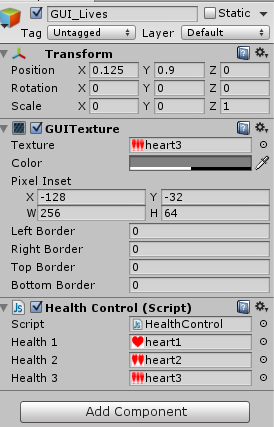
HealthBar

Any ideas? cheers

healthbar.png (25.2 kB)
Comment
Add comment · Show 2
10 |3000 characters needed characters left characters exceeded
▼
  • Viewable by all users
  • Viewable by moderators
  • Viewable by moderators and the original poster
  • Advanced visibility
Viewable by all users
avatar image fafase · Dec 08, 2013 at 12:22 PM 0
Share

Could is be that "fallout" should be "Fallout"

Concerning your switch you have twice case 3.

avatar image PemonLarty · Dec 08, 2013 at 02:21 PM 0
Share

I fixed the case thing.

Now when I press play I start at 2 lives (2 hearts on screen) and I have to dive down to my death 2 times before it goes to 1 life (1 heart on screen)

Why doesnt it just go from 3 to 2 to 1 ?

Oh and the fallout thing has nothing to do with it, my "Fallout" object is tagget "fallout" so it does work :)

1 Reply

· Add your reply
  • Sort: 
avatar image
1
Best Answer

Answer by KellyThomas · Dec 08, 2013 at 02:53 PM

You are missing the break after your case 3 as a result execution falls through and runs the case 2 code as well.

Your code is currently:

         case 3:
             guiTexture.texture = health3;
  
         case 2:
             guiTexture.texture = health2;
         break;

While it should be:

     case 3:
         guiTexture.texture = health3;
     break;

     case 2:
         guiTexture.texture = health2;
     break;
Comment
Add comment · Show 4 · Share
10 |3000 characters needed characters left characters exceeded
▼
  • Viewable by all users
  • Viewable by moderators
  • Viewable by moderators and the original poster
  • Advanced visibility
Viewable by all users
avatar image PemonLarty · Dec 08, 2013 at 03:09 PM 0
Share

I just fixed the case 3 thing so its goes 3 to 2 to 1

Scenario now is i start on 2 lives (2 hearts on screen) and if I let my character fall down once nothing happens, twice it goes to 1 life (1 heart on screen)

Why don't I start at 3 and go from 3 to 2 to 1 like my cases says I should?

The fallout is with an lower case f because my Fallout object is tagged with a fallout (lower case f) tag

avatar image KellyThomas · Dec 08, 2013 at 03:23 PM 0
Share

Please look again at the second block of code in my answer:

     case 3:
         guiTexture.texture = health3;
     break; //this is the line you are missing

You will see that your code is missing the break for your case 3.

As a result during execution when LIVES is equal to 3 you will assign the texture representing 3 lives, then immediately assign the texture representing 2 lives.

avatar image PemonLarty · Dec 08, 2013 at 03:31 PM 0
Share

I didnt see you answer before, thanks alot buddy!

I am new here I have to get used to the diffrence of answer and comment.

Have a nice day!

avatar image KellyThomas · Dec 08, 2013 at 03:41 PM 0
Share

Excellent, happy to help. Please remember to accept answers that satisfactorily resolve your questions. It marks them as resolved, and helps people navigate the site.

Your answer

Hint: You can notify a user about this post by typing @username

Up to 2 attachments (including images) can be used with a maximum of 524.3 kB each and 1.0 MB total.

Follow this Question

Answers Answers and Comments

17 People are following this question.

avatar image avatar image avatar image avatar image avatar image avatar image avatar image avatar image avatar image avatar image avatar image avatar image avatar image avatar image avatar image avatar image avatar image

Related Questions

Problem vid GuiTexture 0 Answers

guitext is not changing color 1 Answer

Show GUITexture by picking an item. 0 Answers

Quality not working? 1 Answer

GUI.DrawTexture Artifacts 1 Answer


Enterprise
Social Q&A

Social
Subscribe on YouTube social-youtube Follow on LinkedIn social-linkedin Follow on Twitter social-twitter Follow on Facebook social-facebook Follow on Instagram social-instagram

Footer

  • Purchase
    • Products
    • Subscription
    • Asset Store
    • Unity Gear
    • Resellers
  • Education
    • Students
    • Educators
    • Certification
    • Learn
    • Center of Excellence
  • Download
    • Unity
    • Beta Program
  • Unity Labs
    • Labs
    • Publications
  • Resources
    • Learn platform
    • Community
    • Documentation
    • Unity QA
    • FAQ
    • Services Status
    • Connect
  • About Unity
    • About Us
    • Blog
    • Events
    • Careers
    • Contact
    • Press
    • Partners
    • Affiliates
    • Security
Copyright © 2020 Unity Technologies
  • Legal
  • Privacy Policy
  • Cookies
  • Do Not Sell My Personal Information
  • Cookies Settings
"Unity", Unity logos, and other Unity trademarks are trademarks or registered trademarks of Unity Technologies or its affiliates in the U.S. and elsewhere (more info here). Other names or brands are trademarks of their respective owners.
  • Anonymous
  • Sign in
  • Create
  • Ask a question
  • Spaces
  • Default
  • Help Room
  • META
  • Moderators
  • Explore
  • Topics
  • Questions
  • Users
  • Badges
