 koobas.hobune.stream


Object passes through childrens' boxcolliders
I have a box which consists of 5 children cubes. Each cube has box collider.
When I have sphere in this box, and move the box, sphere passes through the "walls" (children cubes) of the box. If I move the box really slightly, the sphere "sees" colliders and reacts accordingly. But if the speed of moving is bigger, sphere just passes through.
It seems that collision detection must be switched to Continous, but I tried it and it didn't work. Sphere has sphere collider and rigidbody.
I tried a lot of things already: - changed collision detection on sphere to all options; - hanged collision detection on cubes to all options; - added and removed rigidbodies on cubes; - OnTrigger is off for each of them.
Looks like I've tried all possible combinations of rigidbodies and collision detection. Please, help.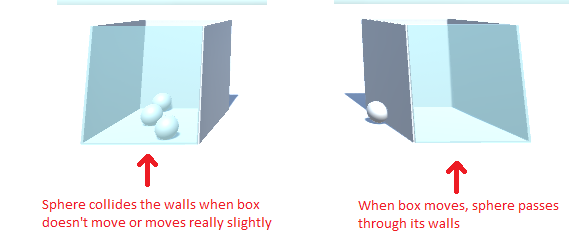

I don't know what code your using so this is just a guess. Have you put your game logic inside Update or FixedUpdate ? Any physics related code is best put in FixedUpdate to best calculate collisions.

It's not about game logic. It's a simple scene with 12 spheres above the box (the link is below). When I start game, they all fall into the box (Gravity is on). Then I move the box left and right, and while moving it, the spheres get out from it through the walls of the box. The moving script is simple (it's below).
The scene is educational one, I downloaded it from Unity educational pathway: https://learn.unity.com/tutorial/counting-prototype?language=en&labelRequired=true&pathwayId=5f7e17e1edbc2a5ec21a20af&missionId=5f7648a4edbc2a5578eb67df#
I already finished this task (used non-tansparent walls and destryable spheres when they are in) but still I'd really appreciate if you can help me for future projects because I spent about 4 hours to solve the problem and still couldn't =(
The moving script fro box is simple: public void Update() { if (isActiveGame) { horizontalInput = Input.GetAxis("Horizontal"); transform.Translate(Vector3.forward boxSpeed Time.deltaTime * horizontalInput); } if (transform.position.z >= zAxisConstraint) { transform.position = new Vector3(transform.position.x, transform.position.y, zAxisConstraint); } if (transform.position.z <= -zAxisConstraint) { transform.position = new Vector3(transform.position.x, transform.position.y, -zAxisConstraint); } {



