
Wayback Machinekoobas.hobune.stream
May JUN Jul
Previous capture 13 Next capture
2021 2022 2023
1 capture
13 Jun 22 - 13 Jun 22
sparklines
Close Help
  • Products
  • Solutions
  • Made with Unity
  • Learning
  • Support & Services
  • Community
  • Asset Store
  • Get Unity

UNITY ACCOUNT

You need a Unity Account to shop in the Online and Asset Stores, participate in the Unity Community and manage your license portfolio. Login Create account
  • Blog
  • Forums
  • Answers
  • Evangelists
  • User Groups
  • Beta Program
  • Advisory Panel

Navigation

  • Home
  • Products
  • Solutions
  • Made with Unity
  • Learning
  • Support & Services
  • Community
    • Blog
    • Forums
    • Answers
    • Evangelists
    • User Groups
    • Beta Program
    • Advisory Panel

Unity account

You need a Unity Account to shop in the Online and Asset Stores, participate in the Unity Community and manage your license portfolio. Login Create account

Language

  • Chinese
  • Spanish
  • Japanese
  • Korean
  • Portuguese
  • Ask a question
  • Spaces
    • Default
    • Help Room
    • META
    • Moderators
    • Topics
    • Questions
    • Users
    • Badges
  • Home /
avatar image
0
Question by MarcusCodes · Oct 30, 2012 at 02:41 AM · transparent shader

whats wrong with Transparent/diffuse shader and my object?

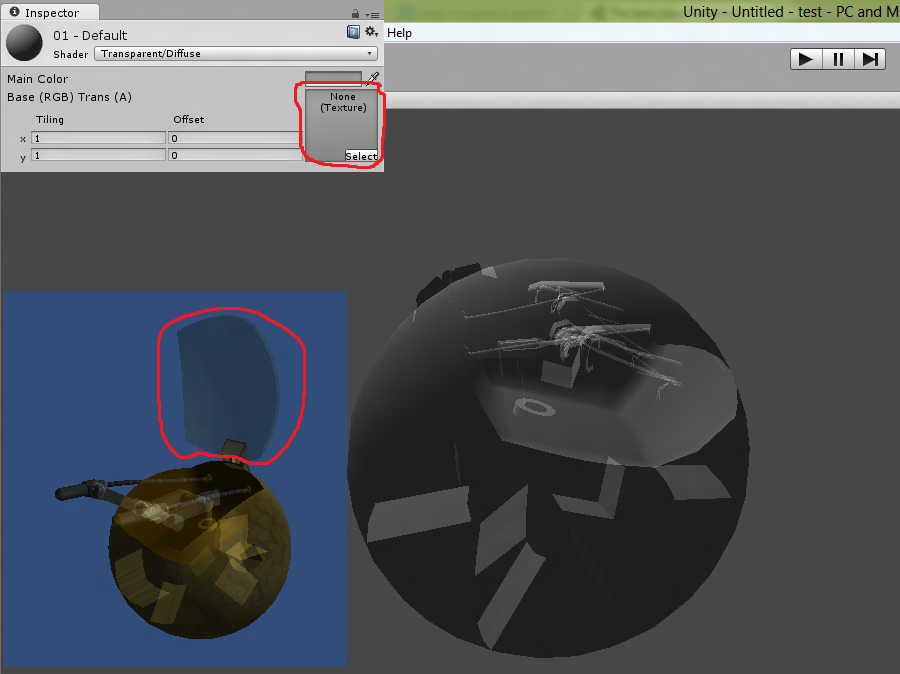
Even if i set the shader texture to none this happens :S

What i want is that the hood should be transparent and sure.. thats what i got but i also got the rest of the object to make wierd things ^^

Problem: see through at odd places and backfacing alt text
opacity fail.zip (177.8 kB)
ball fail.png (143.1 kB)
Comment
Add comment · Show 18
10 |3000 characters needed characters left characters exceeded
▼
  • Viewable by all users
  • Viewable by moderators
  • Viewable by moderators and the original poster
  • Advanced visibility
Viewable by all users
avatar image MarcusCodes · Oct 30, 2012 at 01:56 PM 0
Share

The blue picture is "WITH" texture but you can still see through some wierd partys of the mesh

avatar image liszto · Oct 30, 2012 at 02:04 PM 0
Share

Are you sure that you texture don't have alpha in diffuse part too ? Cause transparent/Diffuse can't display through the opaque texture so your texture got an opaque part and a transparent part ?

avatar image MarcusCodes · Oct 30, 2012 at 07:37 PM 0
Share

100% sure and this shouldnt happen with "none" texture... right?

avatar image MarcusCodes · Oct 30, 2012 at 07:51 PM 0
Share

i noticed that in 3ds $$anonymous$$ax Shaded view this also happens but not in realistic

avatar image liszto · Oct 30, 2012 at 08:40 PM 0
Share

If you've got a link to a simple project with your model & your texture maybe I can look what's wrong with that :/. Cause it's really strange. And the fact that is happened in 3DS$$anonymous$$ax probably means that the problem comes from your texture. But send a simple project with it and I gonna help you with that ;)

Show more comments

2 Replies

· Add your reply
  • Sort: 
avatar image
1

Answer by AlvinHerawan · Oct 31, 2012 at 03:45 AM

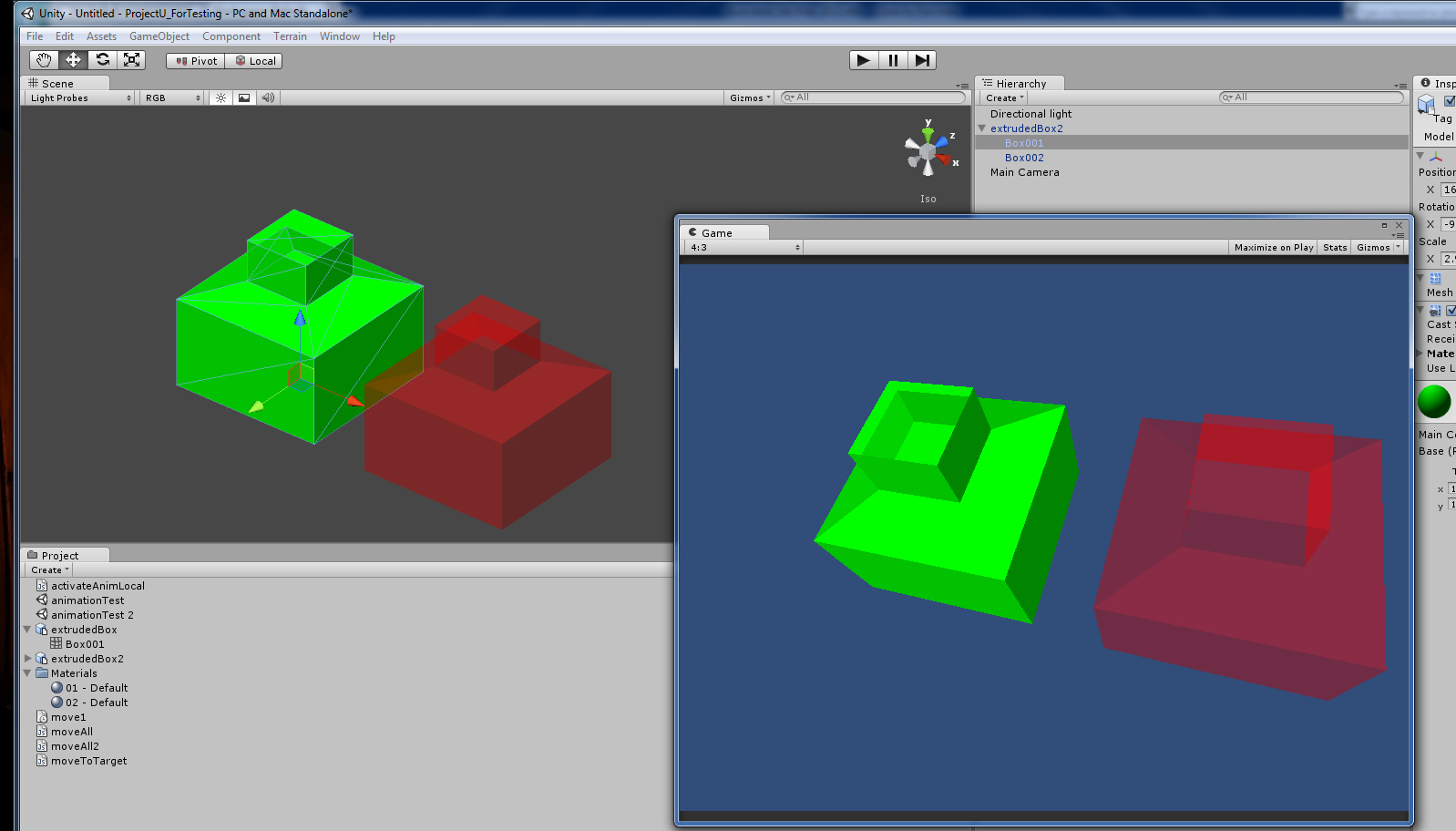
Sorry to jump in all of a sudden. I was curious so I tried testing on the max files that you've been working on, Marcus. Lis is right, the problem seems to be in the model, more precisely, maybe the problem lies with the way max extrude certain part of a face.

I've managed to flip that problematic face as you can see from the red box in the attached image. The green box is the original one that Marcus had sent.

Here's what I did: 1. Select the problematic face and delete it. 2. Recreate by using the 'Cap Holes' modifier or using the Create function under the Editable Poly>Polygon modifier panel.

I hope this solution is the only you're looking for.
alt text

Comment
Add comment · Show 2 · Share
10 |3000 characters needed characters left characters exceeded
▼
  • Viewable by all users
  • Viewable by moderators
  • Viewable by moderators and the original poster
  • Advanced visibility
Viewable by all users
avatar image MarcusCodes · Oct 31, 2012 at 05:10 PM 0
Share

Thank you, this does work but the object im working on is much bigger and it will take ages to fix it like this =D

but i guess if theres no better solution i have to do it.

avatar image AlvinHerawan · Nov 01, 2012 at 02:53 AM 0
Share

Thanks to you, too ... At least now I know that extruding poly-s in max would produce such problem. Better plan ahead next time. Look at the bright side ;)

avatar image
0

Answer by MarcusCodes · Nov 01, 2012 at 07:40 AM

Im gonna do like this:

Deatach transparent parts! :)

it gonna take way to long to recreate my model.. found other parts of it with the same see through effect

Comment
Add comment · Share
10 |3000 characters needed characters left characters exceeded
▼
  • Viewable by all users
  • Viewable by moderators
  • Viewable by moderators and the original poster
  • Advanced visibility
Viewable by all users

Your answer

Hint: You can notify a user about this post by typing @username

Up to 2 attachments (including images) can be used with a maximum of 524.3 kB each and 1.0 MB total.

Follow this Question

Answers Answers and Comments

12 People are following this question.

avatar image avatar image avatar image avatar image avatar image avatar image avatar image avatar image avatar image avatar image avatar image avatar image

Related Questions

Transparent Glass for Free Version Of Unity? 1 Answer

LightingLambert': cannot implicitly convert from 'half3' to 'struct UnityGI' 0 Answers

Rendering object that is partially obscured by another 1 Answer

Unity Occlusion unable to recognize Occludee and Occluder? 1 Answer

Standard Shader - Transparent/Fade Issue 6 Answers


Enterprise
Social Q&A

Social
Subscribe on YouTube social-youtube Follow on LinkedIn social-linkedin Follow on Twitter social-twitter Follow on Facebook social-facebook Follow on Instagram social-instagram

Footer

  • Purchase
    • Products
    • Subscription
    • Asset Store
    • Unity Gear
    • Resellers
  • Education
    • Students
    • Educators
    • Certification
    • Learn
    • Center of Excellence
  • Download
    • Unity
    • Beta Program
  • Unity Labs
    • Labs
    • Publications
  • Resources
    • Learn platform
    • Community
    • Documentation
    • Unity QA
    • FAQ
    • Services Status
    • Connect
  • About Unity
    • About Us
    • Blog
    • Events
    • Careers
    • Contact
    • Press
    • Partners
    • Affiliates
    • Security
Copyright © 2020 Unity Technologies
  • Legal
  • Privacy Policy
  • Cookies
  • Do Not Sell My Personal Information
  • Cookies Settings
"Unity", Unity logos, and other Unity trademarks are trademarks or registered trademarks of Unity Technologies or its affiliates in the U.S. and elsewhere (more info here). Other names or brands are trademarks of their respective owners.
  • Anonymous
  • Sign in
  • Create
  • Ask a question
  • Spaces
  • Default
  • Help Room
  • META
  • Moderators
  • Explore
  • Topics
  • Questions
  • Users
  • Badges
