 koobas.hobune.stream


Saving gameobjects data to JSON.
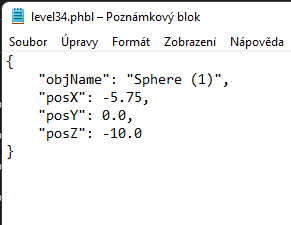
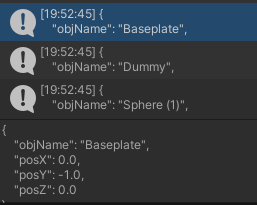
Hi there, I am trying to loop through all the gameobjects with a tag and save their data like position, rotation etc.. to a JSON file, however the JSON only contains data for the last object it loops through. What's weird is when I Debug.Log(json.ToString()); it returns the JSON data just fine.
     SaveLoadObjects data = new SaveLoadObjects();
     Debug.Log("Saving file as level" + levelInt + "...");

     GameObject[] objects = GameObject.FindGameObjectsWithTag("Object");

     foreach (GameObject obj in objects)
     {
         data.objName = obj.name;
         data.posX = obj.transform.position.x;
         data.posY = obj.transform.position.y;
         data.posZ = obj.transform.position.z;

         string json = JsonUtility.ToJson(data, true);

         Debug.Log(json.ToString());
         File.WriteAllText("level" + levelInt + ".phbl", json);
     }


Best Answer
You are using the IO function File.WriteAllText instead of File.AppendText. WriteAll deletes all content in that file then writes to it (overwrites it). This will mean only your last object remains. Instead use file.append, or use a stringbuilder and append to the stringbuilder, then write all your text at once. For example:
      SaveLoadObjects data = new SaveLoadObjects();
      Debug.Log("Saving file as level" + levelInt + "...");
      GameObject[] objects = GameObject.FindGameObjectsWithTag("Object");
      var sb = new StringBuilder();

      foreach (GameObject obj in objects)
      {
          data.objName = obj.name;
          data.posX = obj.transform.position.x;
          data.posY = obj.transform.position.y;
          data.posZ = obj.transform.position.z;
          string json = JsonUtility.ToJson(data, true);
          Debug.Log(json.ToString());
          sb.AppendLine(json);
      }

 File.WriteAllText("level" + levelInt + ".phbl", sb.ToString());




