
Wayback Machinekoobas.hobune.stream
May JUN Jul
Previous capture 12 Next capture
2021 2022 2023
1 capture
12 Jun 22 - 12 Jun 22
sparklines
Close Help
  • Products
  • Solutions
  • Made with Unity
  • Learning
  • Support & Services
  • Community
  • Asset Store
  • Get Unity

UNITY ACCOUNT

You need a Unity Account to shop in the Online and Asset Stores, participate in the Unity Community and manage your license portfolio. Login Create account
  • Blog
  • Forums
  • Answers
  • Evangelists
  • User Groups
  • Beta Program
  • Advisory Panel

Navigation

  • Home
  • Products
  • Solutions
  • Made with Unity
  • Learning
  • Support & Services
  • Community
    • Blog
    • Forums
    • Answers
    • Evangelists
    • User Groups
    • Beta Program
    • Advisory Panel

Unity account

You need a Unity Account to shop in the Online and Asset Stores, participate in the Unity Community and manage your license portfolio. Login Create account

Language

  • Chinese
  • Spanish
  • Japanese
  • Korean
  • Portuguese
  • Ask a question
  • Spaces
    • Default
    • Help Room
    • META
    • Moderators
    • Topics
    • Questions
    • Users
    • Badges
  • Home /
  • Help Room /
avatar image
0
Question by $$anonymous$$ · Sep 04, 2016 at 04:25 PM · minimapracing game

Simple mapping to indicate car position on the road

This is a simple 2d Car racing and looking far a simple solution. How can I indicate the car position on the road? Please check the image for better understanding... alt text
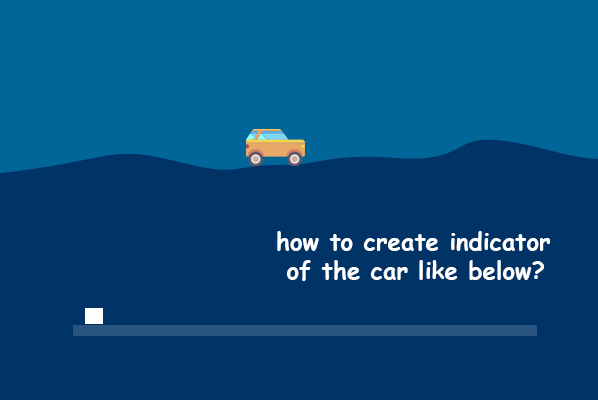
car-minimap.jpg (53.9 kB)
Comment
Add comment
10 |3000 characters needed characters left characters exceeded
▼
  • Viewable by all users
  • Viewable by moderators
  • Viewable by moderators and the original poster
  • Advanced visibility
Viewable by all users

1 Reply

· Add your reply
  • Sort: 
avatar image
1
Best Answer

Answer by Nerull22 · Sep 04, 2016 at 05:37 PM

There are two methods that come to mind for your current problem.

Option 1:

The first is marking a beginning position and an ending position with transforms. Then whenever the car moves update a UI slider with the progress of the car movement between the beginning and ending transform positions. So your UI slider would look something along the lines of:

 public void UpdateCarPosition(Transform carPosition)
 {
     uiSlider.value = (startingPositionTransform.x + carPosition.x) / endingPositionTransform.x;
 }

Set the uiSlider minValue to 0, and maxValue to 1, and it will act as a percent completed.

Option 2:

You can create a second camera that will render a different layer. You can place a white box on a seperate rendering layer at the car position and the flat line on the same layer. Disable this rendering layer from the primary camera and enable only that layer on the second camera. The camera will be placed so that its view is how you want it, and then don't move it. Set the camera clear flags to "Don't Clear", and then it will only render that white box and blue box, and then the primary camera will render the game normally behind it. May also need to set the depth of the cameras.

The first option requires a little more setup. The second option is probably the easier of the two methods for setup, but requires a little more know-how about the Unity engine and how it renders scenes. What's easier is up to you; and also what may fit your situation better is dependant on what you're trying to achieve. But either method should work.

Comment
Add comment · Show 1 · Share
10 |3000 characters needed characters left characters exceeded
▼
  • Viewable by all users
  • Viewable by moderators
  • Viewable by moderators and the original poster
  • Advanced visibility
Viewable by all users
avatar image $$anonymous$$ · Sep 07, 2016 at 01:22 AM 0
Share

Thank you a lot

Your answer

Hint: You can notify a user about this post by typing @username

Up to 2 attachments (including images) can be used with a maximum of 524.3 kB each and 1.0 MB total.

Follow this Question

Answers Answers and Comments

3 People are following this question.

avatar image avatar image avatar image

Related Questions

How to make viewport stay inside parent(Overworldmap) 0 Answers

How can we simulate VTEC ( yea the Honda Civic VTEC) ? 0 Answers

2D minimap - convert click point to world point 0 Answers

How to create a random generated racing game track with walls on the side? 0 Answers

Picture frame around minimap 0 Answers


Enterprise
Social Q&A

Social
Subscribe on YouTube social-youtube Follow on LinkedIn social-linkedin Follow on Twitter social-twitter Follow on Facebook social-facebook Follow on Instagram social-instagram

Footer

  • Purchase
    • Products
    • Subscription
    • Asset Store
    • Unity Gear
    • Resellers
  • Education
    • Students
    • Educators
    • Certification
    • Learn
    • Center of Excellence
  • Download
    • Unity
    • Beta Program
  • Unity Labs
    • Labs
    • Publications
  • Resources
    • Learn platform
    • Community
    • Documentation
    • Unity QA
    • FAQ
    • Services Status
    • Connect
  • About Unity
    • About Us
    • Blog
    • Events
    • Careers
    • Contact
    • Press
    • Partners
    • Affiliates
    • Security
Copyright © 2020 Unity Technologies
  • Legal
  • Privacy Policy
  • Cookies
  • Do Not Sell My Personal Information
  • Cookies Settings
"Unity", Unity logos, and other Unity trademarks are trademarks or registered trademarks of Unity Technologies or its affiliates in the U.S. and elsewhere (more info here). Other names or brands are trademarks of their respective owners.
  • Anonymous
  • Sign in
  • Create
  • Ask a question
  • Spaces
  • Default
  • Help Room
  • META
  • Moderators
  • Explore
  • Topics
  • Questions
  • Users
  • Badges
