 koobas.hobune.stream


OnTriggerEnter2D Not Working
What I've tried so far:
Both objects have a collider.
The "other" game object is a RigidBody2D and the the parent has "Is Trigger" checked.
OnCollisionEnter2D doesn't work either
They are all on the default layer but I checked the Project Settings > Physics 2D anyways.
Code:
   public class PlayManager : MonoBehaviour
     {
     ...
         private void OnTriggerExit2D(Collider2D collision)
         {
             UnityEngine.Debug.Log("Note is exiting the play manager trigger.");
         }

         private void OnTriggerEnter2D(Collider2D collision)
         {
             UnityEngine.Debug.Log("Destroying note that was missed.");
             Destroy(collision.gameObject);
         }
     ...
Inspector Screenshots:
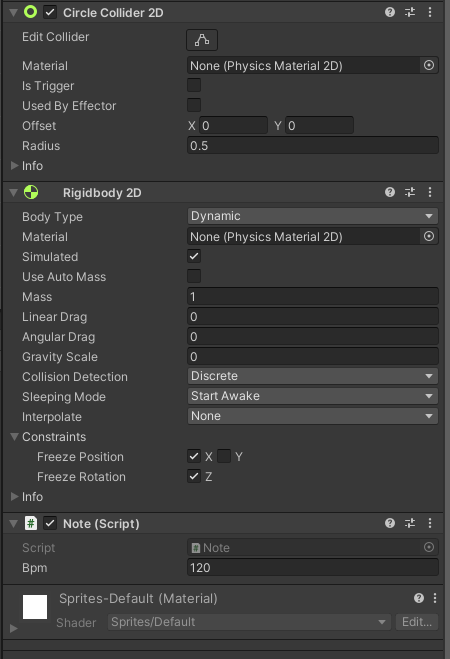
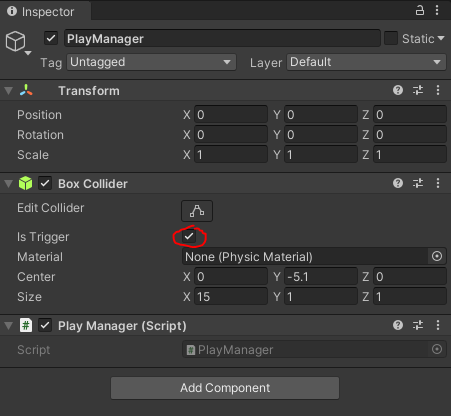
Debug lines don't get called. Please help!

I believe you might have gotten things mixed up. "PlayManager" is a script that reacts to being touched by triggers, you gotta make "trigger objects" collide against your "Play Manager object". Try making the notes a trigger and see if it helps.

Tried making the other objects ("Notes") triggers but that doesn't do anything. Do I need to make the PlayManager a RigidBody as well?

Only the object that is a trigger requires a rigid body according to the documentation Note: Both GameObjects must contain a Collider component. One must have Collider.isTrigger enabled, and contain a Rigidbody. If both GameObjects have Collider.isTrigger enabled, no collision happens. The same applies when both GameObjects do not have a Rigidbody component. I just realized what the problem is tho, you are using a 2DCollider on a 3DCollider, but these two don't interact with each other, they gotta be both 3DCollider to use "OnTriggerEnter" or both 2DCollider to use "OnTriggerEnter2D"
I can't believe I missed that. Thank you very much! It works now.




