
Wayback Machinekoobas.hobune.stream
May JUN Jul
Previous capture 13 Next capture
2021 2022 2023
1 capture
13 Jun 22 - 13 Jun 22
sparklines
Close Help
  • Products
  • Solutions
  • Made with Unity
  • Learning
  • Support & Services
  • Community
  • Asset Store
  • Get Unity

UNITY ACCOUNT

You need a Unity Account to shop in the Online and Asset Stores, participate in the Unity Community and manage your license portfolio. Login Create account
  • Blog
  • Forums
  • Answers
  • Evangelists
  • User Groups
  • Beta Program
  • Advisory Panel

Navigation

  • Home
  • Products
  • Solutions
  • Made with Unity
  • Learning
  • Support & Services
  • Community
    • Blog
    • Forums
    • Answers
    • Evangelists
    • User Groups
    • Beta Program
    • Advisory Panel

Unity account

You need a Unity Account to shop in the Online and Asset Stores, participate in the Unity Community and manage your license portfolio. Login Create account

Language

  • Chinese
  • Spanish
  • Japanese
  • Korean
  • Portuguese
  • Ask a question
  • Spaces
    • Default
    • Help Room
    • META
    • Moderators
    • Topics
    • Questions
    • Users
    • Badges
  • Home /
avatar image
0
Question by shopguy · Sep 06, 2014 at 08:39 PM · camera2dunity4.3camera viewport

2D ortho camera screen rotation

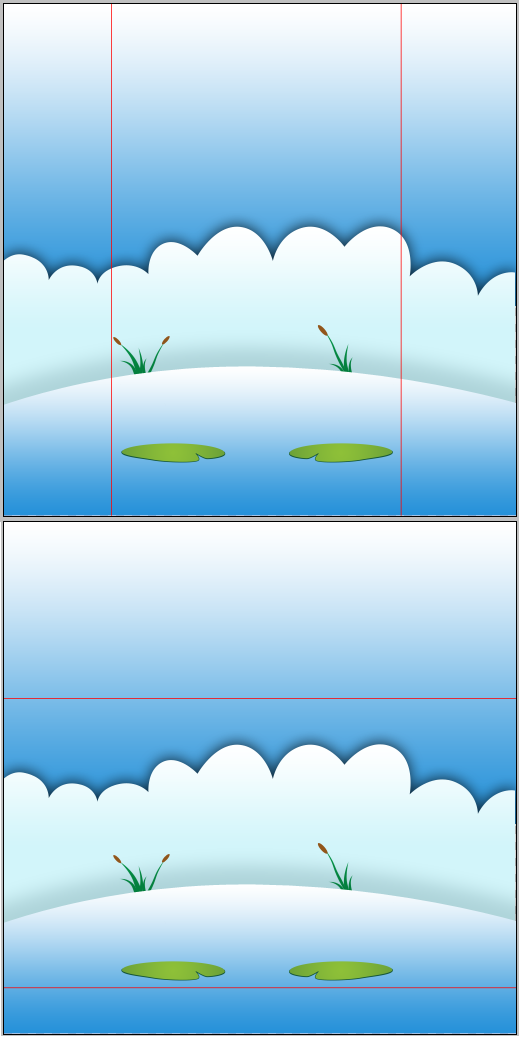
I know there are plenty of similar questions, but most seem to be related to pixel-perfect. I'm not looking for that. I'm not sure exactly what to call what I'm looking for, and that's probably why I can't find any existing answers. So here are some pictures to explain it.

I have a 2048x2048 background that I created in Photoshop, and I made some red boxes over it as guides. The red boxes are the correct aspect ratio for iPhone 5 in portrait and landscape.

I want the red boxes to match the viewport in Unity, when the device rotates:
alt text

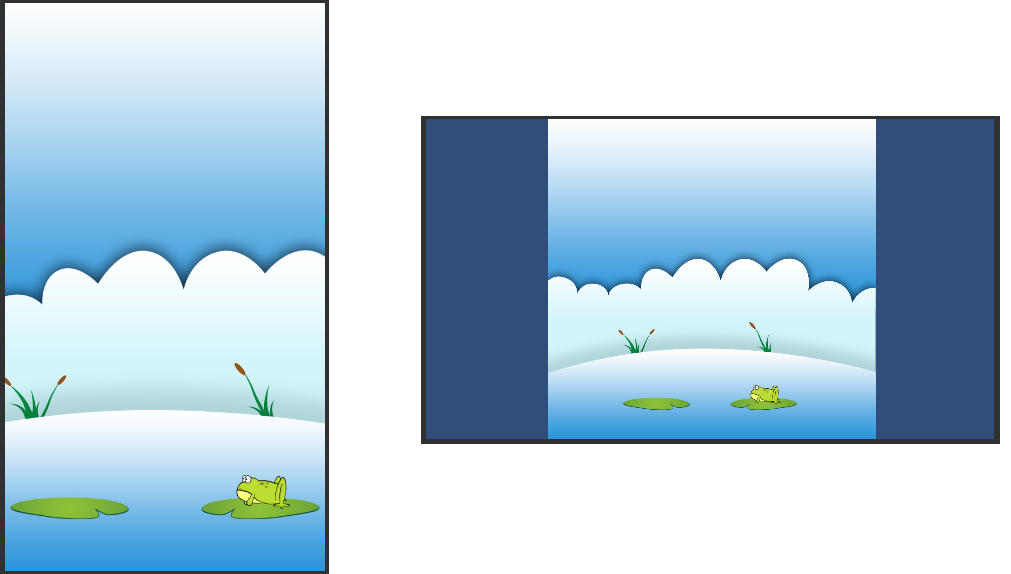
By default, Unity wants to keep the viewable height the same. Here is how it currently looks in game view:
alt text

I don't just want to support iPhone 5 or these 2 exact resolutions, of course. Basically I just want the camera to always maintain the same center point, but instead of staying a fixed height like it does now, I want it to just rotate around that point as needed -- sorry, I'm not sure what this is called. I'm using an ortho camera in a 2D project.

untitled5.png (74.7 kB)
untitled6.png (52.9 kB)
Comment
Add comment · Show 1
10 |3000 characters needed characters left characters exceeded
▼
  • Viewable by all users
  • Viewable by moderators
  • Viewable by moderators and the original poster
  • Advanced visibility
Viewable by all users
avatar image shopguy · Sep 06, 2014 at 10:21 PM 0
Share

$$anonymous$$ight still be nice to hear an answer that explains the math (or just a camera option?), but for now I found something that seems to work well. I just manually adjust the camera size and Y position so that it looks good. Then I checked the $$anonymous$$ and max aspect ratio that I think will cover all devices (in landscape mode) and they all looked acceptable. I put camera settings back to portrait values, and tested all portrait aspect ratios, also looks acceptable. So in my case I guess I'll just have 2 hard-coded settings, one for landscape (screen width > height) and one for portrait. Every size has a slightly different viewable area, but my GUI will handle that and the game area will just stay inside the smallest intersect of all.

0 Replies

· Add your reply
  • Sort: 

Your answer

Hint: You can notify a user about this post by typing @username

Up to 2 attachments (including images) can be used with a maximum of 524.3 kB each and 1.0 MB total.

Follow this Question

Answers Answers and Comments

24 People are following this question.

avatar image avatar image avatar image avatar image avatar image avatar image avatar image avatar image avatar image avatar image avatar image avatar image avatar image avatar image avatar image avatar image avatar image avatar image avatar image avatar image avatar image avatar image avatar image avatar image

Related Questions

Camera display specifications,2D visuals in a 3D game with camera issues 0 Answers

Camera viewport should be square and pixel-perfect, regardless of player aspect ratio. 0 Answers

I can not find Cinemachine in package manager. There is no option of 'All Assets in package manager.' 1 Answer

Cinemachine weird lines of color when moving? 1 Answer

How do I get rid of this motion blur? 0 Answers


Enterprise
Social Q&A

Social
Subscribe on YouTube social-youtube Follow on LinkedIn social-linkedin Follow on Twitter social-twitter Follow on Facebook social-facebook Follow on Instagram social-instagram

Footer

  • Purchase
    • Products
    • Subscription
    • Asset Store
    • Unity Gear
    • Resellers
  • Education
    • Students
    • Educators
    • Certification
    • Learn
    • Center of Excellence
  • Download
    • Unity
    • Beta Program
  • Unity Labs
    • Labs
    • Publications
  • Resources
    • Learn platform
    • Community
    • Documentation
    • Unity QA
    • FAQ
    • Services Status
    • Connect
  • About Unity
    • About Us
    • Blog
    • Events
    • Careers
    • Contact
    • Press
    • Partners
    • Affiliates
    • Security
Copyright © 2020 Unity Technologies
  • Legal
  • Privacy Policy
  • Cookies
  • Do Not Sell My Personal Information
  • Cookies Settings
"Unity", Unity logos, and other Unity trademarks are trademarks or registered trademarks of Unity Technologies or its affiliates in the U.S. and elsewhere (more info here). Other names or brands are trademarks of their respective owners.
  • Anonymous
  • Sign in
  • Create
  • Ask a question
  • Spaces
  • Default
  • Help Room
  • META
  • Moderators
  • Explore
  • Topics
  • Questions
  • Users
  • Badges
