
Wayback Machinekoobas.hobune.stream
May JUN Jul
Previous capture 12 Next capture
2021 2022 2023
1 capture
12 Jun 22 - 12 Jun 22
sparklines
Close Help
  • Products
  • Solutions
  • Made with Unity
  • Learning
  • Support & Services
  • Community
  • Asset Store
  • Get Unity

UNITY ACCOUNT

You need a Unity Account to shop in the Online and Asset Stores, participate in the Unity Community and manage your license portfolio. Login Create account
  • Blog
  • Forums
  • Answers
  • Evangelists
  • User Groups
  • Beta Program
  • Advisory Panel

Navigation

  • Home
  • Products
  • Solutions
  • Made with Unity
  • Learning
  • Support & Services
  • Community
    • Blog
    • Forums
    • Answers
    • Evangelists
    • User Groups
    • Beta Program
    • Advisory Panel

Unity account

You need a Unity Account to shop in the Online and Asset Stores, participate in the Unity Community and manage your license portfolio. Login Create account

Language

  • Chinese
  • Spanish
  • Japanese
  • Korean
  • Portuguese
  • Ask a question
  • Spaces
    • Default
    • Help Room
    • META
    • Moderators
    • Topics
    • Questions
    • Users
    • Badges
  • Home /
  • Help Room /
avatar image
0
Question by Gode14 · Jul 31, 2016 at 12:20 PM · quaternionflying

Funky Flying Quaternion Question

Hey all! I'm prototyping a gyroscope based flying game for Android. Here is my problem:
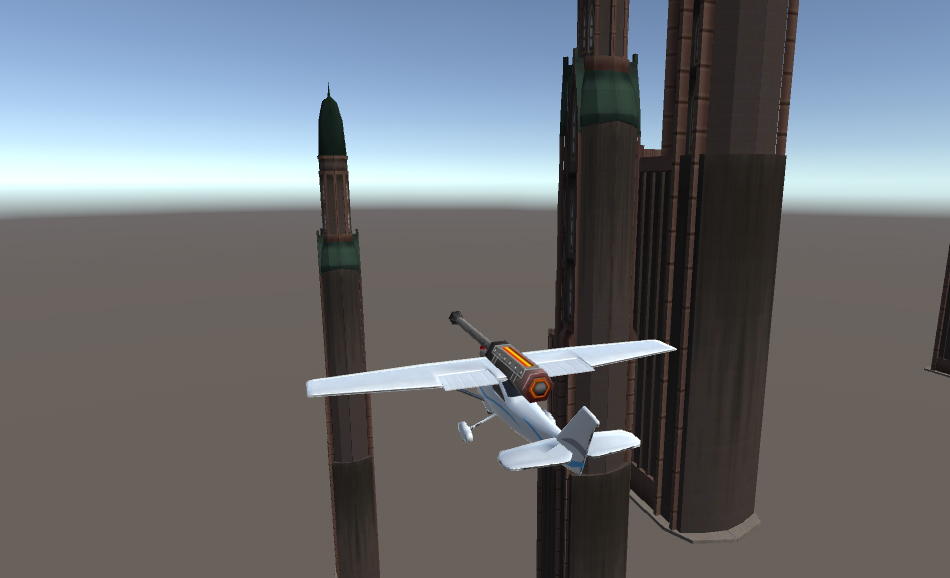
our problem is we can't support this giant laser!

I have a target rotation (the orientation of the player's phone). The plane needs to rotate towards that direction at different speeds on each axis (so pitch and roll (X and Z) are snappy and yaw (Y) is ineffective). Here's what we're working from:

 driver1.transform.rotation = Quaternion.Euler(Mathf.LerpAngle(plane.transform.eulerAngles.x, targetRot.eulerAngles.x, Time.deltaTime * pitch), 
 Mathf.LerpAngle(plane.transform.eulerAngles.y, targetRot.eulerAngles.y, Time.deltaTime * yaw), 
 Mathf.LerpAngle(plane.transform.eulerAngles.z, targetRot.eulerAngles.z, Time.deltaTime * roll));

I've got it working smoothly but the planes X and Y axis don't take the Z axis into account. When flying straight forward and right side up, everything works correctly - the yaw (Y axis) is sluggish because the yaw value is low.
But if I roll (Z axis) the plane 90 degrees, flying "sideways", the PITCH (the plane's up and down) becomes sluggish, because it's rotating around the WORLD's yaw (Y axis). I need the PLANE's left and right (yaw, Y axis) to always be slower no matter if it's aligned with the WORLD's Y axis or not.

Thinking that this is an issue of "local" and "relativeness" vs "worldness", I tried attaching the plane, still controlling the X and Y rotation, to a parent object, controlling the Z axis. But this resulted in some strange loopy behavior. Still, if this is the way to accomplish this, here is the code to be corrected:

 driver1Z.transform.rotation = Quaternion.Euler(originalZRot.eulerAngles.x, 
             originalZRot.eulerAngles.y, 
             Mathf.LerpAngle(planeZ.transform.eulerAngles.z, targetRotation.eulerAngles.z, Time.deltaTime * roll));
         
         driver1.transform.localRotation = Quaternion.Euler(Mathf.LerpAngle(plane.transform.eulerAngles.x, targetRotation.eulerAngles.x, Time.deltaTime * pitch),
             Mathf.LerpAngle(plane.transform.eulerAngles.y, targetRotation.eulerAngles.y, Time.deltaTime * yaw), 
             originalRot.eulerAngles.z);

How can I make my adjusted Quaternion.Euler align with the plane's (it's OWN) Z axis instead of the world's, without having loopy (I'm assuming gimbal locked) rotation? Thanks a lot!

untitled-1.jpg (157.0 kB)
Comment
Add comment · Show 2
10 |3000 characters needed characters left characters exceeded
▼
  • Viewable by all users
  • Viewable by moderators
  • Viewable by moderators and the original poster
  • Advanced visibility
Viewable by all users
avatar image Glurth · Jul 31, 2016 at 05:08 PM 0
Share

I see that you are using transform.eulerAngles, which provide the Euler angles for the WORLD-space roatation of the transform. I would suggest you try transform.localRotation.eulerAngles since you want to affect the speeds of the planes local (model-space) rotation.

avatar image Gode14 Glurth · Aug 02, 2016 at 03:18 AM 0
Share

Hey Glurth! I'm not quite sure how to implement what you suggest, and I have tried a few ways.

 driver1.transform.rotation = Quaternion.Euler($$anonymous$$athf.LerpAngle(driver1.transform.*localRotation.eulerAngles*.x, targetRotation.eulerAngles.x, Time.deltaTime * pitch),
             $$anonymous$$athf.LerpAngle(driver1.transform.*localRotation.eulerAngles*.y, targetRotation.eulerAngles.y, Time.deltaTime * yaw), 
             $$anonymous$$athf.LerpAngle(driver1.transform.*localRotation.eulerAngles*.z, targetRotation.eulerAngles.z, Time.deltaTime * roll));

The results are the same if I change the first "driver1.transform.rotation" to ".localRotation". I test this by setting my yaw speed to 0, rolling 90 degrees, and trying to "pitch" horizontally and I still haven't turned at all. Should I apply an additional rotation to the target direction to account for roll? Thanks dude.

0 Replies

· Add your reply
  • Sort: 

Your answer

Hint: You can notify a user about this post by typing @username

Up to 2 attachments (including images) can be used with a maximum of 524.3 kB each and 1.0 MB total.

Follow this Question

Answers Answers and Comments

4 People are following this question.

avatar image avatar image avatar image avatar image

Related Questions

Determining if my target is standing upright 4 Answers

Rotate my spaceship in the right direction 1 Answer

How to test for rotation? 0 Answers

Cancel out the steering rotation returned from a wheel colliders .GetWorldPose(out pos, out rot); 1 Answer

Rotation resets after input 1 Answer


Enterprise
Social Q&A

Social
Subscribe on YouTube social-youtube Follow on LinkedIn social-linkedin Follow on Twitter social-twitter Follow on Facebook social-facebook Follow on Instagram social-instagram

Footer

  • Purchase
    • Products
    • Subscription
    • Asset Store
    • Unity Gear
    • Resellers
  • Education
    • Students
    • Educators
    • Certification
    • Learn
    • Center of Excellence
  • Download
    • Unity
    • Beta Program
  • Unity Labs
    • Labs
    • Publications
  • Resources
    • Learn platform
    • Community
    • Documentation
    • Unity QA
    • FAQ
    • Services Status
    • Connect
  • About Unity
    • About Us
    • Blog
    • Events
    • Careers
    • Contact
    • Press
    • Partners
    • Affiliates
    • Security
Copyright © 2020 Unity Technologies
  • Legal
  • Privacy Policy
  • Cookies
  • Do Not Sell My Personal Information
  • Cookies Settings
"Unity", Unity logos, and other Unity trademarks are trademarks or registered trademarks of Unity Technologies or its affiliates in the U.S. and elsewhere (more info here). Other names or brands are trademarks of their respective owners.
  • Anonymous
  • Sign in
  • Create
  • Ask a question
  • Spaces
  • Default
  • Help Room
  • META
  • Moderators
  • Explore
  • Topics
  • Questions
  • Users
  • Badges
