
Wayback Machinekoobas.hobune.stream
May JUN Jul
Previous capture 13 Next capture
2021 2022 2023
1 capture
13 Jun 22 - 13 Jun 22
sparklines
Close Help
  • Products
  • Solutions
  • Made with Unity
  • Learning
  • Support & Services
  • Community
  • Asset Store
  • Get Unity

UNITY ACCOUNT

You need a Unity Account to shop in the Online and Asset Stores, participate in the Unity Community and manage your license portfolio. Login Create account
  • Blog
  • Forums
  • Answers
  • Evangelists
  • User Groups
  • Beta Program
  • Advisory Panel

Navigation

  • Home
  • Products
  • Solutions
  • Made with Unity
  • Learning
  • Support & Services
  • Community
    • Blog
    • Forums
    • Answers
    • Evangelists
    • User Groups
    • Beta Program
    • Advisory Panel

Unity account

You need a Unity Account to shop in the Online and Asset Stores, participate in the Unity Community and manage your license portfolio. Login Create account

Language

  • Chinese
  • Spanish
  • Japanese
  • Korean
  • Portuguese
  • Ask a question
  • Spaces
    • Default
    • Help Room
    • META
    • Moderators
    • Topics
    • Questions
    • Users
    • Badges
  • Home /
avatar image
0
Question by JA_555 · Jan 24, 2015 at 06:13 PM · animationanimatoranimator controller

Why is my animation not working?

The problem is that it moves it's position, but say for example, it is supposed to jump; all it does is move up and down and it is still in the T-position.

It is a humanoid model, it has an animator, the animation is marked as 3, and I don't know what else to tell you. This was an asset from the asset store, and the animations came with it. So any ideas on what to do? I suspect that there's a problem with the animator controller but that's all I guess. The controller has an avatar, update is set to normal and culling is based on renderers.

I think that maybe I should forgo using the humanoid and maybe get everything to legacy, or use the animation component as if it were not a humanoid model. Let me know what you think

Comment
Add comment · Show 4
10 |3000 characters needed characters left characters exceeded
▼
  • Viewable by all users
  • Viewable by moderators
  • Viewable by moderators and the original poster
  • Advanced visibility
Viewable by all users
avatar image Mmmpies · Jan 24, 2015 at 06:55 PM 0
Share

How are you setting the animation to run in mecanim? In your example of jumping are you passing a bool to tell mecanim to run the jump animation?

avatar image JA_555 · Jan 24, 2015 at 07:02 PM 0
Share

yes, that was set to true and I set the clip to default

avatar image Mmmpies · Jan 24, 2015 at 07:16 PM 0
Share

O$$anonymous$$, if you get an animation that should loop and run the game without "$$anonymous$$aximize On Play" select your character in the hierarchy and open the animation tab. Can you see the that animation looping through?
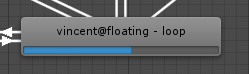
$$anonymous$$ecanimLoop

Should look a bit like that.

mecanimloop.png (4.6 kB)
avatar image JA_555 · Jan 24, 2015 at 08:23 PM 0
Share

yes, $$anonymous$$e is orange because it is set to default. The problem is that it stays in it's T-position; my last resort had to be to re-import and start everything all over again. It didn't solve the mystery, but at least it's working. I'll post this as an answer I guess

1 Reply

· Add your reply
  • Sort: 
avatar image
0
Best Answer

Answer by JA_555 · Jan 24, 2015 at 08:23 PM

I re-imported my asset and although it didn't solve the mystery, everything is working now. My theory is that it had something to do with the rigging or the baking of the animation.

Comment
Add comment · Show 1 · Share
10 |3000 characters needed characters left characters exceeded
▼
  • Viewable by all users
  • Viewable by moderators
  • Viewable by moderators and the original poster
  • Advanced visibility
Viewable by all users
avatar image Mmmpies · Jan 24, 2015 at 08:29 PM 0
Share

Re-import was going to be my next suggestion if you didn't see something like that image but, hey, you worked it out yourself. I think the import can, occasionally, screw up. Seen it before myself.

Your answer

Hint: You can notify a user about this post by typing @username

Up to 2 attachments (including images) can be used with a maximum of 524.3 kB each and 1.0 MB total.

Follow this Question

Answers Answers and Comments

20 People are following this question.

avatar image avatar image avatar image avatar image avatar image avatar image avatar image avatar image avatar image avatar image avatar image avatar image avatar image avatar image avatar image avatar image avatar image avatar image avatar image avatar image

Related Questions

Animator Controller 2D RPG Best Practices 0 Answers

Animtion looping if joystick is held 0 Answers

Can I play an animation with only 1 image for a duration? 0 Answers

Velocity not changing value in Blend Tree 0 Answers

How to play an Animation only once from my MachineState Animator? 2 Answers


Enterprise
Social Q&A

Social
Subscribe on YouTube social-youtube Follow on LinkedIn social-linkedin Follow on Twitter social-twitter Follow on Facebook social-facebook Follow on Instagram social-instagram

Footer

  • Purchase
    • Products
    • Subscription
    • Asset Store
    • Unity Gear
    • Resellers
  • Education
    • Students
    • Educators
    • Certification
    • Learn
    • Center of Excellence
  • Download
    • Unity
    • Beta Program
  • Unity Labs
    • Labs
    • Publications
  • Resources
    • Learn platform
    • Community
    • Documentation
    • Unity QA
    • FAQ
    • Services Status
    • Connect
  • About Unity
    • About Us
    • Blog
    • Events
    • Careers
    • Contact
    • Press
    • Partners
    • Affiliates
    • Security
Copyright © 2020 Unity Technologies
  • Legal
  • Privacy Policy
  • Cookies
  • Do Not Sell My Personal Information
  • Cookies Settings
"Unity", Unity logos, and other Unity trademarks are trademarks or registered trademarks of Unity Technologies or its affiliates in the U.S. and elsewhere (more info here). Other names or brands are trademarks of their respective owners.
  • Anonymous
  • Sign in
  • Create
  • Ask a question
  • Spaces
  • Default
  • Help Room
  • META
  • Moderators
  • Explore
  • Topics
  • Questions
  • Users
  • Badges
