Wayback Machinekoobas.hobune.stream
May JUN Jul
Previous capture 13 Next capture
2021 2022 2023
1 capture
13 Jun 22 - 13 Jun 22
sparklines
Close Help
  • Products
  • Solutions
  • Made with Unity
  • Learning
  • Support & Services
  • Community
  • Asset Store
  • Get Unity

UNITY ACCOUNT

You need a Unity Account to shop in the Online and Asset Stores, participate in the Unity Community and manage your license portfolio. Login Create account
  • Blog
  • Forums
  • Answers
  • Evangelists
  • User Groups
  • Beta Program
  • Advisory Panel

Navigation

  • Home
  • Products
  • Solutions
  • Made with Unity
  • Learning
  • Support & Services
  • Community
    • Blog
    • Forums
    • Answers
    • Evangelists
    • User Groups
    • Beta Program
    • Advisory Panel

Unity account

You need a Unity Account to shop in the Online and Asset Stores, participate in the Unity Community and manage your license portfolio. Login Create account

Language

  • Chinese
  • Spanish
  • Japanese
  • Korean
  • Portuguese
  • Ask a question
  • Spaces
    • Default
    • Help Room
    • META
    • Moderators
    • Topics
    • Questions
    • Users
    • Badges
  • Home /
avatar image
0
Question by AlwaysSunny · Aug 16, 2012 at 05:28 AM · cameranormalsclippingz-fighting

z-fighting and clipping @ ~90deg viewing angle
alt textalt text
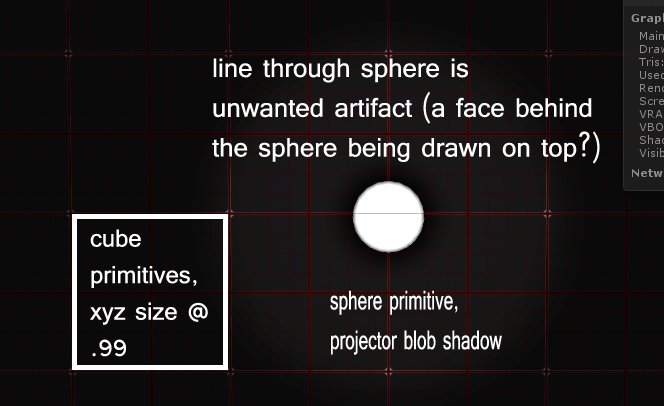
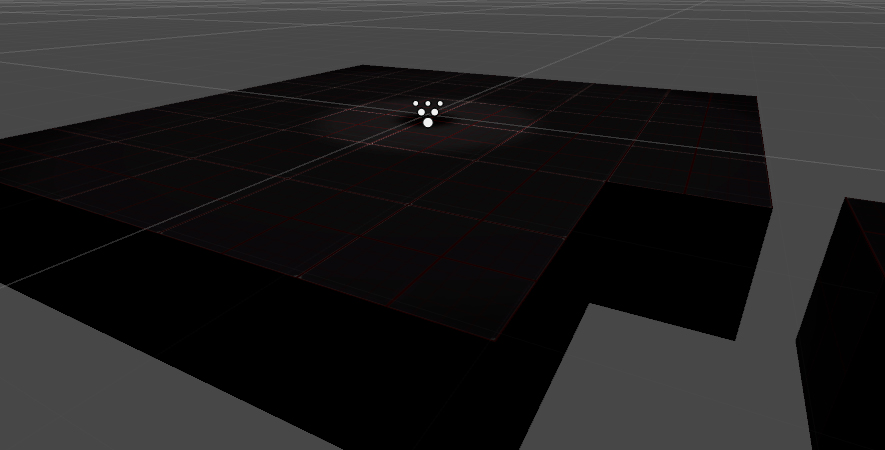
I'm getting artifacts when viewing faces at close-to-90 degree angles. Because of my overhead view and grid-based world, the issue is quite jarring and is seen frequently, particularly at low quality settings.

It looks like a razor thin black line (it's actually my view of the offending face) is cutting through anything and everything, forcing itself to be drawn on top of whatever is actually closer to the camera.

Adjusting the camera's clip distances helped in high quality settings, but even then the issue is obvious and pervasive. Is this perhaps a fact of life? Worth noting that the issue is occurring with Unity's cube primitive. My recourse here seems to be modeling my grid cell objects such that their face normals will rarely be perpendicular to my camera's Z. (or tilting my camera for the same effect, of course. ^^)

23095809273.jpg (142.4 kB)
38546843154.jpg (141.5 kB)
Comment
Add comment · Show 1
10 |3000 characters needed characters left characters exceeded
▼
  • Viewable by all users
  • Viewable by moderators
  • Viewable by moderators and the original poster
  • Advanced visibility
Viewable by all users
avatar image ScroodgeM · Aug 16, 2012 at 07:36 AM 2
Share

post a screenshot of what are you talking about. this helps a lot us to understand the question

1 Reply

· Add your reply
  • Sort: 
avatar image
0
Best Answer

Answer by AlwaysSunny · Aug 16, 2012 at 09:36 PM

One or more of the following changes have solved this issue:

Decreasing the overall range of the camera clipping planes,
Creating my own geometry versus using Unity's cube primitive,
Ensuring there is a gap between all faces, so no two faces occupy the same location,
Setting my cube texture's wrap mode to 'clamp' in texture import settings,

Comment
Add comment · Share
10 |3000 characters needed characters left characters exceeded
▼
  • Viewable by all users
  • Viewable by moderators
  • Viewable by moderators and the original poster
  • Advanced visibility
Viewable by all users

Your answer

Hint: You can notify a user about this post by typing @username

Up to 2 attachments (including images) can be used with a maximum of 524.3 kB each and 1.0 MB total.

Follow this Question

Answers Answers and Comments

9 People are following this question.

avatar image avatar image avatar image avatar image avatar image avatar image avatar image avatar image avatar image

Related Questions

Procedural Mesh, Strange Clipping 1 Answer

Camera spaced normals for a surface shader 1 Answer

world canvases z fighting or rendering in the order when camera moves around 0 Answers

Shadow flicker 0 Answers

Doing a clipping effect with a 3D text mesh using shaders 1 Answer


Enterprise
Social Q&A

Social
Subscribe on YouTube social-youtube Follow on LinkedIn social-linkedin Follow on Twitter social-twitter Follow on Facebook social-facebook Follow on Instagram social-instagram

Footer

  • Purchase
    • Products
    • Subscription
    • Asset Store
    • Unity Gear
    • Resellers
  • Education
    • Students
    • Educators
    • Certification
    • Learn
    • Center of Excellence
  • Download
    • Unity
    • Beta Program
  • Unity Labs
    • Labs
    • Publications
  • Resources
    • Learn platform
    • Community
    • Documentation
    • Unity QA
    • FAQ
    • Services Status
    • Connect
  • About Unity
    • About Us
    • Blog
    • Events
    • Careers
    • Contact
    • Press
    • Partners
    • Affiliates
    • Security
Copyright © 2020 Unity Technologies
  • Legal
  • Privacy Policy
  • Cookies
  • Do Not Sell My Personal Information
  • Cookies Settings
"Unity", Unity logos, and other Unity trademarks are trademarks or registered trademarks of Unity Technologies or its affiliates in the U.S. and elsewhere (more info here). Other names or brands are trademarks of their respective owners.
  • Anonymous
  • Sign in
  • Create
  • Ask a question
  • Spaces
  • Default
  • Help Room
  • META
  • Moderators
  • Explore
  • Topics
  • Questions
  • Users
  • Badges