
Wayback Machinekoobas.hobune.stream
May JUN Jul
Previous capture 12 Next capture
2021 2022 2023
2 captures
12 Jun 22 - 14 Jun 22
sparklines
Close Help
  • Products
  • Solutions
  • Made with Unity
  • Learning
  • Support & Services
  • Community
  • Asset Store
  • Get Unity

UNITY ACCOUNT

You need a Unity Account to shop in the Online and Asset Stores, participate in the Unity Community and manage your license portfolio. Login Create account
  • Blog
  • Forums
  • Answers
  • Evangelists
  • User Groups
  • Beta Program
  • Advisory Panel

Navigation

  • Home
  • Products
  • Solutions
  • Made with Unity
  • Learning
  • Support & Services
  • Community
    • Blog
    • Forums
    • Answers
    • Evangelists
    • User Groups
    • Beta Program
    • Advisory Panel

Unity account

You need a Unity Account to shop in the Online and Asset Stores, participate in the Unity Community and manage your license portfolio. Login Create account

Language

  • Chinese
  • Spanish
  • Japanese
  • Korean
  • Portuguese
  • Ask a question
  • Spaces
    • Default
    • Help Room
    • META
    • Moderators
    • Topics
    • Questions
    • Users
    • Badges
  • Home /
avatar image
0
Question by RedHillbilly · May 08, 2019 at 07:01 PM · 2dcamera-movement

Cinemachine jumping around - how can I stop it?

I am using cinemachine in one of my projects, and I keep running in the issue that the camera jumps to center on the player from time to time, and I have no idea why.

This person seems to have the same issue, but no answer was posted: https://www.reddit.com/r/Unity3D/comments/9ubpur/cinemachine_camera_jumps_around_how_to_fix/

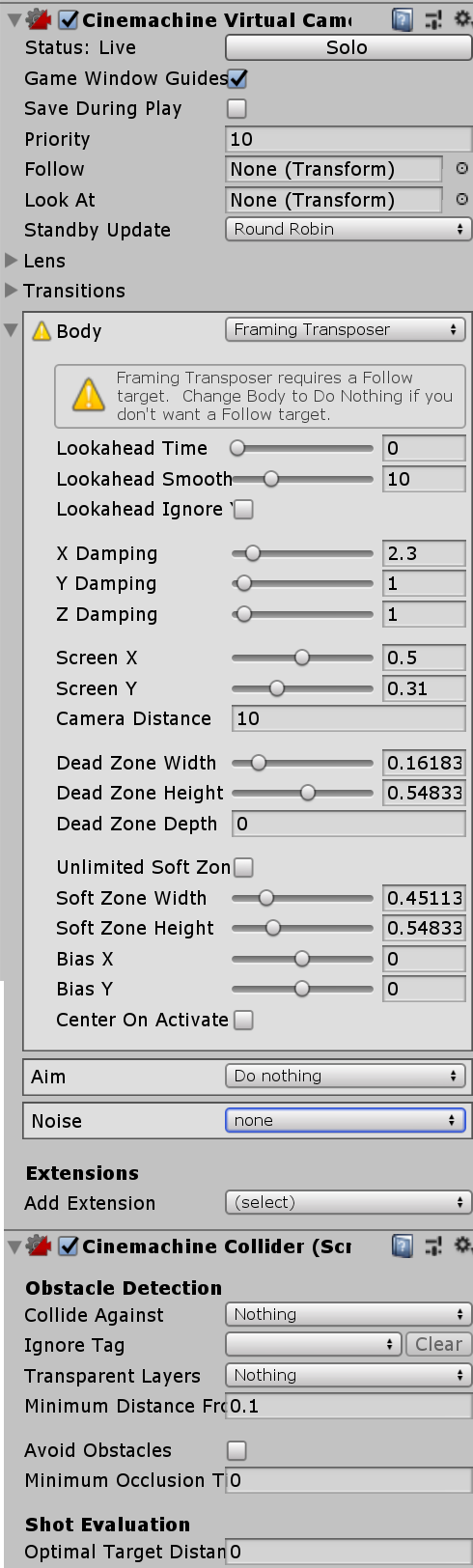
Here are my camera settings: Camera settings I tried to add a cinemachine collider and tell it to avoid nothing, but it didn't fix the issue.
The jump can be seen here

Any idea how this could be fixed?

camerasettings.png (135.7 kB)
Comment
Add comment
10 |3000 characters needed characters left characters exceeded
▼
  • Viewable by all users
  • Viewable by moderators
  • Viewable by moderators and the original poster
  • Advanced visibility
Viewable by all users

2 Replies

· Add your reply
  • Sort: 
avatar image
2
Best Answer

Answer by RedHillbilly · May 09, 2019 at 01:47 PM

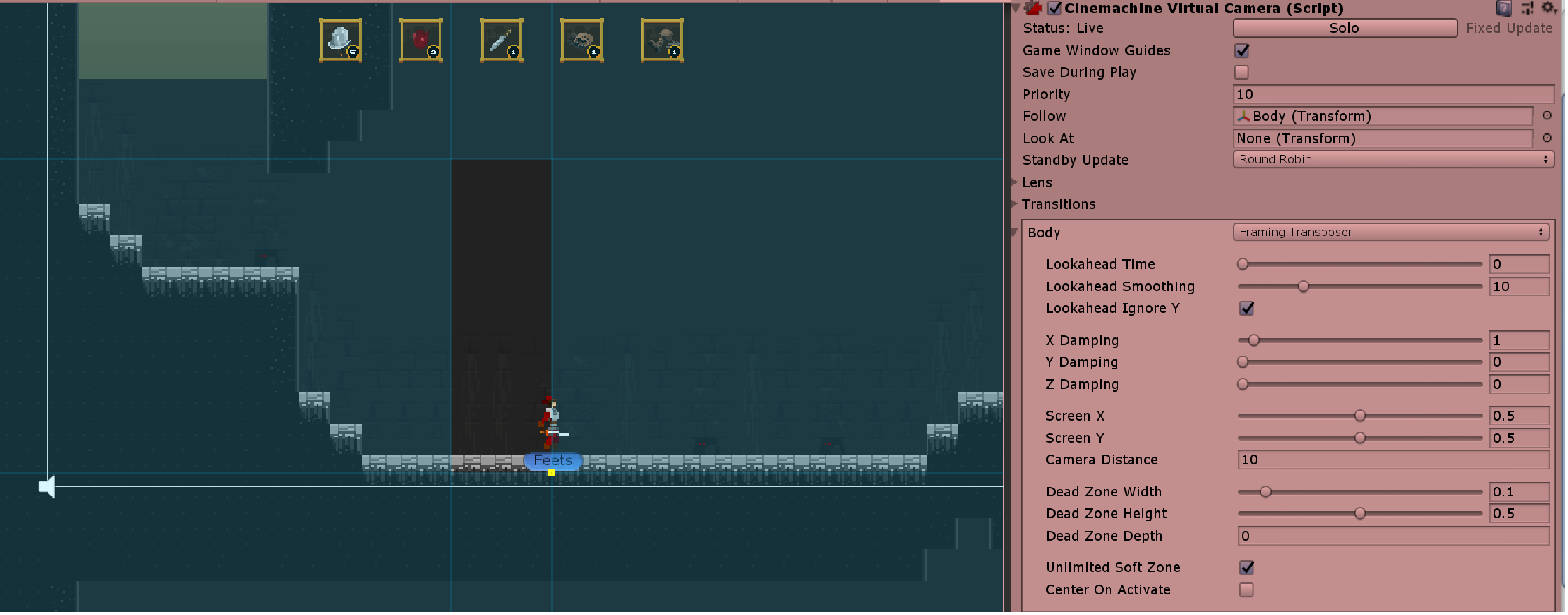
Okay, I think I found the bug: whenever my object to follow was hitting the lower dead zone, the camera was re-centering on x. Is this intended behavior? seems like a bug to me.

Anyway, after some trial and error I found a solution: set soft zone to unlimited and play with the damping: set it to 0 for y to simulate a hard bound, and to a low value for x such that it re-centers nicely. Seems to be working, but also seems like a hack. The hard bound should be working too. alt text

camerasettings.png (305.9 kB)
Comment
Add comment · Show 2 · Share
10 |3000 characters needed characters left characters exceeded
▼
  • Viewable by all users
  • Viewable by moderators
  • Viewable by moderators and the original poster
  • Advanced visibility
Viewable by all users
avatar image Trevor_trev · Feb 20, 2020 at 12:14 PM 0
Share

Thanks for updating with at least some kind of solution! Did you ever figure out any other solution that allows you to have a finite soft zone? I'm having the same issue with my project.

avatar image RedHillbilly Trevor_trev · Mar 10, 2020 at 03:42 PM 0
Share

No sorry, didn't find another way of achieving this. Let me know if you come up with something less hacky.

avatar image
0

Answer by FrickinSilly · Jan 23 at 03:07 PM

I stumbled across this question (and the reddit question mentioned by the OP) and tried the Best Answer which unfortunately didn't work in my case.

Like the OP, I had a single VirtualCamera, no custom code, and the polygon collider was a square shape. Yet every time my character crossed the halfway point going up or down, the camera jumped in an awful way.

I fiddled with every possible field on the CinemachineVirtualCamera, the Confiner, the Camera itself, to know avail.

SOLUTION THAT WORKED FOR ME: My polygon collider, while square-ish, was not perfectly square. I ended up copying and pasting the point values of each X and Y of the corners to ensure the polygon was perfectly square. My values were off by an order of ~0.01 units (compared to the length of the squares of ~10 units).

I guess having a slightly obtuse or slightly acute angle (we're talking 89.9 or 90.1 degrees) is enough to confuse the CinemachineVirtualCamera.

Comment
Add comment · Share
10 |3000 characters needed characters left characters exceeded
▼
  • Viewable by all users
  • Viewable by moderators
  • Viewable by moderators and the original poster
  • Advanced visibility
Viewable by all users

Your answer

Hint: You can notify a user about this post by typing @username

Up to 2 attachments (including images) can be used with a maximum of 524.3 kB each and 1.0 MB total.

Follow this Question

Answers Answers and Comments

214 People are following this question.

avatar image avatar image avatar image avatar image avatar image avatar image avatar image avatar image avatar image avatar image avatar image avatar image avatar image avatar image avatar image avatar image avatar image avatar image avatar image avatar image avatar image avatar image avatar image avatar image avatar image avatar image avatar image avatar image avatar image avatar image avatar image avatar image avatar image avatar image avatar image avatar image avatar image avatar image avatar image avatar image avatar image avatar image avatar image avatar image avatar image avatar image avatar image avatar image avatar image avatar image avatar image avatar image avatar image avatar image avatar image avatar image avatar image avatar image avatar image avatar image avatar image avatar image avatar image avatar image avatar image avatar image avatar image avatar image avatar image avatar image avatar image avatar image avatar image avatar image avatar image avatar image avatar image avatar image avatar image avatar image avatar image avatar image avatar image avatar image avatar image avatar image avatar image avatar image avatar image avatar image avatar image avatar image avatar image avatar image avatar image avatar image avatar image avatar image avatar image avatar image avatar image avatar image avatar image avatar image avatar image avatar image avatar image avatar image avatar image avatar image avatar image avatar image avatar image avatar image avatar image avatar image avatar image avatar image avatar image avatar image avatar image avatar image avatar image avatar image avatar image avatar image avatar image avatar image avatar image avatar image avatar image avatar image avatar image avatar image avatar image avatar image avatar image avatar image avatar image avatar image avatar image avatar image avatar image avatar image avatar image avatar image avatar image avatar image avatar image avatar image avatar image avatar image avatar image avatar image avatar image avatar image avatar image avatar image avatar image avatar image avatar image avatar image avatar image avatar image avatar image avatar image avatar image avatar image avatar image avatar image avatar image avatar image avatar image avatar image avatar image avatar image avatar image avatar image avatar image avatar image avatar image avatar image avatar image avatar image avatar image avatar image avatar image avatar image avatar image avatar image avatar image avatar image avatar image avatar image avatar image avatar image avatar image avatar image avatar image avatar image avatar image avatar image avatar image avatar image avatar image avatar image avatar image avatar image avatar image avatar image avatar image avatar image avatar image avatar image

Related Questions

Mouse Position returns wired values with Cinemachine2D 1 Answer

Main Camera child under player, causes flip 3 Answers

(2D) Camera negative boundaries 0 Answers

Assets/Scripts/PlayerController.cs(32,49): error CS0126: An object of a type convertible to `float' is required for the return statement 1 Answer

Camera wrapping 0 Answers


Enterprise
Social Q&A

Social
Subscribe on YouTube social-youtube Follow on LinkedIn social-linkedin Follow on Twitter social-twitter Follow on Facebook social-facebook Follow on Instagram social-instagram

Footer

  • Purchase
    • Products
    • Subscription
    • Asset Store
    • Unity Gear
    • Resellers
  • Education
    • Students
    • Educators
    • Certification
    • Learn
    • Center of Excellence
  • Download
    • Unity
    • Beta Program
  • Unity Labs
    • Labs
    • Publications
  • Resources
    • Learn platform
    • Community
    • Documentation
    • Unity QA
    • FAQ
    • Services Status
    • Connect
  • About Unity
    • About Us
    • Blog
    • Events
    • Careers
    • Contact
    • Press
    • Partners
    • Affiliates
    • Security
Copyright © 2020 Unity Technologies
  • Legal
  • Privacy Policy
  • Cookies
  • Do Not Sell My Personal Information
  • Cookies Settings
"Unity", Unity logos, and other Unity trademarks are trademarks or registered trademarks of Unity Technologies or its affiliates in the U.S. and elsewhere (more info here). Other names or brands are trademarks of their respective owners.
  • Anonymous
  • Sign in
  • Create
  • Ask a question
  • Spaces
  • Default
  • Help Room
  • META
  • Moderators
  • Explore
  • Topics
  • Questions
  • Users
  • Badges
