 koobas.hobune.stream


Bounce Attack Like in Sonic the hedgehog
I'm looking to create a bounce attack like in sonic the hedgehog when certain conditions are met you can bounce attack on enemies and certain obtacles. The way I'm planning to do this is:
create a variable that detects if its within a certain raidus. Then you can bounce attack.
-Bounce attack only happens when you have pressed the jump button along with the button to bounce attack(if that makes sense.
-Then this is where i'm not sure how to implement the feature of moving my character towards the enemy smoothly. Also just like the bounce attack in sonic it is loopable meaning you can bounce attack one enemy then other as along as its within the radius for bounce attack.
I know i might need some sort of array I just need guidance on what i should be looking at and the actual movement of the player towards the enemy is the crucial part the way i see it.
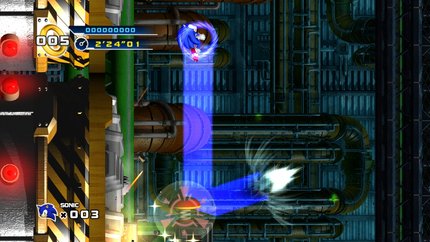

Its been a while since I played Sonic, I will not remember the exact sequence of action from the game, instead I will build my answer from the details you have provided.
I have answered a question on chain attack, it might not be exactly the same, but it is worth taking a look at. I am going to use the same technique from that question and modify it to fit your question.
Preparation
Create a trigger sphere prefab
Animate the sphere to scale up ( start from 0 to MaximumRange ), so the effect will strike the closest enemy first
Steps
Assumption: the attack occurs when you are inAir/isJumpinng and you pressed an attack button (in this example, A-key)*
Press jump, character
isJumpingPress A, spawn a trigger-sphere
If trigger-sphere hit a destructible-object, send a message to character (search for target, this will make your character hit the nearest target)
Move character towards the destructible-object, (hit)
When character hit the destructible-object, move the character upward (bounce)
If A is still pressed, restart from Step-2
Sample Script
Trigger script*
public class TriggerSphere : MonoBehaviour { public GameObject character;
 void OnTriggerEnter( Collider other ) {
       if( other.gameObject.CompareTag("CanHit") ) {

          /* Note: A */

          character.SendMessage("SetBounceTarget", other.gameObject);
          Kill();
       }
    }

    //Call this using an animation event, just in case the sphere strike nothing at all
    void Kill() {
       Destroy(gameObject);
    }
 }
Character Script
 public class Character : MonoBehaviour {
    public TriggerSphere ts;

    private bool isJumping = false;
    private GameObject moveToward;
    void Update() {
       ...

       if( isJumping && Input.GetKeyDown(KeyCode.A) && moveToward == null ) {
          TriggerSphere tsClone = Instantiate( ts, transform.position, Quaternion.identity );
          tsClone.character = gameObject;
       }

       if( moveToward != null ) {
          /* Note : B */
       }
    }

    void OnCollisionEnter( Collision collision ) {
       if( collision.gameObject.CompareTag("CanHit") ) {
          isJumping = false;
          /* Note : C */
       }
    }

    void SetBounceTarget( GameObject go ) {
       moveToward = go;
    }
 }
Note
A
You need to use a raycast to check there is no obstacle between your character and the destructible-object. You should hit the closest and non-obstructed destructible-object.
B
Do a calculation on how to move toward a gameobject, you can use Google to assist you
C
When you have hit a destrutible-object, you will need to return your character back to the jumping-state ( applying force, setting variables to true, etc. Whatever you are using to making your character jump )

In this condition:
 if( isJumping && Input.Get$$anonymous$$eyDown($$anonymous$$eyCode.A) && moveToward == null ) {
    ...
 }
In Input.Get$$anonymous$$eyDown(),user need to press A every time to bounce; If Input.Get$$anonymous$$ey() is used ins$$anonymous$$d, player will need hold to A to keep on bouncing.

Honestly thats spot on I'm working on it now and just viewed your answer and it makes alot of sense so far i've got my character moving towards the enemy when the button is pressed which is great and just like you mentioned i need apply the right forces so its accurate according to the key presses pressed.
Didn't think about the raycast being used to detect if theres an object obstructing so thanks alot honestly !! :D
@ Chronos-L Hey I've basically got like 90% of the bounce attack working but my only issue is the calculation to move the gameobject because right now it snaps to the target rather than move towards the target without snapping if that makes sense .
I know its ideally to do with this part of my code:
transform.position = Vector3.Lerp(transform.position,target.position, step);
i've also used Vector3.$$anonymous$$oveTowards but its the same thing
the variable step is: var step = bouncespeed extraspeed Time.deltaTime;
I'm wondering if its something to do with the time or movement i would be happy if i was given guidance on this part then i believe everything should work fine
Okay thanks I've got a perfect bounce attack with no delays now

Can you give a final script of the ho$$anonymous$$g attack with the improvements in your comments please ? Thanks

I don't want to be a name Nazi or something but I though you were talking about the bounce attack from sonic adventure and you were talking about the ho$$anonymous$$g attack(but now that i mention it does anyone know how to make the bounce attack from adventure as well)



