
Wayback Machinekoobas.hobune.stream
May JUN Jul
Previous capture 13 Next capture
2021 2022 2023
1 capture
13 Jun 22 - 13 Jun 22
sparklines
Close Help
  • Products
  • Solutions
  • Made with Unity
  • Learning
  • Support & Services
  • Community
  • Asset Store
  • Get Unity

UNITY ACCOUNT

You need a Unity Account to shop in the Online and Asset Stores, participate in the Unity Community and manage your license portfolio. Login Create account
  • Blog
  • Forums
  • Answers
  • Evangelists
  • User Groups
  • Beta Program
  • Advisory Panel

Navigation

  • Home
  • Products
  • Solutions
  • Made with Unity
  • Learning
  • Support & Services
  • Community
    • Blog
    • Forums
    • Answers
    • Evangelists
    • User Groups
    • Beta Program
    • Advisory Panel

Unity account

You need a Unity Account to shop in the Online and Asset Stores, participate in the Unity Community and manage your license portfolio. Login Create account

Language

  • Chinese
  • Spanish
  • Japanese
  • Korean
  • Portuguese
  • Ask a question
  • Spaces
    • Default
    • Help Room
    • META
    • Moderators
    • Topics
    • Questions
    • Users
    • Badges
  • Home /
avatar image
3
Question by anton_sl · May 06, 2015 at 12:45 PM · collision

rigidBody.MovePosition() skips collisions

Hi all.

I have following situation (iOS and android oriented game): object with attached rigidboby, when object is pressed, it moves with the finger on Update().

Update() { ... if (isDragging) mainRigidbody.movePosition(pos); ... }

Than I have another object I need to collide with, but during fast movement of object 1 collision (I use onTrigger function) is not called.

Can anybody advice me how to fix that situation?
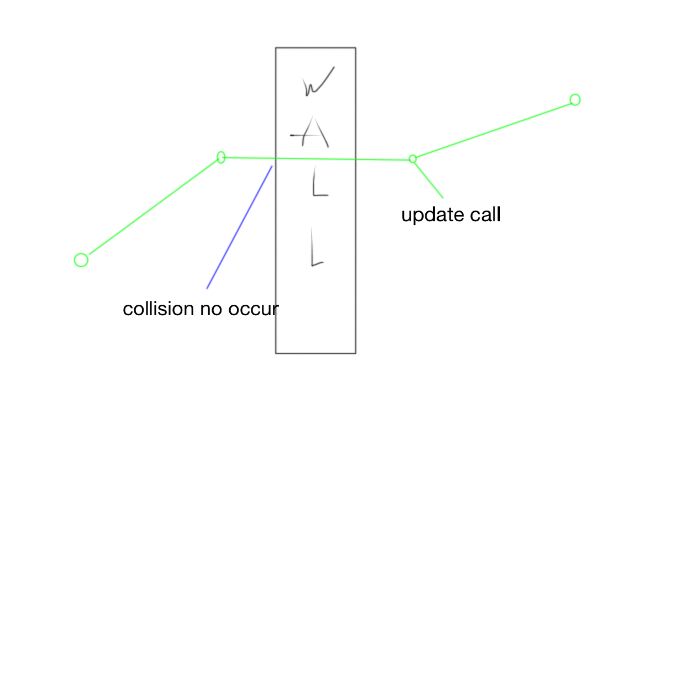
alt text

collision.jpg (16.2 kB)
Comment
Add comment
10 |3000 characters needed characters left characters exceeded
▼
  • Viewable by all users
  • Viewable by moderators
  • Viewable by moderators and the original poster
  • Advanced visibility
Viewable by all users

7 Replies

· Add your reply
  • Sort: 
avatar image
6

Answer by joshuapeacock · Jun 11, 2018 at 06:22 PM

Here was my solution to this problem.

Cast a ray from your current position to the desired movePosition. Check if we hit a collider. If so move to the hit location, if not then move as usual.

 Vector3 direction = new Vector3(desiredPosition - currentPosition);
 Ray ray = new Ray(currentPosition, direction);
 RaycastHit hit;
 if (!Physics.Raycast(ray,out hit,direction.magnitude))
      rigidbody.MovePosition(desiredPosition);
 else
     rigidbody.MovePosition(hit.point);


Comment
Add comment · Share
10 |3000 characters needed characters left characters exceeded
▼
  • Viewable by all users
  • Viewable by moderators
  • Viewable by moderators and the original poster
  • Advanced visibility
Viewable by all users
avatar image
1

Answer by Jakeocinco · Sep 05, 2017 at 12:32 AM

I know this from a while ago, but did you end up figuring it out? @anton_sl

Comment
Add comment · Share
10 |3000 characters needed characters left characters exceeded
▼
  • Viewable by all users
  • Viewable by moderators
  • Viewable by moderators and the original poster
  • Advanced visibility
Viewable by all users
avatar image
1

Answer by GregoryFenn · Jun 11, 2018 at 06:41 PM

There is no solution in the sense that there will always be the chance of an extremely fast object literally missing the collider wall altogether. The only way to stop this would be to have a restriction on the maximal speed, or have an infinitely-wide collider.

But, maybe this will help:

(1) make sure you test for collisions in FixedUpdate(), not Update(), so that the checks occur at exact regular intervals, without the risk of framerate reduction when the CPU is working extra hard (e.g. when scrolling fast!).

(2) to address the collision-miss, that still could occur with if you follow (1), make sure you

(2.1) have a wide-enough collider. You could even program the game so that the collider scales-out when an object is moving very fast. A thin collider has a higher risk of never being touched during the FixedUpdate calls.

(2.2) Failing that, you could record a boolean for the object saying "isLeftOfWall", which switches to true after the object goes through the wall, even if no collision is detected. This can be implemented by checking the coordinates of the wall with the current transform.position to see if your object is left or right of the wall. (Obviously you can do this trick for any axis, not just left/right). Then you just call the collision function (or another function that does the same stuff) as if there was a collision detected.

I would recommend using (2.1). There is no reason why your wall couldn't have a HUGE collider, or two trigger colliders on the left and right side of it, that just reports whether the object is inside it or not.

Comment
Add comment · Show 2 · Share
10 |3000 characters needed characters left characters exceeded
▼
  • Viewable by all users
  • Viewable by moderators
  • Viewable by moderators and the original poster
  • Advanced visibility
Viewable by all users
avatar image joshuapeacock · Jun 11, 2018 at 07:54 PM 0
Share

Here was my solution...

Cast a ray from the current position to the desired move to position. If the ray hits any obstacles handle accordingly, either pass through or move to the hit point.

This seems to be a solution. No matter how fast my object moves it will never pass through another collider.

Thank you for your response!

avatar image GregoryFenn joshuapeacock · Jun 11, 2018 at 09:17 PM 0
Share

Ahh yes, I've seen that solution too. Personally, I'm still trying to make sense of Raycast and none of the beginner/intermediate tutorials explain it in a straightforward way, so I tend to just avoid them for now! But I suspect your way is better than $$anonymous$$e.

avatar image
1

Answer by 9NICK6 · Oct 09, 2019 at 09:30 AM

Maybe you can try to put rigidBody.MovePosition() in FixedUpdate(). In this way the changing in position is synchronized with the physic, namely with collisions

Comment
Add comment · Share
10 |3000 characters needed characters left characters exceeded
▼
  • Viewable by all users
  • Viewable by moderators
  • Viewable by moderators and the original poster
  • Advanced visibility
Viewable by all users
avatar image
0

Answer by UnbreakableOne · Jun 11, 2018 at 09:34 PM

Apparently rigidbody's "continus" mode helps, (I'm trying to figure it out), but if not, raycast works always.

Comment
Add comment · Share
10 |3000 characters needed characters left characters exceeded
▼
  • Viewable by all users
  • Viewable by moderators
  • Viewable by moderators and the original poster
  • Advanced visibility
Viewable by all users
  • 1
  • 2
  • ›

Your answer

Hint: You can notify a user about this post by typing @username

Up to 2 attachments (including images) can be used with a maximum of 524.3 kB each and 1.0 MB total.

Follow this Question

Answers Answers and Comments

9 People are following this question.

avatar image avatar image avatar image avatar image avatar image avatar image avatar image avatar image avatar image

Related Questions

Another Collision Question 3 Answers

collision with enemy that give damage 2 Answers

RigidBody collision is so bad SOMETHING is wrong! What did i do? 1 Answer

OnCollision Works for one script but not the other? 2 Answers

Make AI run from Player 1 Answer


Enterprise
Social Q&A

Social
Subscribe on YouTube social-youtube Follow on LinkedIn social-linkedin Follow on Twitter social-twitter Follow on Facebook social-facebook Follow on Instagram social-instagram

Footer

  • Purchase
    • Products
    • Subscription
    • Asset Store
    • Unity Gear
    • Resellers
  • Education
    • Students
    • Educators
    • Certification
    • Learn
    • Center of Excellence
  • Download
    • Unity
    • Beta Program
  • Unity Labs
    • Labs
    • Publications
  • Resources
    • Learn platform
    • Community
    • Documentation
    • Unity QA
    • FAQ
    • Services Status
    • Connect
  • About Unity
    • About Us
    • Blog
    • Events
    • Careers
    • Contact
    • Press
    • Partners
    • Affiliates
    • Security
Copyright © 2020 Unity Technologies
  • Legal
  • Privacy Policy
  • Cookies
  • Do Not Sell My Personal Information
  • Cookies Settings
"Unity", Unity logos, and other Unity trademarks are trademarks or registered trademarks of Unity Technologies or its affiliates in the U.S. and elsewhere (more info here). Other names or brands are trademarks of their respective owners.
  • Anonymous
  • Sign in
  • Create
  • Ask a question
  • Spaces
  • Default
  • Help Room
  • META
  • Moderators
  • Explore
  • Topics
  • Questions
  • Users
  • Badges
