 koobas.hobune.stream


LayoutRebuilder.ForceRebuildLayoutImmediate doesn't work correctly in nested layout.,LayoutRebuilder does not work in Nested Complex Layout
source code of UGUI, it seems like it can fit in nested layout. 
However,it doesn't work when I call the function "LayoutRebuilder.ForceRebuildLayoutImmediate" once at the root node. I have to call this function multiple times like that when I met nested layout. (from bottom to top, child to parent) 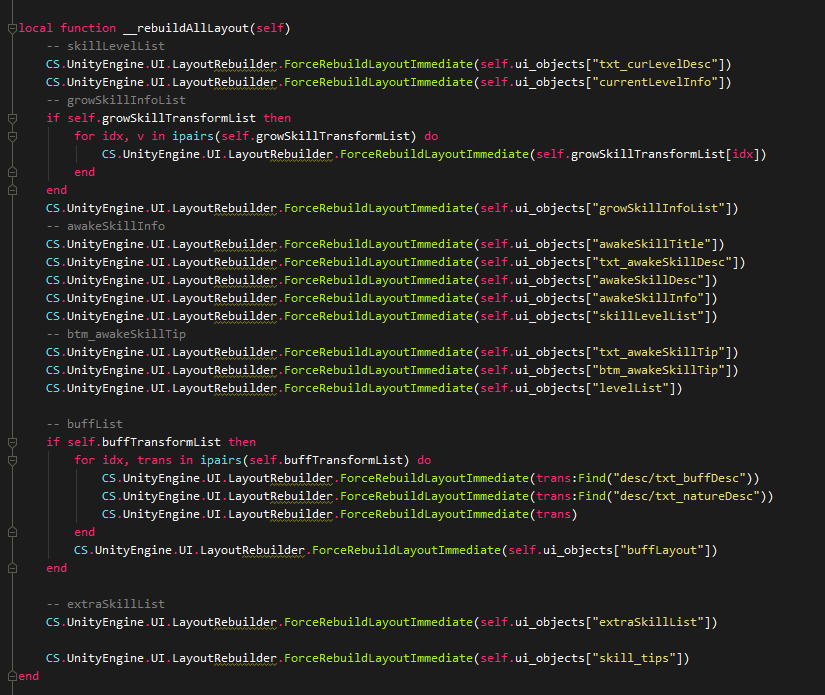 Does anyone know why the source code doesn't work well as I expected and what I can do to deal with the problem properly.

Hey mate, unfortunately, your snippets seem like very bad practice
I haven't figured out how to solve this myself, but it just doesn't seem fit to force so many layout resets. What I have found, though, is that usually, it has to do with the layout in your hierarchy. For example, a text placeholder that will adjust its size, that is inside another placeholder that will adjust its size too. In this case, I just had to have two layout resets, as the first will affect the inner placeholder (the one that holds the text), whilst the second will affect the second (the one that holds the placeholder)
I would love to see some answer to this issue as well :)

I actually came across the following solution - it seems to work perfectly. Source: https://forum.unity.com/threads/force-immediate-layout-update.372630/
[QUOTE="gresolio, post: 5604151, member: 519501"]
I want to slightly expand the Sun-Pengfei's answer. After long adventures and frustrations with UGUI, I can say with confidence that reading the source code helps better than official documentation. There are many "not a Bug, but rather a feature by design" things, won't be fixed in current HorizontalOrVerticalLayoutGroup ;) To avoid using ForceRebuildLayoutImmediate or/and some manual update workarounds, the following approach works well:
Both "child controls size" checkboxes must be enabled and "child force expand" disabled for all ILayoutController (Horizontal, Vertical, also for nested ones), then to control the dimension of the objects you simply use the LayoutElement component ($$anonymous$$, pref, flex sizes). As a result, any dynamic content is correctly aligned, regardless of the activation/deactivation/addition/removal of neighbors.
Note 1: There is no need for ContentSizeFitter component for GameObjects, that are first level children of any LayoutGroup. The main thing is to correctly set the checkboxes, as described above. However ContentSizeFitter may be useful for top level container, or children of children that are not directly controlled by any LayoutGroup.
Note 2: Minimize LayoutGroup nesting when possible. Layout rebuild is very expensive. More info on topic: Unite Europe 2017 - Squeezing Unity: Tips for raising performance. [/QUOTE]

Wow, this is actually really nice. In horizontal layout with images and flexible text it works perfectly. I totally need to read more about this. Thanks, man


