
Wayback Machinekoobas.hobune.stream
May JUN Jul
Previous capture 12 Next capture
2021 2022 2023
1 capture
12 Jun 22 - 12 Jun 22
sparklines
Close Help
  • Products
  • Solutions
  • Made with Unity
  • Learning
  • Support & Services
  • Community
  • Asset Store
  • Get Unity

UNITY ACCOUNT

You need a Unity Account to shop in the Online and Asset Stores, participate in the Unity Community and manage your license portfolio. Login Create account
  • Blog
  • Forums
  • Answers
  • Evangelists
  • User Groups
  • Beta Program
  • Advisory Panel

Navigation

  • Home
  • Products
  • Solutions
  • Made with Unity
  • Learning
  • Support & Services
  • Community
    • Blog
    • Forums
    • Answers
    • Evangelists
    • User Groups
    • Beta Program
    • Advisory Panel

Unity account

You need a Unity Account to shop in the Online and Asset Stores, participate in the Unity Community and manage your license portfolio. Login Create account

Language

  • Chinese
  • Spanish
  • Japanese
  • Korean
  • Portuguese
  • Ask a question
  • Spaces
    • Default
    • Help Room
    • META
    • Moderators
    • Topics
    • Questions
    • Users
    • Badges
  • Home /
avatar image
1
Question by jni97 · Feb 08, 2017 at 07:08 PM · physicsrigidbodyanimatorhierarchychildren

Rigidbody should ignore child collider

Hello, I'm having some problems with the movement system for my character. I have generic avatar setting with this bone transform hierarchy: alt text
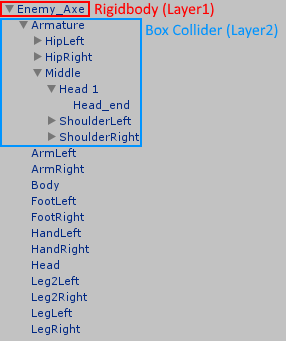
There is also an animator attached to the root object, which will animate the blue hierarchy. All bones have just a box collider attached, so that projectiles can hit the character. The movement rigidbody has this settings:

  • useGravity: true

  • isKinematic: false

  • constraints: freezed rotation

That settings can't be changed to kinematic, because I need the "dynamic" behaviour of the rigidbody.

Now the problem: The moved bones from the animator will affect the root rigidbody. For example the walk cycle will move the character up and down, because the leg animation will push the leg into the ground.

I tried to put the rigidbody and the colliders on separate layers, but that didn't fixed the problem.

How can I force the root rigidbody to ignore the colliders of the children? I also can't add a kinematic rigidbody to the child objects, because that will cause the root rigidbody to get crazy velocity and fly away...

I am grateful for any help!

hierarchy.png (11.1 kB)
Comment
Add comment · Show 1
10 |3000 characters needed characters left characters exceeded
▼
  • Viewable by all users
  • Viewable by moderators
  • Viewable by moderators and the original poster
  • Advanced visibility
Viewable by all users
avatar image Achilleterzo · Jun 10, 2018 at 04:28 PM 0
Share

Hi, you solved this? I have a similar problem with some colliders inner a rigidbody that are not part of compound

3 Replies

· Add your reply
  • Sort: 
avatar image
2

Answer by bakir-omarov · Jun 10, 2018 at 05:49 PM

You can use simple scripts for your main body with Movement Collider, and ignore collision with all of its children . Script:


 using System.Collections;
 using System.Collections.Generic;
 using UnityEngine;
 
 public class UnityAnswers_IgnoreChildsCollision : MonoBehaviour {
 
     private Collider[] childrenColliders;
 
     void Start () {
         // adding all colliders to an array, but our collider will be added to !
         childrenColliders = GetComponentsInChildren<Collider>();
       
         
         foreach (Collider col in childrenColliders)
         {
             // checking if it is our collider, then skip it, 
             if(col != GetComponent<Collider>())
             {
                 // if it is not our collider then ignore collision between our collider and childs collider
                 Physics.IgnoreCollision(col, GetComponent<Collider>());
             }
         }
     }
 }


Comment
Add comment · Share
10 |3000 characters needed characters left characters exceeded
▼
  • Viewable by all users
  • Viewable by moderators
  • Viewable by moderators and the original poster
  • Advanced visibility
Viewable by all users
avatar image
0

Answer by FortisVenaliter · Feb 08, 2017 at 08:11 PM

The only way I know of would be to separate your graphics and your control. Make the rigidbody a separate object from the collision/render mesh, and then have the collision/render object match the transform of the Rigidbody each frame.

Comment
Add comment · Show 2 · Share
10 |3000 characters needed characters left characters exceeded
▼
  • Viewable by all users
  • Viewable by moderators
  • Viewable by moderators and the original poster
  • Advanced visibility
Viewable by all users
avatar image jni97 · Feb 09, 2017 at 09:05 PM 0
Share

I think this would be very bad for the performance. 12 colliders for each character, multiplied by 100 characters = 1200x get and set transform each frame... I think this is not an ideal solution.

avatar image FortisVenaliter jni97 · Feb 09, 2017 at 09:08 PM 0
Share

Not the colliders, the root object for the graphics.

avatar image
0

Answer by Okido · May 11, 2019 at 10:02 PM

I know this is old but it still comes up in google so I thought I'd answer - afaik this is the easiest way to have selective interaction in your game, as it's a built in unity feature, doesn't need any code, and doesn't even take a minute to do (:

You can make things ignore each other by setting them to different layers, and having those layers ignore collisions with each other.

  • Click any item in Unity, then in the inspector click "Layers" (just underneath the name of the object, on the right) > "Add new layer". Make a layer for your child objects (and your parent if you only want these colliders to ignore their parent, but still interact with other things).

  • Select all of the children you want the parent object to ignore, and in the inspector click Layers again, then select the new layer you made for the children. Do this with the parent too, setting it to be on your parent layer.

  • Next, go to Edit > Project Settings > Physics. At the bottom of that menu you'll see a collision matrix. Find the check box where your parent and child layers intersect, and uncheck it.

Comment
Add comment · Show 2 · Share
10 |3000 characters needed characters left characters exceeded
▼
  • Viewable by all users
  • Viewable by moderators
  • Viewable by moderators and the original poster
  • Advanced visibility
Viewable by all users
avatar image Achilleterzo · May 12, 2019 at 09:01 AM 0
Share

Not a true solution, if the collider is a trigger, the rigidbody throws exceptions, if not, it's compund parts don't collide each other, but still part of the main rigidbody. Try to think about a ragdoll for example, and some parts that can be attached to the character of the ragdoll. if you don't want rewrite rigidbody and colliders, we can suggest to the unity staff to put an extra setting for colliders that need to stay out of rigidbody.

avatar image Tommyae · Jan 02, 2021 at 04:43 PM 0
Share

Finally a good solution to this problem! Thank you.

Your answer

Hint: You can notify a user about this post by typing @username

Up to 2 attachments (including images) can be used with a maximum of 524.3 kB each and 1.0 MB total.

Follow this Question

Answers Answers and Comments

115 People are following this question.

avatar image avatar image avatar image avatar image avatar image avatar image avatar image avatar image avatar image avatar image avatar image avatar image avatar image avatar image avatar image avatar image avatar image avatar image avatar image avatar image avatar image avatar image avatar image avatar image avatar image avatar image avatar image avatar image avatar image avatar image avatar image avatar image avatar image avatar image avatar image avatar image avatar image avatar image avatar image avatar image avatar image avatar image avatar image avatar image avatar image avatar image avatar image avatar image avatar image avatar image avatar image avatar image avatar image avatar image avatar image avatar image avatar image avatar image avatar image avatar image avatar image avatar image avatar image avatar image avatar image avatar image avatar image avatar image avatar image avatar image avatar image avatar image avatar image avatar image avatar image avatar image avatar image avatar image avatar image avatar image avatar image avatar image avatar image avatar image avatar image avatar image avatar image avatar image avatar image avatar image avatar image avatar image avatar image avatar image avatar image avatar image avatar image avatar image avatar image avatar image avatar image avatar image avatar image avatar image avatar image avatar image avatar image avatar image avatar image avatar image avatar image avatar image avatar image avatar image avatar image

Related Questions

Character Controller children of a car: Inertia effect, delay effect, what??? 1 Answer

How do you move a character with physics when using Animator.setInteger to play the animations? 0 Answers

How does the Animator drive Rigidbody with root motion (in detail)? 1 Answer

Animate Physics. Moving a rigidbody with an animation 0 Answers

Animation causes rigidbody to move 0 Answers


Enterprise
Social Q&A

Social
Subscribe on YouTube social-youtube Follow on LinkedIn social-linkedin Follow on Twitter social-twitter Follow on Facebook social-facebook Follow on Instagram social-instagram

Footer

  • Purchase
    • Products
    • Subscription
    • Asset Store
    • Unity Gear
    • Resellers
  • Education
    • Students
    • Educators
    • Certification
    • Learn
    • Center of Excellence
  • Download
    • Unity
    • Beta Program
  • Unity Labs
    • Labs
    • Publications
  • Resources
    • Learn platform
    • Community
    • Documentation
    • Unity QA
    • FAQ
    • Services Status
    • Connect
  • About Unity
    • About Us
    • Blog
    • Events
    • Careers
    • Contact
    • Press
    • Partners
    • Affiliates
    • Security
Copyright © 2020 Unity Technologies
  • Legal
  • Privacy Policy
  • Cookies
  • Do Not Sell My Personal Information
  • Cookies Settings
"Unity", Unity logos, and other Unity trademarks are trademarks or registered trademarks of Unity Technologies or its affiliates in the U.S. and elsewhere (more info here). Other names or brands are trademarks of their respective owners.
  • Anonymous
  • Sign in
  • Create
  • Ask a question
  • Spaces
  • Default
  • Help Room
  • META
  • Moderators
  • Explore
  • Topics
  • Questions
  • Users
  • Badges
