
Wayback Machinekoobas.hobune.stream
May JUN Jul
Previous capture 13 Next capture
2021 2022 2023
1 capture
13 Jun 22 - 13 Jun 22
sparklines
Close Help
  • Products
  • Solutions
  • Made with Unity
  • Learning
  • Support & Services
  • Community
  • Asset Store
  • Get Unity

UNITY ACCOUNT

You need a Unity Account to shop in the Online and Asset Stores, participate in the Unity Community and manage your license portfolio. Login Create account
  • Blog
  • Forums
  • Answers
  • Evangelists
  • User Groups
  • Beta Program
  • Advisory Panel

Navigation

  • Home
  • Products
  • Solutions
  • Made with Unity
  • Learning
  • Support & Services
  • Community
    • Blog
    • Forums
    • Answers
    • Evangelists
    • User Groups
    • Beta Program
    • Advisory Panel

Unity account

You need a Unity Account to shop in the Online and Asset Stores, participate in the Unity Community and manage your license portfolio. Login Create account

Language

  • Chinese
  • Spanish
  • Japanese
  • Korean
  • Portuguese
  • Ask a question
  • Spaces
    • Default
    • Help Room
    • META
    • Moderators
    • Topics
    • Questions
    • Users
    • Badges
  • Home /
avatar image
0
Question by Shlomito · Apr 16, 2021 at 05:24 PM · rigidbody2dbeginnerplayer movement

Player accelerates upwards when jumping into a slope while running

This has happened to me a lot of times,well basically any time I have a player controller in a platformer, and I think I know why it happens, just not how to fix it.

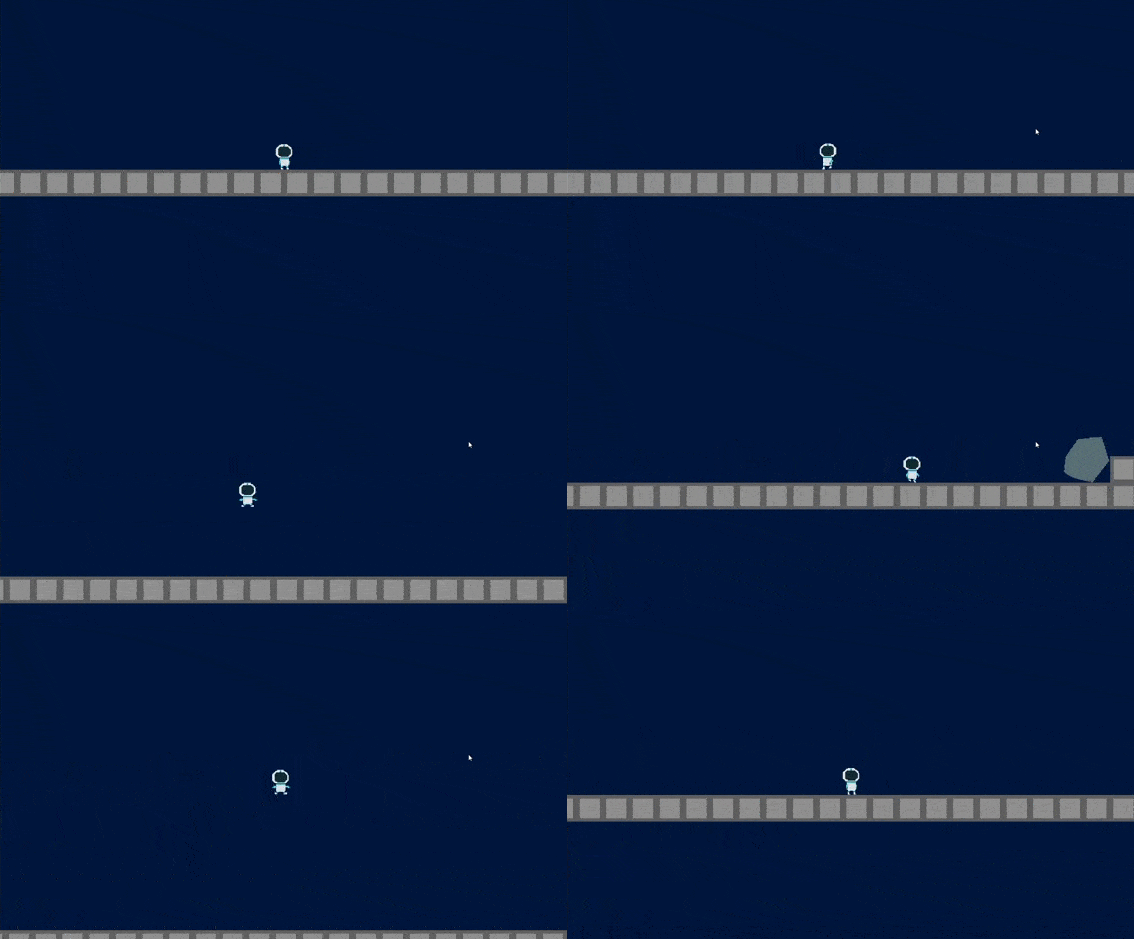
The issue is that when my character is, say, moving right, and there's a slope beside it (or if it has a capsule collider it would also happen with the edge of a platform), and it jumps towards it, if it hits the slope while it's still jumping a lot of the horizontal movement transfers to the Y axis too and it makes a much higher jump than normal. This is my code:

     private void Update()
         {
             input = Input.GetAxis("Horizontal");    
             if(Input.GetButtonDown("Jump") && (grounded || canCoyoteJump))
             {
                 jumping = true;
             }

         }
     
     private void FixedUpdate()
         {
             rb.velocity = new Vector2(input * speed, rb.velocity.y);
             CheckJump();
         }
 
     private void CheckJump()
     {
         if(jumping)
         {
             rb.velocity = new Vector2(rb.velocity.x, jumpVelocity);
             
             jumping = false;
             isCoyote = false;
         }
         
         if(rb.velocity.y < jumpVelocity / 2)
         {
             rb.AddForce(Vector2.down * fallMultiplier);
         }else if (rb.velocity.y > 0 && !Input.GetKey("space"))
         {
             rb.AddForce(Vector2.down * lowJumpMultiplier);
         }
     }

I tried fixing this by changing the rb.velocity to an rb.AddForce so that if it hits a ledge it loses its speed and has to accelerate back up again, but that just makes it so that either it takes a lot longer to get to full speed to the controls feel terrible or the acceleration is so fast it ends up having the same issue, and it's still worse for controls.

Here's a gif of it happening, sorry for the bad quality, but it should get the point across. I pressed space on the whole jump in both of them:
alt text

Any ideas would be appreciated

2021-04-16-12-14-09.gif (459.0 kB)
Comment
Add comment
10 |3000 characters needed characters left characters exceeded
▼
  • Viewable by all users
  • Viewable by moderators
  • Viewable by moderators and the original poster
  • Advanced visibility
Viewable by all users

1 Reply

· Add your reply
  • Sort: 
avatar image
0

Answer by Shlomito · Apr 18, 2021 at 10:20 PM

Ok so I was able to fix this by clamping the Y velocity, which isn't a perfect solution if I ever want the player to move upwards quickly for some other mechanic but it works for me. I changed the line that moved the player horizontally to this: rb.velocity = new Vector2(input * speed, Mathf.Clamp(rb.velocity.y, rb.velocity.y, yClamp)); and that seems to work fine! I guess the underlying issue still happens but I can now control how much it does

Comment
Add comment · Share
10 |3000 characters needed characters left characters exceeded
▼
  • Viewable by all users
  • Viewable by moderators
  • Viewable by moderators and the original poster
  • Advanced visibility
Viewable by all users

Your answer

Hint: You can notify a user about this post by typing @username

Up to 2 attachments (including images) can be used with a maximum of 524.3 kB each and 1.0 MB total.

Follow this Question

Answers Answers and Comments

134 People are following this question.

avatar image avatar image avatar image avatar image avatar image avatar image avatar image avatar image avatar image avatar image avatar image avatar image avatar image avatar image avatar image avatar image avatar image avatar image avatar image avatar image avatar image avatar image avatar image avatar image avatar image avatar image avatar image avatar image avatar image avatar image avatar image avatar image avatar image avatar image avatar image avatar image avatar image avatar image avatar image avatar image avatar image avatar image avatar image avatar image avatar image avatar image avatar image avatar image avatar image avatar image avatar image avatar image avatar image avatar image avatar image avatar image avatar image avatar image avatar image avatar image avatar image avatar image avatar image avatar image avatar image avatar image avatar image avatar image avatar image avatar image avatar image avatar image avatar image avatar image avatar image avatar image avatar image avatar image avatar image avatar image avatar image avatar image avatar image avatar image avatar image avatar image avatar image avatar image avatar image avatar image avatar image avatar image avatar image avatar image avatar image avatar image avatar image avatar image avatar image avatar image avatar image avatar image avatar image avatar image avatar image avatar image avatar image avatar image avatar image avatar image avatar image avatar image avatar image avatar image avatar image avatar image avatar image avatar image avatar image avatar image avatar image avatar image avatar image avatar image avatar image avatar image avatar image avatar image avatar image avatar image avatar image avatar image avatar image avatar image

Related Questions

I need help with rigidbody and collision or something idk 2 Answers

How do add force to the left (x-axis) 2 Answers

Player rapidly accelerating instead of stopping 1 Answer

which is best method for 2d player movement 0 Answers

Player moves differently in different aspect ratios 0 Answers


Enterprise
Social Q&A

Social
Subscribe on YouTube social-youtube Follow on LinkedIn social-linkedin Follow on Twitter social-twitter Follow on Facebook social-facebook Follow on Instagram social-instagram

Footer

  • Purchase
    • Products
    • Subscription
    • Asset Store
    • Unity Gear
    • Resellers
  • Education
    • Students
    • Educators
    • Certification
    • Learn
    • Center of Excellence
  • Download
    • Unity
    • Beta Program
  • Unity Labs
    • Labs
    • Publications
  • Resources
    • Learn platform
    • Community
    • Documentation
    • Unity QA
    • FAQ
    • Services Status
    • Connect
  • About Unity
    • About Us
    • Blog
    • Events
    • Careers
    • Contact
    • Press
    • Partners
    • Affiliates
    • Security
Copyright © 2020 Unity Technologies
  • Legal
  • Privacy Policy
  • Cookies
  • Do Not Sell My Personal Information
  • Cookies Settings
"Unity", Unity logos, and other Unity trademarks are trademarks or registered trademarks of Unity Technologies or its affiliates in the U.S. and elsewhere (more info here). Other names or brands are trademarks of their respective owners.
  • Anonymous
  • Sign in
  • Create
  • Ask a question
  • Spaces
  • Default
  • Help Room
  • META
  • Moderators
  • Explore
  • Topics
  • Questions
  • Users
  • Badges
