 koobas.hobune.stream


2D rigidbody behaves strangely with a negative scale
Hey all! I've been making a system that when you click on a monster's limb it destroys the limb you clicked and makes fall to the ground the children limbs. There is a rigidbody attached to the monster gameobject and all the limbs are its children.When I click on a limb all the fallen children limbs are set children to a flesh container gameobject I instantiated wich is a child of the zombie gameobject and it has a rigidbody too,wich lets the limb fall. Then at the top there is an empty parent gameobject of the monster that I scale its x to 1 or -1 to change the direction the monster is facing called monster parent. The problem is when I set the monster parent x scale to -1(so the monster is flipped), the falling limbs don't linearly fall to the ground but they start flickering around, they stop in mid air or they get stuck in the ground. When the zombie is facing right (monster parent x scale = 1) everything works fine. Here there's the structure of the monster:
 monster_parent|(it sets the positive or negative scale)
                              |_
                                 |monster (it has a rigidbody attached)
                                 |_
                                    |limbs /bones bla bla (example of the structure of the limbs)
                                    |arm
                                    |_
                                       |hand
                                    |...
                                    |femur
                                    |_
                                       |foot
                                    |
                                    |flesh container (1) (it has  a rigidbody attached)
                                    |_
                                       |fallen limb (ex. leg) (it has a collider attached)
                                    |
                                    |flesh container (2)
                                    |_
                                       |limb
                                    |_flesh container (n)
                                    |_
                                       |limb
Here the code that manages the limbs when they are clicked and when they are falling
     void Update()
     {
         if (ClickedGameobject() && ClickedGameobject().transform.parent)
         {
             parent = ClickedGameobject().transform.parent;//the "direct" parent of the clicked object
             children = parent.transform.GetComponentsInChildren<Transform>();
             root = ClickedGameobject().transform.root;//monster,the principal gameobject
             children_limbs = root.GetComponentsInChildren<Transform>();//array with the root's children
         }
         else
         {
             parent = null;
             children = null;
             root = null;
             children_limbs = null;
         }
          flesh_containers = GameObject.FindGameObjectsWithTag("flesh container");

         if (Input.GetMouseButtonDown(0) && ClickedGameobject() != null)
         {

             foreach (Transform tra in children)
             {
                 //clicked gameobject
                 if (!tra.gameObject.name.Contains("bone"))
                 {
                     go = Instantiate(flesh_container, tra.position, Quaternion.identity) as GameObject
                if (tra.transform.root.localScale.x >= 0)//made just for debug purposes
                     {
                         go.transform.parent = flesh_container_parent.transform;
                         Debug.Log("scale >0 " + tra.root);
                     }
                     else
                     {
                         go.transform.parent = flesh_container_parent.transform;
                         Debug.Log("scale <0 " + tra.root);
                     }

                     tra.transform.parent = go.transform;
                 }
             }

                 if (ClickedGameobject() != null)
                 {
                     ClickedGameobject().SetActive(false);
                 }
         }
         //checks the collision
         foreach(GameObject go in flesh_containers)
         {
             //if there isn't the external collision check scripts
             if (go.transform.GetChild(0).gameObject.GetComponent<ExternalCollisionCheck>() == null && go.transform.GetComponentInChildren<Transform>()!=null)
             {
                 external_collision = go.transform.GetChild(0).gameObject.AddComponent<ExternalCollisionCheck>();//adds it
                 external_collision.tag_colz = "terra";//sets the tag for the collision checking
              }
         }
         }

     }
I think the problem is with the rigidbodies but I didn't find a way to solve it yet. What should I change to make the limbs fall normally? Thank you very much in advance for your time and help :D

I changed the script so it puts all the fallen limbs under a parent outside of the monster,so they don't move with the monster.I thought it would solve the problem because it looked like the rigidbodies in the monster and in the flesh containers would enter in conflict, but the problem still remains.Another thing I found is that during the fall, the limbs' colliders don't stay in their position but they totally go out of the object they are attached at. 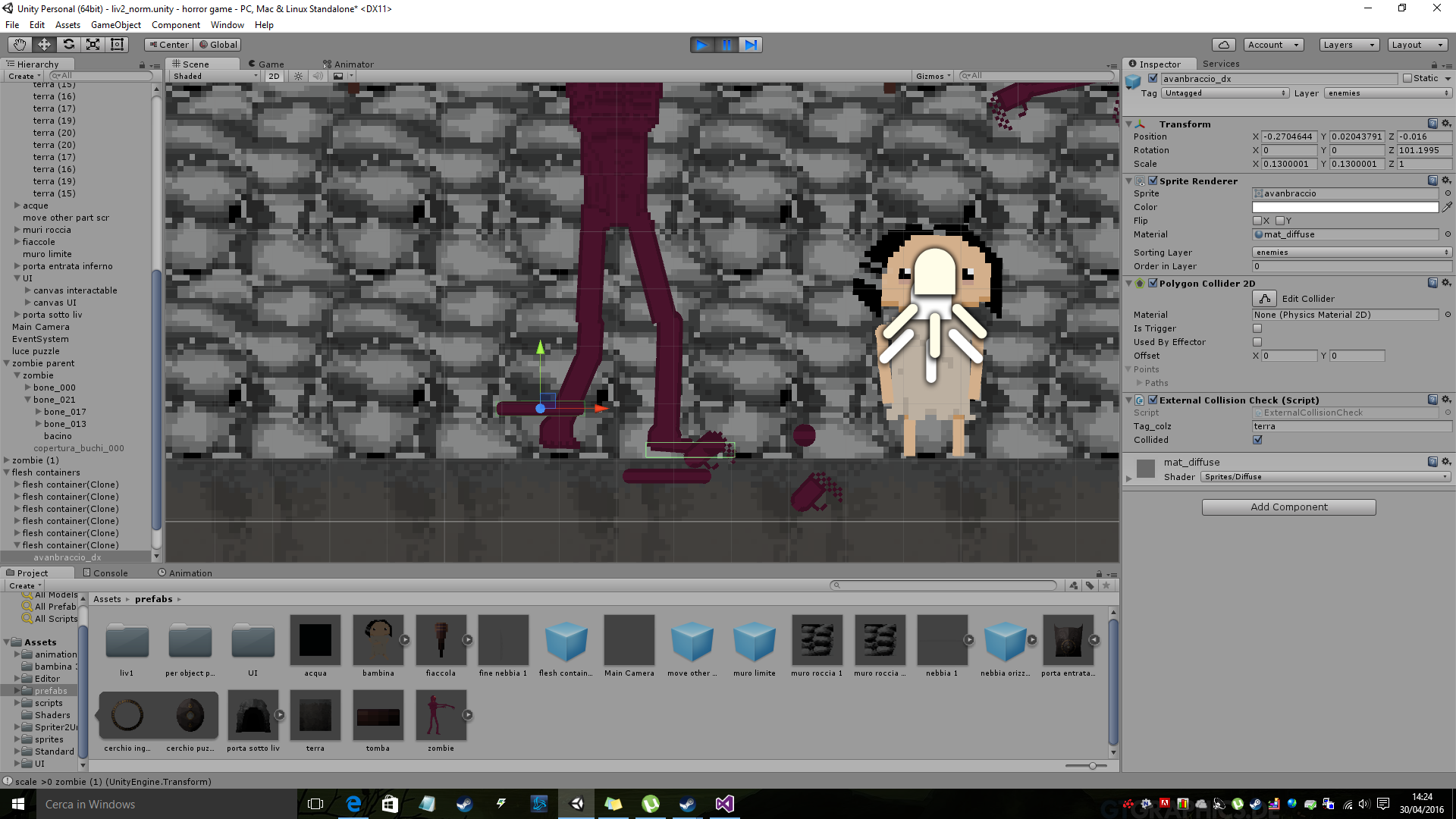
As you can see the collider is totally out of the sprite,,I saw all the fallen limbs have this problem or go through the ground. Any solutions?



