 koobas.hobune.stream


On trigger enter sometimes not working
I'm trying to make a character controller (which can wall run). I currently have unity's character controller, with a slightly thicker capsulle collider around it set to trigger, to detect collisions 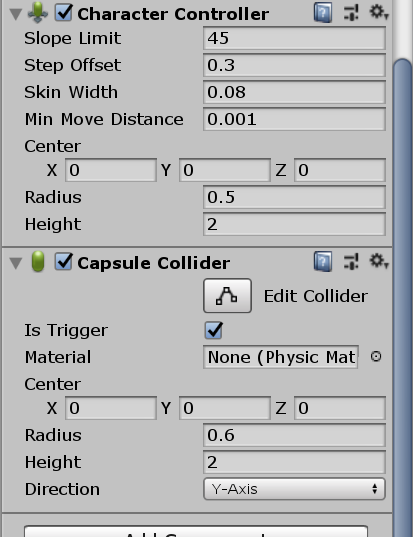
However, sometimes when I jump off a wall, and hit another, the collider doesn't detect this collision (it tends to happen when I'm moving). I have a video demonstrating it: https://www.youtube.com/watch?v=dWfHc8govX4
Colliding code:
 private void OnTriggerEnter(Collider other)
     {
         //If the player enters collison with something other than themselves, set colliding to true
         if(other.gameObject != gameObject)
         {
             colliding = true;
         }
     }

     private void OnTriggerExit(Collider other)
     {
         //If the player exits collison with something other than themselves, set colliding to false
         if (other.gameObject != gameObject)
         {
             colliding = false;
         }

         //If detached from a wall, set the normal to 0, to avoid bugs
         if (other.gameObject.tag.Equals("Wall Run"))
         {
             wallRunNormal = Vector3.zero;
         }
     }
Wall run code:
 void WallRun()
     {
         //Wall running is true if it is a vertical wall, if the player is not touching the floor and if the player is colliding with something
         wallRunning = Vector3.Angle(Vector3.up, wallRunNormal) > 89 && !player.isGrounded && colliding;

         if (wallRunning)
         {
             //Sets 'targetRot' to the camera's rotation to better modify it
             Vector3 targetRot = camera.transform.localEulerAngles;

             //Depending on the wall surface the z rotation will be set taking into account the axis the normal of the surface is pointing
             if ((int)wallRunNormal.x != 0)
                 targetRot.z = wallRunRotation * -wallRunNormal.x * transform.forward.z;
             else if ((int)wallRunNormal.z != 0)
                 targetRot.z = wallRunRotation * wallRunNormal.z * transform.forward.x;

             //Lerps the rotation of the camera
             camera.transform.localRotation = Quaternion.Lerp(camera.transform.localRotation, Quaternion.Euler(targetRot), Time.deltaTime * wallRunRotationSmooth);

             //Sticks the player to the surface of the wall by "atracting" it (moving the player in the oposite direction of the wall normal)
             finalMovement.x -= wallRunNormal.x * speed * 2 * Mathf.Abs(transform.forward.z);
             finalMovement.z -= wallRunNormal.z * speed * 2  * Mathf.Abs(transform.forward.x);

             //When the player sticks to the wall, they do a little jump
             if (!done)
             {
                 yVel = jumpForce;
                 done = true;
             }

         }
         else
         {
             //Lerps the camera back to zero when not wall running
             Vector3 targetRot = camera.transform.localEulerAngles;
             targetRot.z = 0;
             targetRot.y = 0;
             camera.transform.localRotation = Quaternion.Lerp(camera.transform.localRotation, Quaternion.Euler(targetRot), Time.deltaTime * wallRunRotationSmooth);

         }

         //Detaches the player from the wall if they jump
         if (wallRunning && Input.GetButton("Jump"))
         {
             AddForce(new Vector3(wallRunNormal.x * wallImpulse, jumpForce, wallRunNormal.z * wallImpulse));
             colliding = false;
             return;
         }

         if (!wallRunning)
         {
             done = false;
         }


         //Update the player movement
         MovePlayer();
     }
Force code (When the player jumps off a wall, force is added)
 void Force()
     {
         if(force.y != 0)
         {
             jumping = true;
             yVel = force.y;
             force.y = 0;
         }

         if (!player.isGrounded || crouching)
         {
             force = Vector3.Lerp(force, Vector3.zero, 1f * Time.deltaTime);
         }
         else
         {
             force = Vector3.Lerp(force, Vector3.zero, 7f * Time.deltaTime);
         }

         finalMovement += force;
     }
Movement script
 void Movement()
     {
         //Gets the input
         float hMovement = Input.GetAxis("Horizontal");
         float vMovement = Input.GetAxis("Vertical");

         //If the player can sprint, when they hold the sprint key, lerp to the sprint speed, when they let go, lerp to the original speed
         if (canSprint)
         {
             if (Input.GetButton("Sprint"))
             {
                 speed = Mathf.Lerp(speed, sprintSpeed, Time.deltaTime * sprintSmooth);
             }
             else if (!Input.GetButton("Sprint"))
             {
                 speed = Mathf.Lerp(speed, prevSpeed, Time.deltaTime * sprintSmooth);
             }
         }


         //Translates the input into something we can use
         Vector3 zMovement = transform.forward * vMovement;
         Vector3 xMovement = transform.right * hMovement;

         //Stores the final movement so it can be clamped
         movement = xMovement + zMovement;

         //Clamps the movement
         movement = Vector3.ClampMagnitude(movement, 1);

         //Ads some resistance and momentum in the air
         if (player.isGrounded || wallRunning)
         {
             finalMovement = new Vector3(movement.x * speed, yVel, movement.z * speed);
             groundedMovement = finalMovement;
             groundedMovement.y = 0;
         }

         if (!player.isGrounded && !wallRunning)
         {
             finalMovement = groundedMovement;
             groundedMovement += movement;
             groundedMovement = Vector3.ClampMagnitude(groundedMovement, speed * 2);
             groundedMovement = Vector3.Lerp(groundedMovement, Vector3.zero, 1f * Time.deltaTime);
             finalMovement.y = yVel;
         }

         //Applies the movement
         if (!crouching)
             MovePlayer();
     }
That's all I can think of that would affect this. Thanks in advance.
I'm just going to redo the script with a rigidbody because the character controller is giving me a lot of problems

A few things are weird.
I don't think a rigidbody can ever collide with themselves.
Since you can collide with multiple colliders at once, you need a collide counter, not a colliding Boolean. This is likely your problem
Your code has a lot of side-effects (here, you are using a lot of private variables instead of local), which would make it hard to debug
You haven't posted the code for MovePlayer, but if it uses the transform instead of CharacterController.Move(), you might miss collision events

The thing is, since the collider I'm using to detect collisions is slightly thicker than the player controller, it collides with it. I've tried the whole counter thing, and it doesn't work, but that's not the problem, the problem is that when the player jumps off a wall and hits another (while moving forward), this collision is not detected by the collider. And as for movement, I'll post the code, but it's really simple and it does use CharacterController.$$anonymous$$ove(). $$anonymous$$y best guess is that the problem has to do with how i tackled momentum and force, but I'm out of ideas. Thank you so much for the response though.

Are you using both a character controller and a rigidbody? Damn, that will definitely not work.
Use OnControllerColliderHit. And use a counter.
I am, but it is set on kinematic and it's just so the collider attached to the player object detects collisions. If I use OnControllerColliderHit, how will I know if the player has exited a collision? Because I've done some research and Unity doesn't provide any information for that I believe.

Have you also checked that colliding = false before the 2nd collision?
Yes, whenever the player jumps off a wall, colliding is set to false. The problem is that when a player hits anotehr wall, this collision isn't detected

I've been dealing with this issue for some time as well, it's a fairly annoying thing to deal with but I finally found a workaround I believe.
As most of us know when the Char Controller hits the collider it will ignore the collision and it turns out instead of colliding with the entity involved it will stand on top of it if able (maybe be pushed away from it if possible i'm unsure haven't tested it out as a wall). Well by increasing the values of the colliders Scale so the player has no choice but to walk through it you won't be able to ever "Stand" on the trigger, you'll always be forced to walk through it and activate trigger effects. My jump pad wasn't working previously and by doing this it works every time now.
Also for anyone interested in an easy way to get collisions working with this method you can follow something like this
 private void OnTriggerEnter(Collider other)
     {
         Debug.Log("Collision");
         // One way to do this better, might be to check componenets on the object.
         // if the player collides with the object
         if (other.gameObject.layer == 10) { Debug.Log("Player"); PlayerCollision(other.gameObject); }
     }

     private void PlayerCollision(GameObject _player)
     {
         _player.GetComponent<FirstPersonPlayerController>().addForce(direction);
     }



