
Wayback Machinekoobas.hobune.stream
May JUN Jul
Previous capture 13 Next capture
2021 2022 2023
1 capture
13 Jun 22 - 13 Jun 22
sparklines
Close Help
  • Products
  • Solutions
  • Made with Unity
  • Learning
  • Support & Services
  • Community
  • Asset Store
  • Get Unity

UNITY ACCOUNT

You need a Unity Account to shop in the Online and Asset Stores, participate in the Unity Community and manage your license portfolio. Login Create account
  • Blog
  • Forums
  • Answers
  • Evangelists
  • User Groups
  • Beta Program
  • Advisory Panel

Navigation

  • Home
  • Products
  • Solutions
  • Made with Unity
  • Learning
  • Support & Services
  • Community
    • Blog
    • Forums
    • Answers
    • Evangelists
    • User Groups
    • Beta Program
    • Advisory Panel

Unity account

You need a Unity Account to shop in the Online and Asset Stores, participate in the Unity Community and manage your license portfolio. Login Create account

Language

  • Chinese
  • Spanish
  • Japanese
  • Korean
  • Portuguese
  • Ask a question
  • Spaces
    • Default
    • Help Room
    • META
    • Moderators
    • Topics
    • Questions
    • Users
    • Badges
  • Home /
avatar image
1
Question by Gureen_Ryuu · Jan 30, 2014 at 07:01 AM · boxcolliderprocedural generationpolygon collider 2dprocedural-terrainphysics 2d

Slope polygon collider 2D causing box collider 2D to 'bump' while sliding on it.

I'm doing procedural terrain generation. So far I've created the mesh, and attached a 2D polygon collider to it. The terrain is made up of hills going up and down.
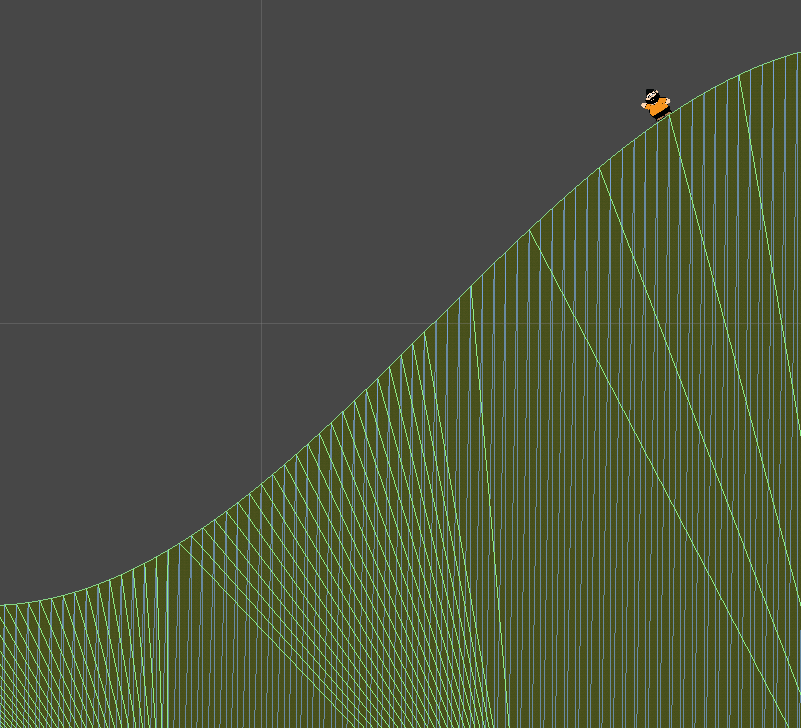
alt text

After doing so, I put a 2D rigid body, along with a 2D box collider to represent the player. When I put the player on top and let him slide all the way down, sometimes he doesn't slide properly, and instead bumps on the hill, jumping all of a sudden on his own as if he tripped on something (even though there's nothing there). What's weird is that it doesn't happen all the time, just sometimes. Even when I make him slide on the same spot he bumped before again, he wouldn't do it again except on rare occasions.

What could be causing this?

Comment
Add comment · Show 3
10 |3000 characters needed characters left characters exceeded
▼
  • Viewable by all users
  • Viewable by moderators
  • Viewable by moderators and the original poster
  • Advanced visibility
Viewable by all users
avatar image frogsbo · Jan 31, 2014 at 07:58 AM 0
Share

it would appear that your slide physics code is not adapted to the 2d collider, essentially it's a unity error in the slide code, perhaps it is due to the front of your square being square and going over corners in physics even though they are very gradual. perhaps look at 2-D codes where they have wheels, or see if you can figure out the slide code on the guyden and skip any possible jumping. What is the name of the slide code?

avatar image Gureen_Ryuu · Jan 31, 2014 at 04:29 PM 0
Share

There is no slide code per say. This is just normal gravity of a rigid body with a box collider sliding on a slope shaped polygon collider. I want to note that this isn't happening when I use a circle collider.

avatar image CraigCrawford · Jan 31, 2014 at 05:08 PM 0
Share

Have you tried placing a 2d Physics $$anonymous$$aterial with 0 friction and 0 bounciness on the collider? You also may want to add circle colliders to the feet of the character along with the box for other collision on the body.

1 Reply

· Add your reply
  • Sort: 
avatar image
1

Answer by Plystire · Jun 20, 2014 at 05:58 AM

Old question, I know. Figured I'd try to answer this in case someone else stumbled in here.

You should try using a circle collider for the feet of your player, as this will keep the sharp corners of the box from catching on uneven terrain and "tripping" your player.

You can add multiple colliders to your player, so just use a circle near the base of the player, and then a box collider for the upper portion of their body. (Though, looking at your player sprite, a circle may well suit the entire thing lol)

Comment
Add comment · Share
10 |3000 characters needed characters left characters exceeded
▼
  • Viewable by all users
  • Viewable by moderators
  • Viewable by moderators and the original poster
  • Advanced visibility
Viewable by all users

Your answer

Hint: You can notify a user about this post by typing @username

Up to 2 attachments (including images) can be used with a maximum of 524.3 kB each and 1.0 MB total.

Follow this Question

Answers Answers and Comments

20 People are following this question.

avatar image avatar image avatar image avatar image avatar image avatar image avatar image avatar image avatar image avatar image avatar image avatar image avatar image avatar image avatar image avatar image avatar image avatar image avatar image avatar image

Related Questions

What is the best way to generate water bodies in a procedurally generated world? 1 Answer

How to instantiate prefabs in an unloaded (or just loaded) scene? 1 Answer

How can I generate procedural 3D geometry faster? 2 Answers

Having trouble getting NavMeshBuilder.CollectSources to work. 0 Answers

2D topdown generating stairs (access) to generated hill 0 Answers


Enterprise
Social Q&A

Social
Subscribe on YouTube social-youtube Follow on LinkedIn social-linkedin Follow on Twitter social-twitter Follow on Facebook social-facebook Follow on Instagram social-instagram

Footer

  • Purchase
    • Products
    • Subscription
    • Asset Store
    • Unity Gear
    • Resellers
  • Education
    • Students
    • Educators
    • Certification
    • Learn
    • Center of Excellence
  • Download
    • Unity
    • Beta Program
  • Unity Labs
    • Labs
    • Publications
  • Resources
    • Learn platform
    • Community
    • Documentation
    • Unity QA
    • FAQ
    • Services Status
    • Connect
  • About Unity
    • About Us
    • Blog
    • Events
    • Careers
    • Contact
    • Press
    • Partners
    • Affiliates
    • Security
Copyright © 2020 Unity Technologies
  • Legal
  • Privacy Policy
  • Cookies
  • Do Not Sell My Personal Information
  • Cookies Settings
"Unity", Unity logos, and other Unity trademarks are trademarks or registered trademarks of Unity Technologies or its affiliates in the U.S. and elsewhere (more info here). Other names or brands are trademarks of their respective owners.
  • Anonymous
  • Sign in
  • Create
  • Ask a question
  • Spaces
  • Default
  • Help Room
  • META
  • Moderators
  • Explore
  • Topics
  • Questions
  • Users
  • Badges
