
Wayback Machinekoobas.hobune.stream
May JUN Jul
Previous capture 12 Next capture
2021 2022 2023
1 capture
12 Jun 22 - 12 Jun 22
sparklines
Close Help
  • Products
  • Solutions
  • Made with Unity
  • Learning
  • Support & Services
  • Community
  • Asset Store
  • Get Unity

UNITY ACCOUNT

You need a Unity Account to shop in the Online and Asset Stores, participate in the Unity Community and manage your license portfolio. Login Create account
  • Blog
  • Forums
  • Answers
  • Evangelists
  • User Groups
  • Beta Program
  • Advisory Panel

Navigation

  • Home
  • Products
  • Solutions
  • Made with Unity
  • Learning
  • Support & Services
  • Community
    • Blog
    • Forums
    • Answers
    • Evangelists
    • User Groups
    • Beta Program
    • Advisory Panel

Unity account

You need a Unity Account to shop in the Online and Asset Stores, participate in the Unity Community and manage your license portfolio. Login Create account

Language

  • Chinese
  • Spanish
  • Japanese
  • Korean
  • Portuguese
  • Ask a question
  • Spaces
    • Default
    • Help Room
    • META
    • Moderators
    • Topics
    • Questions
    • Users
    • Badges
  • Home /
  • Help Room /
avatar image
0
Question by Kurtino · Aug 01, 2016 at 02:17 PM · bug-perhapsplaymodepreviewunknown

Blue bar appearing over playmode preview

Recently since I've been pressing play in Unity a blue bar will cover the right section of the preview screen.

I am using the Oculus Rift CV1 with VR support enabled, and the blue bar doesn't appear in the headset but it covers a section of the preview.

I've tried looking around for anything similar but can't find anything. Does anyone know what it is and how to remove it?
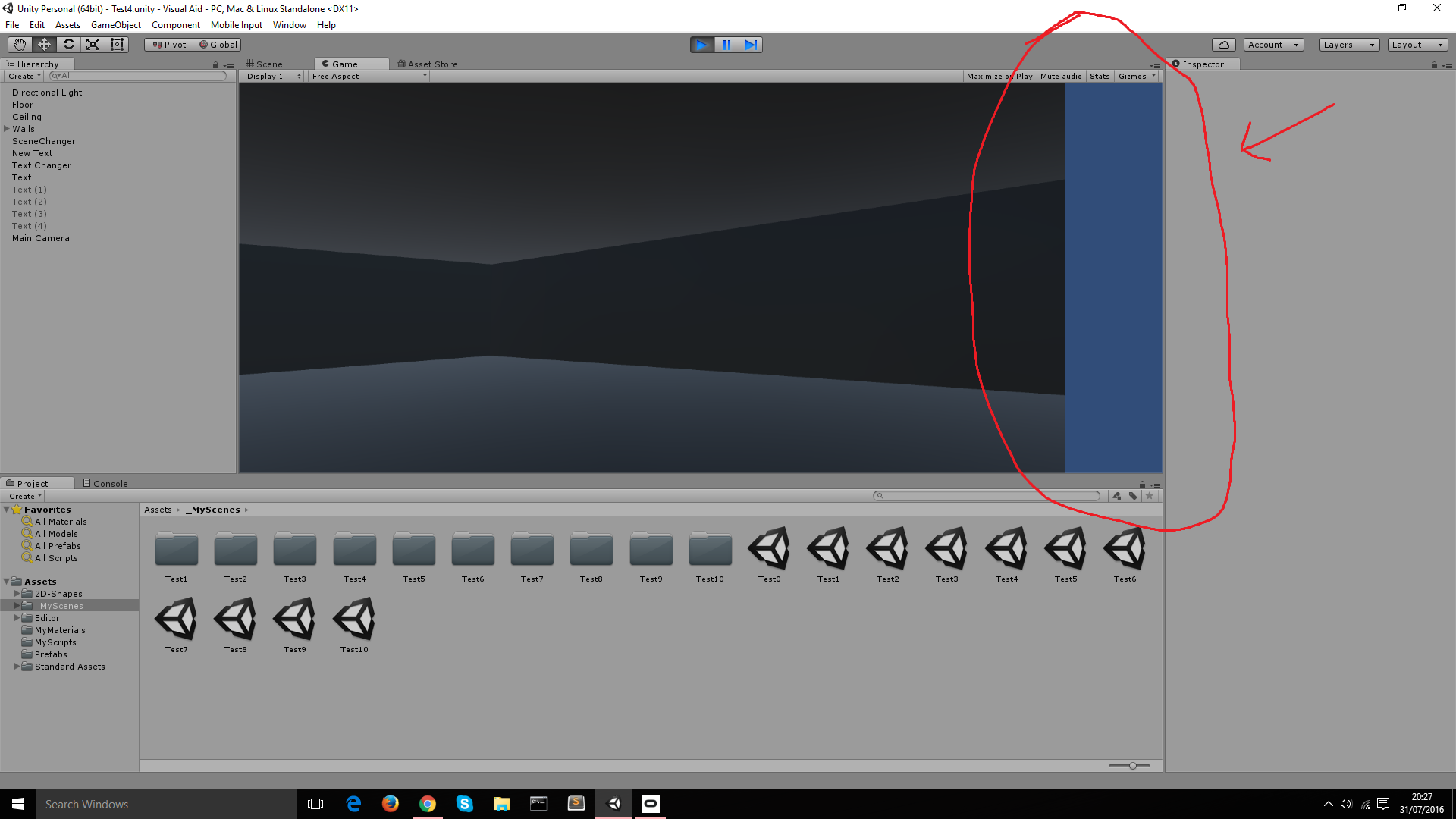
alt text

bluebar.png (176.4 kB)
Comment
Add comment · Show 6
10 |3000 characters needed characters left characters exceeded
▼
  • Viewable by all users
  • Viewable by moderators
  • Viewable by moderators and the original poster
  • Advanced visibility
Viewable by all users
avatar image Owen-Reynolds · Aug 01, 2016 at 02:18 PM 0
Share

Looks like the sky. Your background just doesn't cover that wide, short window.

avatar image Glurth · Aug 01, 2016 at 02:53 PM 0
Share

shot in the dark: check the viewport rect on your camera. this should go from 0,0, to 1,1 to covert the entire preview area. looks like yours is set to 0,0 to 0.9,1 Though honestly, I don't think this is it, as my tests show black not blue bar.

Do you have any scripts on your camera? I ask because you metnioned the blue bar only appears when you hit play. If you look at the game-preview screen without hitting play, does it look normal?

avatar image jecolon · Aug 02, 2016 at 02:32 PM 0
Share

Having the same problem. Glurth solution does not work. And to answer his question, it looks normal without hitting play. Once I hit play, it has the blue bar. What I've noticed is that it's only rendering the left side eye viewport, not both.

avatar image Glurth jecolon · Aug 03, 2016 at 02:20 PM 0
Share

left side eye: Oh, I was wondering if it might be that, but since I only saw one camera in the scene, I didn't think that would be the case. I though that effect would only happen with stereoscopic VR, which requires TWO cameras, offset-slightly.

avatar image Kurtino · Aug 02, 2016 at 04:46 PM 0
Share

I've only had this since I've started using the Oculus Rift CV1. The D$$anonymous$$2 did not produce this problem and I noticed yesterday that I saw a black bar in the same position in a preview of Lucky's Tail?

Perhaps this isn't a Unity problem at all and something to do with the CV1.

avatar image HarmonyRic · Nov 29, 2016 at 09:06 PM 0
Share

We have had this issue on one particular project (Unity v5.3.4p6) for both the D$$anonymous$$2 and the CV1, though it seemed intermittent. Upgrading the project to v5.4.1p4 got rid of the bar but caused some horrendous rendering issues and stopped the Leap $$anonymous$$otion working, so we tried v5.3.5p8 and that seemed to do the trick for us.

0 Replies

· Add your reply
  • Sort: 

Your answer

Hint: You can notify a user about this post by typing @username

Up to 2 attachments (including images) can be used with a maximum of 524.3 kB each and 1.0 MB total.

Follow this Question

Answers Answers and Comments

6 People are following this question.

avatar image avatar image avatar image avatar image avatar image avatar image

Related Questions

Bug?: Functionality regarding timeline doesn't work if the timeline is not present in the editor 1 Answer

Unity playmode bug 0 Answers

Can't enter Play mode with DOTS package enabled. 0 Answers

My camera is stuck at a weird angle when hitting play. 0 Answers

All objects become transparent when press play. why? 0 Answers


Enterprise
Social Q&A

Social
Subscribe on YouTube social-youtube Follow on LinkedIn social-linkedin Follow on Twitter social-twitter Follow on Facebook social-facebook Follow on Instagram social-instagram

Footer

  • Purchase
    • Products
    • Subscription
    • Asset Store
    • Unity Gear
    • Resellers
  • Education
    • Students
    • Educators
    • Certification
    • Learn
    • Center of Excellence
  • Download
    • Unity
    • Beta Program
  • Unity Labs
    • Labs
    • Publications
  • Resources
    • Learn platform
    • Community
    • Documentation
    • Unity QA
    • FAQ
    • Services Status
    • Connect
  • About Unity
    • About Us
    • Blog
    • Events
    • Careers
    • Contact
    • Press
    • Partners
    • Affiliates
    • Security
Copyright © 2020 Unity Technologies
  • Legal
  • Privacy Policy
  • Cookies
  • Do Not Sell My Personal Information
  • Cookies Settings
"Unity", Unity logos, and other Unity trademarks are trademarks or registered trademarks of Unity Technologies or its affiliates in the U.S. and elsewhere (more info here). Other names or brands are trademarks of their respective owners.
  • Anonymous
  • Sign in
  • Create
  • Ask a question
  • Spaces
  • Default
  • Help Room
  • META
  • Moderators
  • Explore
  • Topics
  • Questions
  • Users
  • Badges
