 koobas.hobune.stream


Play Animation
I have a cube character. I have two animations, one that has him "crouch" and one that has him "stand". My character is setup is as show in the image. "Player" has the movement script and the rigidbody. "Graphics" has everything a normal cube does except the collider, and "collider" has the collider. "Camera" is the camera. "Animations" is an empty gameobject. "Animator" has an animator on it with my player animation controller on it. I have a c# script and i am trying to get my player to crouch. I want my player to crouch when I press left shift. The reason the animator is on a separate gameobject as my movement script is because my player won't move if the animator was on the same object. I would prefer if the crouching script would be included in my movement script, which is on the "Player" object. Please help.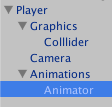

Not sure if you mean this but here is what i think you mean. I am still trying to learn all the terminology of game devs.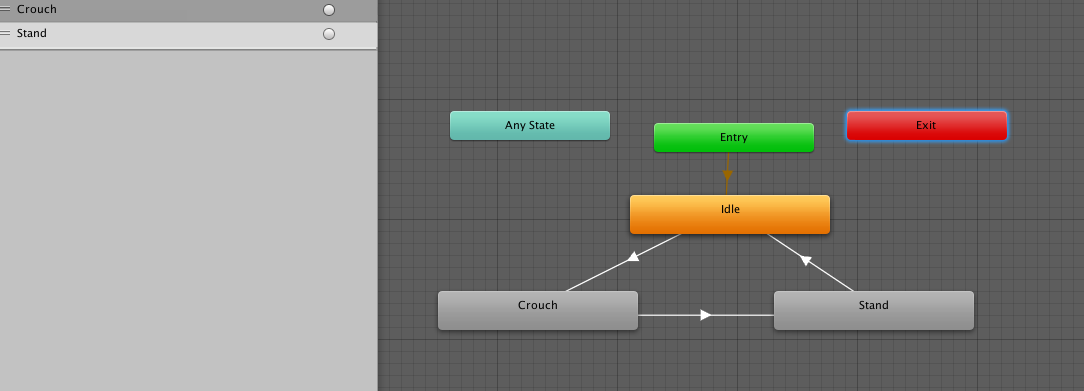
yes, that's the right one. Axtrainz already posted the solution. You can activate the "Crouch" and "Stand" parameters from every Script you like by calling
animator.SetTrigger("Crouch");
Does it work for you?

Assuming your Animator Parameter to trigger Crunch animation is bool crunch you can do this:
for general purpose we create an Animator field:
public Animator anim;
then let's do a function for clear vision:
 public void Crunch_Me()
 {
          if (Input.GetKey(KeyCode.LeftShift))
         {
             if (anim != null)
             {
                 if (anim.GetBool("crunch") != true)
                     anim.SetBool("crunch", true);
                 else
                     anim.SetBool("crunch", false);
             }
         }// get key if
 }//function
You should call this function on:
FixedUpdate()

Sorry, but the script still isn't working. I copied exactly what Axtrainz said above, and called it in the fixed update function. I just don't have a parameter to trigger crouch as a bool. I have two triggers, Crouch and Stand, as shown in the image above.

Is the same thing, ins$$anonymous$$d of: anim.SetBool("crunch", true); you do: anim.SetTrigger("Crouch");




