
Wayback Machinekoobas.hobune.stream
May JUN Jul
Previous capture 13 Next capture
2021 2022 2023
1 capture
13 Jun 22 - 13 Jun 22
sparklines
Close Help
  • Products
  • Solutions
  • Made with Unity
  • Learning
  • Support & Services
  • Community
  • Asset Store
  • Get Unity

UNITY ACCOUNT

You need a Unity Account to shop in the Online and Asset Stores, participate in the Unity Community and manage your license portfolio. Login Create account
  • Blog
  • Forums
  • Answers
  • Evangelists
  • User Groups
  • Beta Program
  • Advisory Panel

Navigation

  • Home
  • Products
  • Solutions
  • Made with Unity
  • Learning
  • Support & Services
  • Community
    • Blog
    • Forums
    • Answers
    • Evangelists
    • User Groups
    • Beta Program
    • Advisory Panel

Unity account

You need a Unity Account to shop in the Online and Asset Stores, participate in the Unity Community and manage your license portfolio. Login Create account

Language

  • Chinese
  • Spanish
  • Japanese
  • Korean
  • Portuguese
  • Ask a question
  • Spaces
    • Default
    • Help Room
    • META
    • Moderators
    • Topics
    • Questions
    • Users
    • Badges
  • Home /
avatar image
0
Question by easilyBaffled · Sep 13, 2012 at 06:39 PM · raycastdistance

Raycast Distance

I have a ball with radius .15, I am trying to cast a ray forward from its center with distance .2 and if it hits something I want that somethings information. This is the line of code `Physics.Raycast(down.position, down.forward *.2, hit, 1)` it is in an if statement, and it doesn't work. When I press play the ray seems to reach out too far and hit other objects, so either I am doing this wrong(and I have tried the many versions of Raycast) or the scale of the scene is different which I dont think is the case because I draw a ray with all the same properties and it only extends .2. So anyone know Rays better than I do?

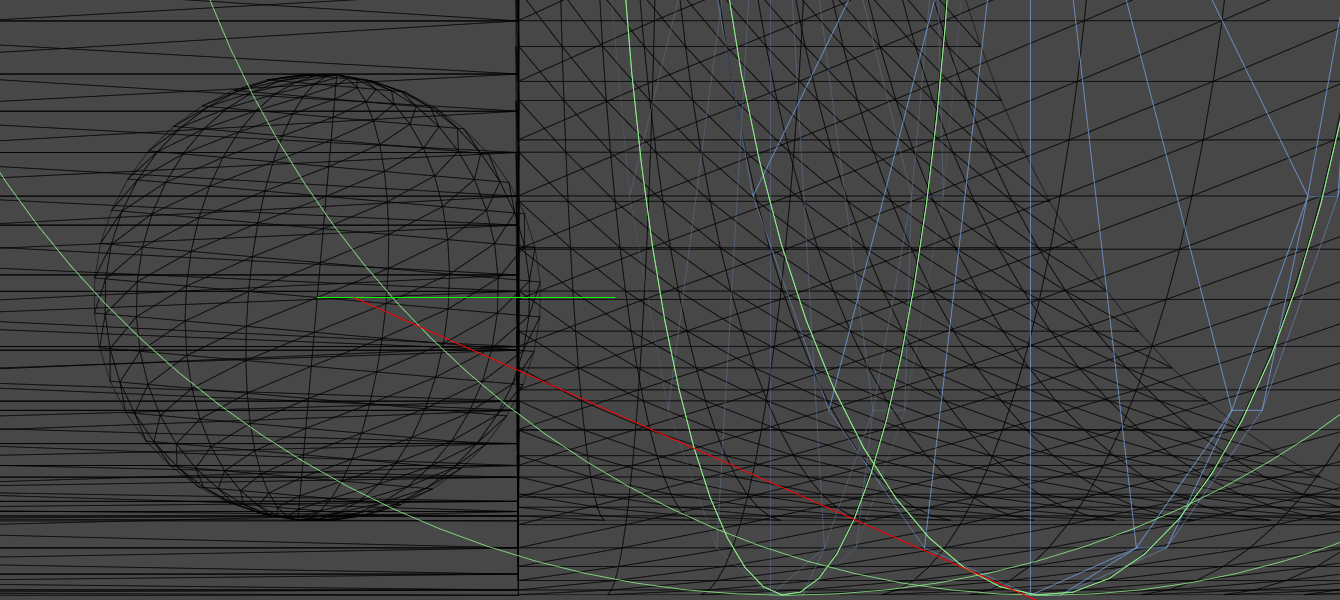
EDIT: I've added a picture. The green ray, is what is what the ray is supposed to be doing. The two highlighted objects are gate1 and gate2, and red ray is the result when I try `Debug.DrawRay(hit.point, hit.point, Color.red, 120);` the game seems to think that "hit" in this case is gate2, and completely ignores gate2
alt text

screen shot 2012-09-14 at 4.06.27 pm.png (327.3 kB)
Comment
Add comment
10 |3000 characters needed characters left characters exceeded
▼
  • Viewable by all users
  • Viewable by moderators
  • Viewable by moderators and the original poster
  • Advanced visibility
Viewable by all users

1 Reply

· Add your reply
  • Sort: 
avatar image
1

Answer by DesiQ · Sep 13, 2012 at 09:25 PM

Rays have infinite length. Multiplying the magnitude of the vector would do nothing, as the ray would be infinite anyway. Use RaycastHit.distance to check whether the collision happened within the distance you wanted. Or use

 Physics.Raycast(transform.position, -Vector3.up, hit, 0.2f)

to cast a ray straight down, limiting possible collisions to 0.2 world units only.

Comment
Add comment · Show 6 · Share
10 |3000 characters needed characters left characters exceeded
▼
  • Viewable by all users
  • Viewable by moderators
  • Viewable by moderators and the original poster
  • Advanced visibility
Viewable by all users
avatar image easilyBaffled · Sep 14, 2012 at 04:01 PM 0
Share

Here is the most current itteration of my block, and it still picks up every object: if(Physics.Raycast(down.position, down.forward, hit, 0.2f)){ if(hit.transform.name.Contains("Gate") && hit.distance < .5){ print(hit.transform.name); } }

avatar image DesiQ · Sep 14, 2012 at 07:18 PM 0
Share

What exactly are you trying to accomplish, and for what purpose? I am confused because you named your object/reference down, and yet it is actually a ball, and you are trying to fire a ray forward. What is down's type? It's unclear why you're not using

 down.transform.position
 down.transform.forward

if it's a moveable object. I just tried your code (but using transform.position and transform.forward) on a flycam and had no problems.

Rays are not only infinite in length, but they pass through objects even after colliding. RaycastHit can return an array of all the collisions that the ray has made within the limit distance. Is this what you mean by "picks up every object"?

The note in the documentation of Physics.Raycast might be relevant here:

Note: This function will return false if you cast a ray from inside a sphere to the outside; this in an intended behaviour.

avatar image ThermalFusion · Sep 14, 2012 at 07:27 PM 0
Share

Raycast should only return one hit, RaycastAll on the other hand returns all hits.

avatar image easilyBaffled · Sep 14, 2012 at 07:33 PM 0
Share

down is: down = transform.Find("Down"); It's called down because I use it earlier in the code to move the ball its inside down. If the Ray is supposed to be infinite then what is the point of distance? But whats more troubling is that when I try to check hit.distance < .5, it says the gates are, when they clearly are not. Stranger still, there's gate2 gate3 and gate4, the ray will pick up gate3 and not gate2

I down know if this will affect anything but gates are children of the tube. I say this because when I checked print(down.position - hit.point); it printed out (0.0, 0.0, 0.0).

avatar image DesiQ · Sep 14, 2012 at 07:45 PM 0
Share

Consider me baffled too, then. $$anonymous$$y advice is to make a new test scene and test your script on a flycam against cubes. It should work (worked for me anyway). Then change the cubes to gates and see if it works. Then swap the flycam out for a ball and see if that works. There shouldn't be anything wrong with that code, so it must be something related to your scene's setup.

Show more comments

Your answer

Hint: You can notify a user about this post by typing @username

Up to 2 attachments (including images) can be used with a maximum of 524.3 kB each and 1.0 MB total.

Follow this Question

Answers Answers and Comments

11 People are following this question.

avatar image avatar image avatar image avatar image avatar image avatar image avatar image avatar image avatar image avatar image avatar image

Related Questions

RaycastHit.distance 1 Answer

Hit distance Change light range 1 Answer

RTS camera help 1 Answer

Instantiate same PreFab to an array of GameObject by RayCast. 1 Answer

How to get distance with raycast.distance 1 Answer


Enterprise
Social Q&A

Social
Subscribe on YouTube social-youtube Follow on LinkedIn social-linkedin Follow on Twitter social-twitter Follow on Facebook social-facebook Follow on Instagram social-instagram

Footer

  • Purchase
    • Products
    • Subscription
    • Asset Store
    • Unity Gear
    • Resellers
  • Education
    • Students
    • Educators
    • Certification
    • Learn
    • Center of Excellence
  • Download
    • Unity
    • Beta Program
  • Unity Labs
    • Labs
    • Publications
  • Resources
    • Learn platform
    • Community
    • Documentation
    • Unity QA
    • FAQ
    • Services Status
    • Connect
  • About Unity
    • About Us
    • Blog
    • Events
    • Careers
    • Contact
    • Press
    • Partners
    • Affiliates
    • Security
Copyright © 2020 Unity Technologies
  • Legal
  • Privacy Policy
  • Cookies
  • Do Not Sell My Personal Information
  • Cookies Settings
"Unity", Unity logos, and other Unity trademarks are trademarks or registered trademarks of Unity Technologies or its affiliates in the U.S. and elsewhere (more info here). Other names or brands are trademarks of their respective owners.
  • Anonymous
  • Sign in
  • Create
  • Ask a question
  • Spaces
  • Default
  • Help Room
  • META
  • Moderators
  • Explore
  • Topics
  • Questions
  • Users
  • Badges
