 koobas.hobune.stream


Non-perpendicular near clip plane
tl;dr - Is there a way to construct a new projection matrix such that the near clip plane is not perpendicular to the camera?
What I'm trying to do is create visual portal effect using render textures so that I can make the illusion of impossible spaces. What I've done is make the rendering camera's movement relative to the rendered portal the same main camera's movement relative to the visible portal. I also keep track of the size of the portals (the portals are two identically sized quads) and then use their size to change the size of the near clip plane (at least, I'm pretty sure that's what I'm doing; that the "right," "left," "top," and "bottom" variables from the documentation represent the size of the near clip plane).
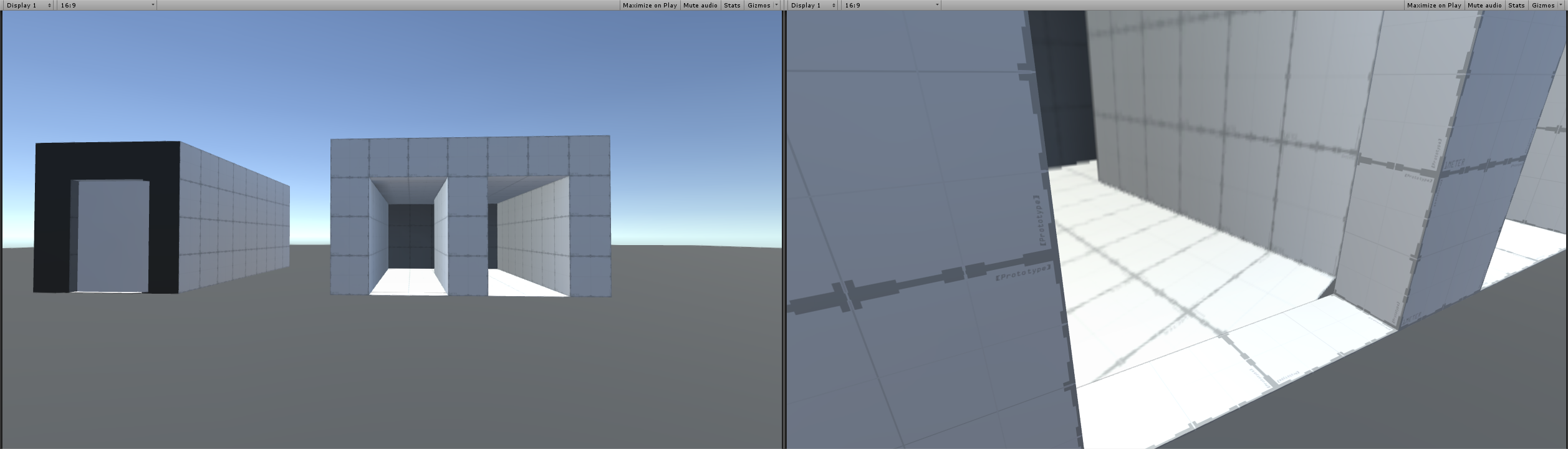
The problem I'm running into is that, while the portal looks fine when viewed straight-on, it looks odd when viewed from sharp angles (first picture).
I've illustrated what I believe is going on (second picture). When the main camera is perpendicular to the visible portal ("this quad"), the rendering camera is also perpendicular to the rendered portal ("opposite quad") and the quad becomes its near clip plane (blue). But when the main camera (and thus the rendering camera) move to be non-perpendicular to the quads (rendering camera at 2b), the rendering camera's near clip plane remains perpendicular (orange) rather than remaining in the same orientation as the opposite quad (black). I'm thinking that if there is a way to get the near clip plane to be at an angle (black), then all will be good. Does anybody know of a way to achieve this?
My code is available below the pictures. Sorry if it's not clear or is over commented, my only coding experience is an introduction to Java course I took about three years ago.

 using UnityEngine;
 using System;
 using System.Collections;

 ///// This script is attached to a quad. It tracks the main camera's movement
 ///// relative to that quad. It moves a second camera so that the second camera
 ///// mirrors the main camera's movement relative to a second quad. The second
 ///// camera renders to a texture that is attached to this quad.

 public class ProjectionMatrix : MonoBehaviour {

     public GameObject opposite; //opposite is a quad that is the same size as this quad
     [HideInInspector] Camera mainCam;
     [HideInInspector] Camera renderCam; //this camera should be attached to the opposite quad and will render to this quad
     [HideInInspector] Matrix4x4 np; //new projection matrix

     //variables for  projection matrix, initialising to default values
     [HideInInspector] float near = 0.3f;
     [HideInInspector] float far = 1000f;
     [HideInInspector] float right = 0.30754f;
     [HideInInspector] float left = -0.30754f;
     [HideInInspector] float top = 0.173205f;
     [HideInInspector] float bottom = -0.173205f;

     public RenderTexture hereTexture; //renderCam renders to this texture, which is attached to this quad

     void Start () {
         mainCam = Camera.main;

         renderCam = opposite.GetComponentInChildren<Camera> ();
         //set most renderCam settings to be same as mainCam settings
             renderCam.tag = "Untagged";
             renderCam.depth = mainCam.depth - 1;
             renderCam.aspect = mainCam.aspect;
             renderCam.cullingMask = ~(0 << 1);
             renderCam.fieldOfView = mainCam.fieldOfView;
             renderCam.farClipPlane = mainCam.farClipPlane;
             renderCam.renderingPath = mainCam.renderingPath;
             renderCam.useOcclusionCulling = mainCam.useOcclusionCulling;
             renderCam.hdr = mainCam.hdr;
             renderCam.nearClipPlane = 0.01f;

         //renderCam renders to this quad's texture
         renderCam.targetTexture = hereTexture;

         np = new Matrix4x4(); //new projection matrix
     }

     void Update () {
         renderCamRepo ();
         renderCamRender ();
     }

     ///// CAMERA RENDERING CODE
     void renderCamRender () {

         //get vertices for this quad, translate them to apply to renderCam
         Vector3[] quadVert = this.GetComponent<MeshFilter> ().mesh.vertices;
         Vector3[] quadVertScreen = new Vector3[quadVert.Length];

         for (int i = 0; i < quadVert.Length; i++) {
             quadVert [i] = this.transform.TransformPoint (quadVert [i]);
             quadVertScreen [i] = mainCam.WorldToViewportPoint (quadVert [i]);
         }

         hereTexture = new RenderTexture (mainCam.pixelWidth, mainCam.pixelHeight, 24);

         //set various terms in the projection matrix
         //right, left, top, and bottom are 1/2 the edges of the quad so that the near clip plane is the same size as the quad
         right = 0.5f * Vector3.Distance (quadVert [3], quadVert [1]);
         left = -0.5f * Vector3.Distance (quadVert [3], quadVert [1]);
         top = 0.5f * Vector3.Distance (quadVert [3], quadVert [0]);
         bottom = -0.5f * Vector3.Distance (quadVert [3], quadVert [0]);
         //near is the distance from the camera to the centre of opposites
         near = Vector3.Distance (renderCam.transform.position, opposite.transform.position);
         far = 1000f;

 //        // failed attempt to adjust renderCam near clip plane for oblique views
 //        float alpha = Vector3.Angle (opposite.transform.forward, renderCam.transform.forward) * Mathf.Deg2Rad;
 //        right = right / Mathf.Sin (alpha);
 //        left = left / Mathf.Sin (alpha);

         //projection matrix for renderCam
         np [0, 0] = (2*near)/(right - left);
         np [0, 1] = 0;
         np [0, 2] = (right + left) / (right - left);
         np [0, 3] = 0;

         np [1, 0] = 0;
         np [1, 1] = (2 * near) / (top - bottom);
         np [1, 2] = (top + bottom) / (top - bottom);
         np [1, 3] = 0;

         np [2, 0] = 0;
         np [2, 1] = 0;
         np [2, 2] = -(far + near) / (far - near);
         np [2, 3] = -(2 * far * near) / (far - near);

         np [3, 0] = 0;
         np [3, 1] = 0;
         np [3, 2] = -1f;
         np [3, 3] = 0;

         renderCam.projectionMatrix = np;
     }

     ///// moves renderCam to mirror mainCam's movment relative to opposite; renderCam looks at opposite
     void renderCamRepo () {
         Vector3 renderCamPos = this.transform.InverseTransformPoint (mainCam.transform.position);
         renderCam.transform.localPosition = renderCamPos;

         Vector3 oppositePos = opposite.transform.position;
         renderCam.transform.LookAt (oppositePos, Vector3.up);
     }
 }


