
Wayback Machinekoobas.hobune.stream
May JUN Jul
Previous capture 13 Next capture
2021 2022 2023
1 capture
13 Jun 22 - 13 Jun 22
sparklines
Close Help
  • Products
  • Solutions
  • Made with Unity
  • Learning
  • Support & Services
  • Community
  • Asset Store
  • Get Unity

UNITY ACCOUNT

You need a Unity Account to shop in the Online and Asset Stores, participate in the Unity Community and manage your license portfolio. Login Create account
  • Blog
  • Forums
  • Answers
  • Evangelists
  • User Groups
  • Beta Program
  • Advisory Panel

Navigation

  • Home
  • Products
  • Solutions
  • Made with Unity
  • Learning
  • Support & Services
  • Community
    • Blog
    • Forums
    • Answers
    • Evangelists
    • User Groups
    • Beta Program
    • Advisory Panel

Unity account

You need a Unity Account to shop in the Online and Asset Stores, participate in the Unity Community and manage your license portfolio. Login Create account

Language

  • Chinese
  • Spanish
  • Japanese
  • Korean
  • Portuguese
  • Ask a question
  • Spaces
    • Default
    • Help Room
    • META
    • Moderators
    • Topics
    • Questions
    • Users
    • Badges
  • Home /
avatar image
0
Question by Findeh · Oct 18, 2020 at 07:32 PM · movementpositiontopdown

Calculate Vector3 position using and Object position + rotation and an angle

The title sounds a little moronish, most likely the question will sound the same way. Sorry for that in advance.

Top down 2d view game. I have an Parent object named Ship, and a child object named Motor (at the back of the ship). I also have some child objects named Steer (with a number) and depending on which Steer is active right now, i apply force to the Motor position. Whole thing is moving with Rigidbody2D.AddForceAtPosition. This way i can move forward or backward and rotate Ship at the same time.
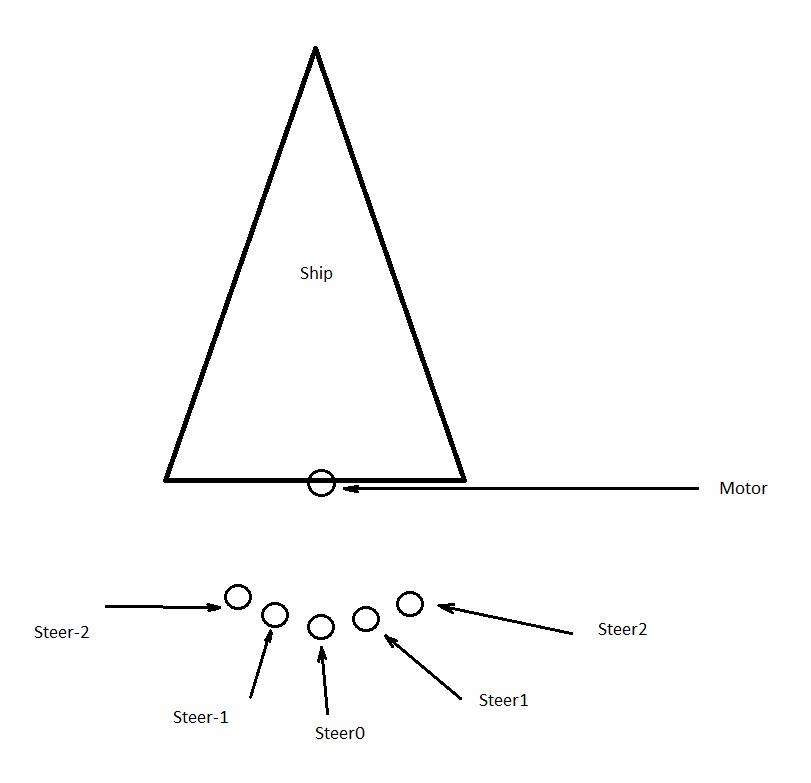
alt text

Code looks like this:

 Vector3 Steer = Steer0.transform.position;
 
 Vector3 forceDirection = (Motor.transform.position - Steer).normalized;
 
 shipBody.AddForceAtPosition(forceDirection * enginePower, Motor.transform.position);


The problem is, i have to use static Steer objects to get their Vector3 coordinates.

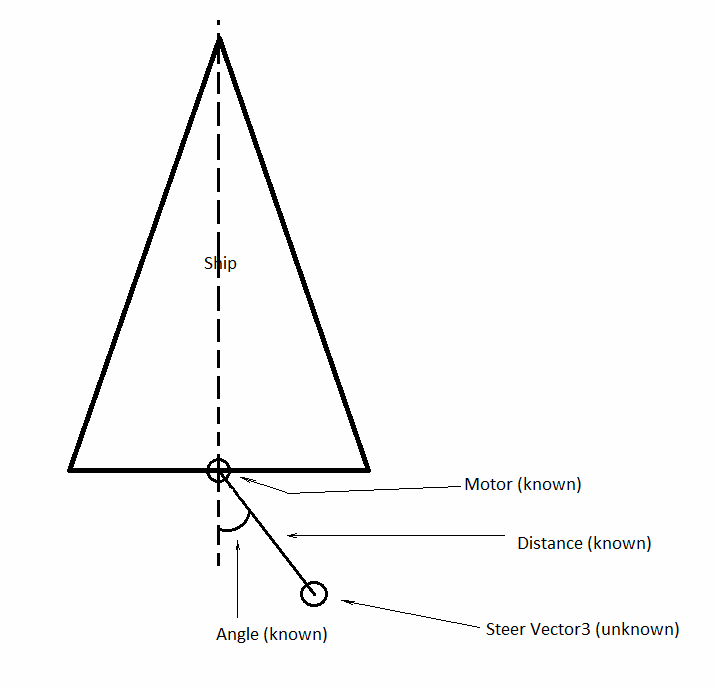
I would like to just calculate where is a Steer suppose to be, without having any real object at that position.

I have a Motor position and Motor rotation, i know the angle Between Motor and Steer (at the second picture). I also know the distance between Motor position and a steer position (lets say it 1, since it does not matter), but i can't understand how do i get Vector3 Steer position from this? alt text I've tried to use something like this:
 Vector3 CalculateSteerCoordinates(float degrees)
     {
         var radians = degrees * Mathf.Deg2Rad;
         var x = Motor.transform.position.x + Mathf.Cos(radians);
         var y = Motor.transform.position.y + Mathf.Sin(radians);
         Vector3 pos =  new Vector3(x, y, 0);
         return pos;
     }

It works, but it does not consider Motor rotation, only it's coordinates. As a result, it will give incorrect position as soon as i rotate the ship.

111111111.png (19.1 kB)
22222222222.png (18.1 kB)
Comment
Add comment
10 |3000 characters needed characters left characters exceeded
▼
  • Viewable by all users
  • Viewable by moderators
  • Viewable by moderators and the original poster
  • Advanced visibility
Viewable by all users

1 Reply

· Add your reply
  • Sort: 
avatar image
1
Best Answer

Answer by Namey5 · Oct 19, 2020 at 11:31 AM

You can use what you already have, just transform those coordinates from the motor's local space to world space;

 Vector3 CalculateSteerCoordinates(float degrees, float distance)
 {
     float radians = degrees * Mathf.Deg2Rad;
     Vector3 localPos = new Vector3 (Mathf.Cos (radians), Mathf.Sin (radians), 0) * distance;
     return Motor.transform.TransformPoint (localPos);
 }
Comment
Add comment · Show 1 · Share
10 |3000 characters needed characters left characters exceeded
▼
  • Viewable by all users
  • Viewable by moderators
  • Viewable by moderators and the original poster
  • Advanced visibility
Viewable by all users
avatar image Findeh · Oct 19, 2020 at 01:26 PM 0
Share

Thank you for the answer. Just tested it very quick (with a drawn objects) and it seems to be working great. Was trying the same thing today but i was adding $$anonymous$$otor.transfrom.position, which was messing everything up.

Thanks a lot

Your answer

Hint: You can notify a user about this post by typing @username

Up to 2 attachments (including images) can be used with a maximum of 524.3 kB each and 1.0 MB total.

Follow this Question

Answers Answers and Comments

223 People are following this question.

avatar image avatar image avatar image avatar image avatar image avatar image avatar image avatar image avatar image avatar image avatar image avatar image avatar image avatar image avatar image avatar image avatar image avatar image avatar image avatar image avatar image avatar image avatar image avatar image avatar image avatar image avatar image avatar image avatar image avatar image avatar image avatar image avatar image avatar image avatar image avatar image avatar image avatar image avatar image avatar image avatar image avatar image avatar image avatar image avatar image avatar image avatar image avatar image avatar image avatar image avatar image avatar image avatar image avatar image avatar image avatar image avatar image avatar image avatar image avatar image avatar image avatar image avatar image avatar image avatar image avatar image avatar image avatar image avatar image avatar image avatar image avatar image avatar image avatar image avatar image avatar image avatar image avatar image avatar image avatar image avatar image avatar image avatar image avatar image avatar image avatar image avatar image avatar image avatar image avatar image avatar image avatar image avatar image avatar image avatar image avatar image avatar image avatar image avatar image avatar image avatar image avatar image avatar image avatar image avatar image avatar image avatar image avatar image avatar image avatar image avatar image avatar image avatar image avatar image avatar image avatar image avatar image avatar image avatar image avatar image avatar image avatar image avatar image avatar image avatar image avatar image avatar image avatar image avatar image avatar image avatar image avatar image avatar image avatar image avatar image avatar image avatar image avatar image avatar image avatar image avatar image avatar image avatar image avatar image avatar image avatar image avatar image avatar image avatar image avatar image avatar image avatar image avatar image avatar image avatar image avatar image avatar image avatar image avatar image avatar image avatar image avatar image avatar image avatar image avatar image avatar image avatar image avatar image avatar image avatar image avatar image avatar image avatar image avatar image avatar image avatar image avatar image avatar image avatar image avatar image avatar image avatar image avatar image avatar image avatar image avatar image avatar image avatar image avatar image avatar image avatar image avatar image avatar image avatar image avatar image avatar image avatar image avatar image avatar image avatar image avatar image avatar image avatar image avatar image avatar image avatar image avatar image avatar image avatar image avatar image avatar image avatar image avatar image avatar image avatar image avatar image avatar image avatar image avatar image avatar image avatar image avatar image avatar image

Related Questions

Vertical & horizontal movement world axis (top view) 1 Answer

how to stop the camera to follow the player on his jump movement ? 2 Answers

2D Topdown Character Contoller 0 Answers

Smooth Camera/Object Movement 1 Answer

In the breakout tutorial,why does the paddle movement use Update() instead of FixedUpdate()? 1 Answer


Enterprise
Social Q&A

Social
Subscribe on YouTube social-youtube Follow on LinkedIn social-linkedin Follow on Twitter social-twitter Follow on Facebook social-facebook Follow on Instagram social-instagram

Footer

  • Purchase
    • Products
    • Subscription
    • Asset Store
    • Unity Gear
    • Resellers
  • Education
    • Students
    • Educators
    • Certification
    • Learn
    • Center of Excellence
  • Download
    • Unity
    • Beta Program
  • Unity Labs
    • Labs
    • Publications
  • Resources
    • Learn platform
    • Community
    • Documentation
    • Unity QA
    • FAQ
    • Services Status
    • Connect
  • About Unity
    • About Us
    • Blog
    • Events
    • Careers
    • Contact
    • Press
    • Partners
    • Affiliates
    • Security
Copyright © 2020 Unity Technologies
  • Legal
  • Privacy Policy
  • Cookies
  • Do Not Sell My Personal Information
  • Cookies Settings
"Unity", Unity logos, and other Unity trademarks are trademarks or registered trademarks of Unity Technologies or its affiliates in the U.S. and elsewhere (more info here). Other names or brands are trademarks of their respective owners.
  • Anonymous
  • Sign in
  • Create
  • Ask a question
  • Spaces
  • Default
  • Help Room
  • META
  • Moderators
  • Explore
  • Topics
  • Questions
  • Users
  • Badges
