 koobas.hobune.stream


Move cards around mouse as pivot
I am trying to make a simple card game and I want the mechanix of grabbing a card to function in this way that if you hold your mouse on the top left it will stay there and not try to center it.
Currently I am detecting where I grabbed on the card and then move it to the mouse position + the offset. That part was simple to implement but the problem is that the cards are rotated when I hold them in "my hand", so they need to rotate back to 0 degrees.
When selecting/deselecting the card it rotates and moves at the same time
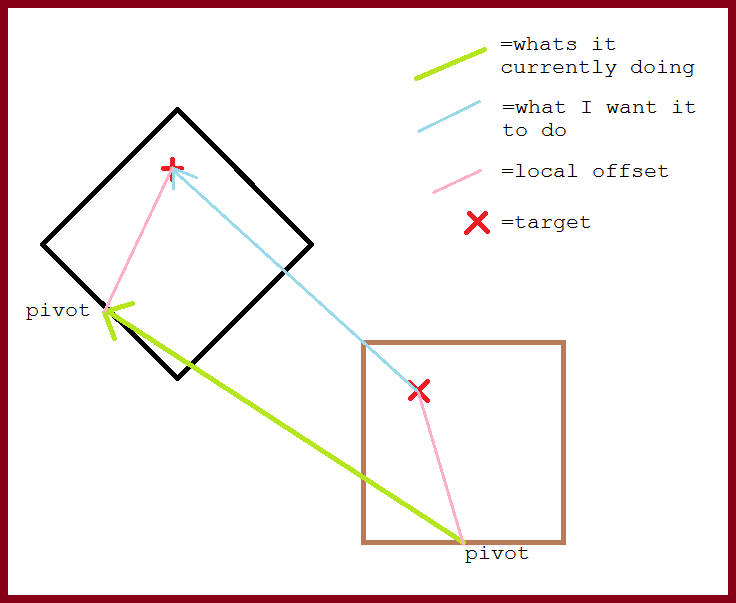
This is my current code for moving the individual cards:
 // Rotate
 transform.localRotation = Quaternion.Lerp (transform.localRotation, rotation, Time.deltaTime * rotateSpeed);

 // Move
 Vector3 offset = transform.TransformVector (useMouseOffset ? mouse.offset : Vector3.zero); // from object space to world space
 transform.position = Vector3.Lerp (transform.position, position - offset, Time.deltaTime * moveSpeed);

 // Puts it in front of the other cards
 transform.position = new Vector3 (transform.position.x, transform.position.y, mouse.down ? -1 : hand.GetDepth(this));
Where "mouse" is a struct with 3 basic variables that's updated elsewhere
 public struct MouseState {
     public bool hover;
     public bool down;
     public Vector3 offset;
 }
The variables "position" and "rotation" varies. When mouse is down (i.e. the card is selected) "position" is the position of the mouse and otherwise it's where the hand holding the cards is (so it returns back to its original position). The "rotation" variables behaviour works in a similar fashion; when mouse is down it is "Quaternion.identity" and otherwise it's some rotation assigned by the hand controller.
"hand.GetDepth()" is just a simple method to get the Z value for the card so they are positioned correctly in front of each other.
Here's a small showcase of it in action: 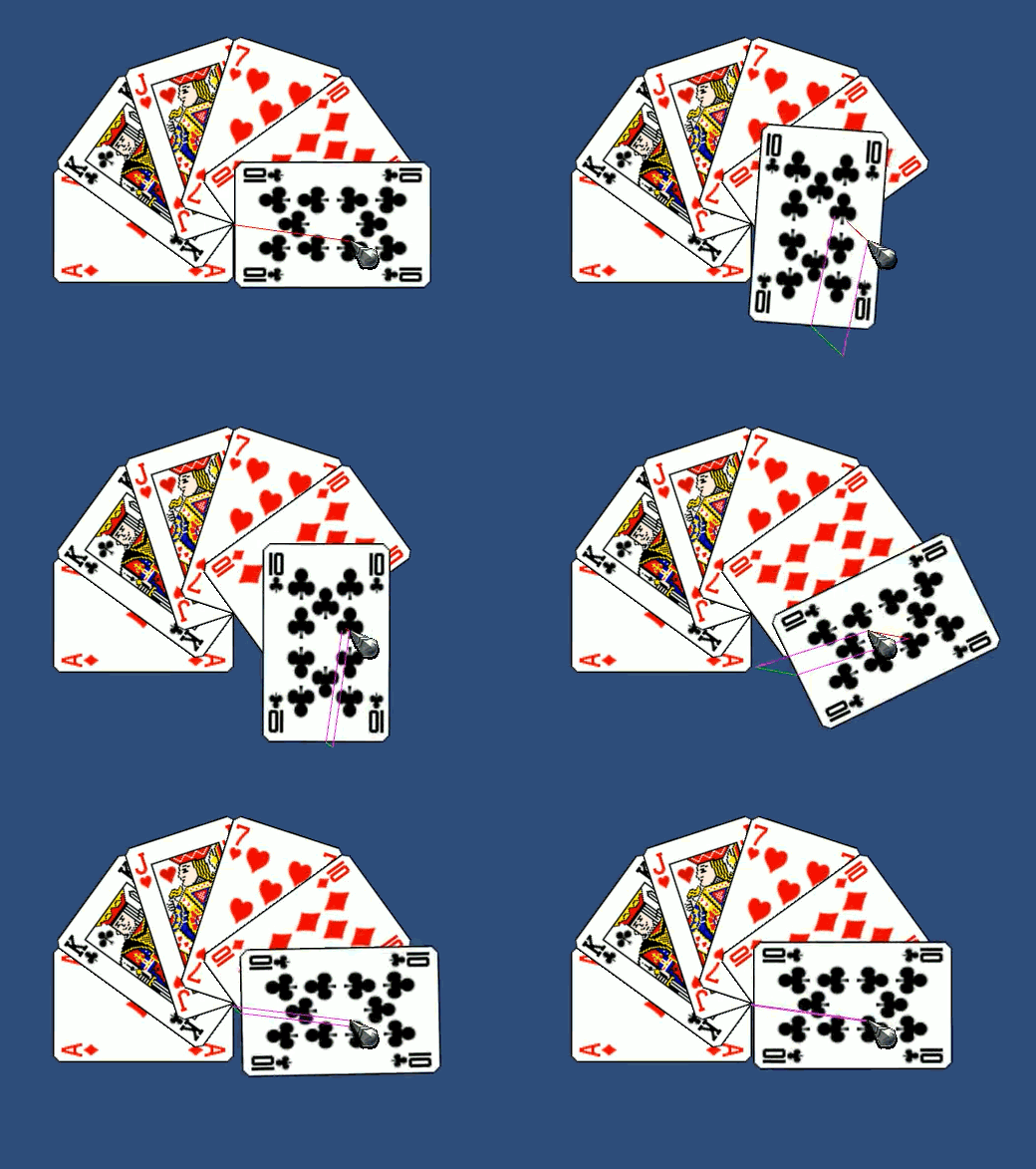
What I want happening is for it to in this case when pressing it to only rotate, cause the position is already where it should be.
Tl;dr: I want each card to move around a custom pivot where the mouse pointer is. I've tried to make a system to move it but it's weird. Is there a better way to solve this puzzle?

Frankly I gave up trying to follow exactly what you're trying to say. The diagram managed to make things more confusing, but perhaps it's just me.
With this in $$anonymous$$d, I'm taking a shot in the dark here, but have you investigated RotateAround?
It may be that you're trying to use the same piece of code to achieve the desired result in multiple scenarios, when in fact each situation calls for a separate distinct method.

Sorry I am not that experienced with writing questions.
Anyhow, I think rota$$anonymous$$round is what I need, but that's only one part. The next part is moving the position.
I just want to change the pivot of the card, and if that isn't possible then I need a script that moves the object around a fake pivot
"I need a script that moves the object around a fake pivot"
This is what RotateAround will do for you.
"The next part is moving the position"
Can't tell what you mean by this. RotateAround does move the position. That's exactly what it does. Otherwise, it would just be "Rotate".
This looks like an especially tricky problem to describe, so no worries there. However, it doesn't look too difficult to solve, provided you select the most convenient approach.
In that animated image, I assume what you want is for the card to rotate around the cursor position without the "extra" lateral motion. To RotateAround the cursor position should accomplish this.
Whar I mean with moving the position is that the cards are supposed to follow the mouse. In the GIF I don't move the mouse just to display the weird effect of it when rotating.
This is why I just want to change the pivot cause then I can just simply move the objects position and rotation without having to think of anything extra
I'm still not able to follow exactly what you're communicating, but that's okay. I don't necessarily need to fully grasp the issue to make another suggestion.
If RotateAround does not accomplish what you want, there is another concept which can simulate changing the pivot point of an object.
This will involve parenting the troublesome object to an empty helper object in a meaningful way, so that you can perform a simple operation on the parent ins$$anonymous$$d of a complex operation on the child.
1 Place the empty where you want the new pivot to be.
2 Parent the troublesome object to the empty.
3 Perform whatever operation(s) this simplifies on the parent.
4 Unparent / discard the empty.
Using a helper parent (and other more complex "mechanical rigs") can be a convenient way to solve a ton of mechanical problems, because it allows you to redefine the parameters of the problem in a way that can present a more intuitive solution.
Can you spy a way to make use of this concept in your scenario? If not, and no one else comes along to help, you may need to take another shot at explaining the situation from the top. Particularly for complex mechanical things requiring diagrams, it helps us when you assume we are kindergarteners (with exceptional reading comprehension). ;)

Just in-case it is useful, here is one way of doing it without a parent object, just working off of the rotations and positions themselves:
 public string CardTag = "Card";
 Transform selectedCard;
 bool isHolding = false;
 Camera camera;
 Vector3 worldPosition;
 Vector3 downWorldPosition;
 float epsilon = 0.01f;
 public float RotSpeed = 90;

 void Start(){
     camera = this.GetComponent<Camera>();
 }

 void Update () {
     worldPosition = camera.ScreenToWorldPoint(Input.mousePosition);
     worldPosition.z = 0;
     if(Input.GetMouseButtonDown(0) && !isHolding){
         RaycastHit2D hit = Physics2D.Raycast(worldPosition, Vector2.zero);
         if(hit.collider != null && hit.collider.gameObject.tag == CardTag){
             downWorldPosition = worldPosition;
             StartCoroutine(MoveCard(hit));
         }
     }

     if(Input.GetMouseButtonUp(0)){
         isHolding = false;
         selectedCard.rotation = Quaternion.Euler(0, 0, 60);
         selectedCard = null;
     }
 }

 IEnumerator MoveCard(RaycastHit2D h){
     isHolding = true;
     selectedCard = h.transform;

     Vector3 dir = downWorldPosition - selectedCard.position;
     dir.z = 0;
     Vector3 targetDir = h.transform.InverseTransformDirection(dir);

     Quaternion q = Quaternion.FromToRotation(dir, targetDir);

     Quaternion new_q = Quaternion.identity;
     Quaternion currentQ = selectedCard.rotation;

     while(isHolding){
         targetDir = new_q*dir;
         selectedCard.rotation = currentQ*new_q;
         selectedCard.position = worldPosition - targetDir;
         new_q = Quaternion.RotateTowards(new_q, q, RotSpeed*Time.deltaTime);

         yield return null;
     }
 }
Glad you have got a working system now!
Scribe

This looks good, I haven't tested it but it looks so complicated. The project I'm working on is more for learning and I wish to be able to go back to any script and read the code and understand what's happening.
I appreciate your aid but I think I will go for the other solution mentioned in the comments. If that fails I will fall back to this. :)
That sounds like a great plan! Just in-case it is useful I will comment each line when I have some time this evening, though quaternions are certainly not the easiest thing to understand, I'm still very fuzzy with knowing what the built-in methods do under the hood!



