
Wayback Machinekoobas.hobune.stream
May JUN Jul
Previous capture 12 Next capture
2021 2022 2023
1 capture
12 Jun 22 - 12 Jun 22
sparklines
Close Help
  • Products
  • Solutions
  • Made with Unity
  • Learning
  • Support & Services
  • Community
  • Asset Store
  • Get Unity

UNITY ACCOUNT

You need a Unity Account to shop in the Online and Asset Stores, participate in the Unity Community and manage your license portfolio. Login Create account
  • Blog
  • Forums
  • Answers
  • Evangelists
  • User Groups
  • Beta Program
  • Advisory Panel

Navigation

  • Home
  • Products
  • Solutions
  • Made with Unity
  • Learning
  • Support & Services
  • Community
    • Blog
    • Forums
    • Answers
    • Evangelists
    • User Groups
    • Beta Program
    • Advisory Panel

Unity account

You need a Unity Account to shop in the Online and Asset Stores, participate in the Unity Community and manage your license portfolio. Login Create account

Language

  • Chinese
  • Spanish
  • Japanese
  • Korean
  • Portuguese
  • Ask a question
  • Spaces
    • Default
    • Help Room
    • META
    • Moderators
    • Topics
    • Questions
    • Users
    • Badges
  • Home /
avatar image
0
Question by M_Lentz · Feb 12, 2020 at 11:36 PM · quaternionsquaternion.lookrotationquaternion.slerp

Quaternion.Slerp() behaves weirdly when turning to look at moving object

So I've got some giant bugs that I'm trying to have chase the player around the scene. Quaternion.Slerp() has worked to rotate the bugs to look at the player while they're chasing him, for the most part. However, every so often, one of the bugs rotates almost, though not exactly, 90 degrees and starts coming at my player from the side. It seems to sort of get stuck in that rotation, and if I move around until I'm almost directly behind the bug, it whips back around to face me again, before getting stuck in that rotation. If I leave the bug's line of sight (so it stops following me) and come back, it seems to be fixed, until it randomly happens again. Sometimes it happens as soon as I enter the bug's line of sight and other times I dance around it for five minutes without it happening. I can't figure out what triggers this random rotation or how to fix it. I've been beating my head against this for a week now, with no results. Here's the code for the bug's attack mode. This all happens in FixedUpdate(), and "attacking" and "rotatingToAttack" are set to true once the player enter's the bug's line of sight. beginWaiting() starts a coroutine, which is stopped every time the player enters the bug's line of sight.

 if(attacking) {
             direction = (player.transform.position - transform.position).normalized;
             lookRotation = Quaternion.LookRotation(direction);
             angle = Quaternion.Angle(transform.rotation, lookRotation);
 
             if(rotatingToAttack) {
                 transform.rotation = Quaternion.Slerp(transform.rotation, lookRotation, rotationSpeed * Time.fixedDeltaTime);
                 if(angle < 1f) {
                     rotatingToAttack = false;
                 }
             } else {
                 transform.LookAt(player.transform);
             }
 
             transform.position = Vector3.MoveTowards(transform.position, player.transform.position, speed * Time.fixedDeltaTime);
             if(Vector3.Distance(player.transform.position, transform.position) <= 10f
                 && transform.position.y < 0.4f) {
                 jump();
             }
 
             if(Vector3.Distance(player.transform.position, transform.position) > los) {
                 rotatingToAttack = false;
                 attacking = false;
                 beginWaiting();
             }
         } else {
             if(Vector3.Distance(player.transform.position, transform.position) <= los) {
                 attack();
             }
         }
 
         transform.rotation = new Quaternion(0f, transform.rotation.y, 0f, transform.rotation.w); // Lock rotation to the y and w directions


If you have any other questions about this problem, I'd be happy to clarify. I think the problem might be in the Quaternion.Slerp() function, but I don't know how to fix it. Oh, and one last thing: I've noticed that occasionally my console log will blow up with tons of message that "Look rotation viewing vector is zero." I don't know if or how this relates, and it doesn't seem to happen when the rotation gets skewed, but it could be helpful to consider. Thank you in advance for your help.

Comment
Add comment
10 |3000 characters needed characters left characters exceeded
▼
  • Viewable by all users
  • Viewable by moderators
  • Viewable by moderators and the original poster
  • Advanced visibility
Viewable by all users

2 Replies

· Add your reply
  • Sort: 
avatar image
0

Answer by unity_ek98vnTRplGj8Q · Feb 13, 2020 at 04:35 AM

I'm guessing that this is your problem code here - transform.rotation = new Quaternion(0f, transform.rotation.y, 0f, transform.rotation.w); // Lock rotation to the y and w directions. In a quaternion, w x y and z are not directions. Unless you really know what quaternions are doing and how they work, stay away from these values. If you are working on a mostly flat plane, you could instead do transform.rotation = Quaternion.Euler(0,transform.rotation.eulerAngles.y,0), keeping in mind that this is kind of a hacky way to lock your rotation to a single axis and will break down for more complicated rotations. I recommend giving this a shot, and if it doesn't work how you want it to I can help you find a better solution.


Also the reason you are getting the look rotation message is because calling lookRotation = Quaternion.LookRotation(direction); when direction is (0,0,0) (when your enemy is at the same position as your player) will cause that function to complain. Its unrelated to the issue you are having though.

Comment
Add comment · Share
10 |3000 characters needed characters left characters exceeded
▼
  • Viewable by all users
  • Viewable by moderators
  • Viewable by moderators and the original poster
  • Advanced visibility
Viewable by all users
avatar image
0

Answer by M_Lentz · Feb 13, 2020 at 04:27 PM

I implemented your change and it works just as well. However, even with your change, or if I don't add any sort of rotation lock at all, the bugs still exhibit the same rotation quirks as they did before. I'm going to keep your change because I trust your knowledge of quaternions, but unfortunately, the bugs are still rotating weirdly. I've attached a picture to try to illustrate what's happening. The bug on the left is heading directly towards me, and even jumping at me, but it's not facing me.
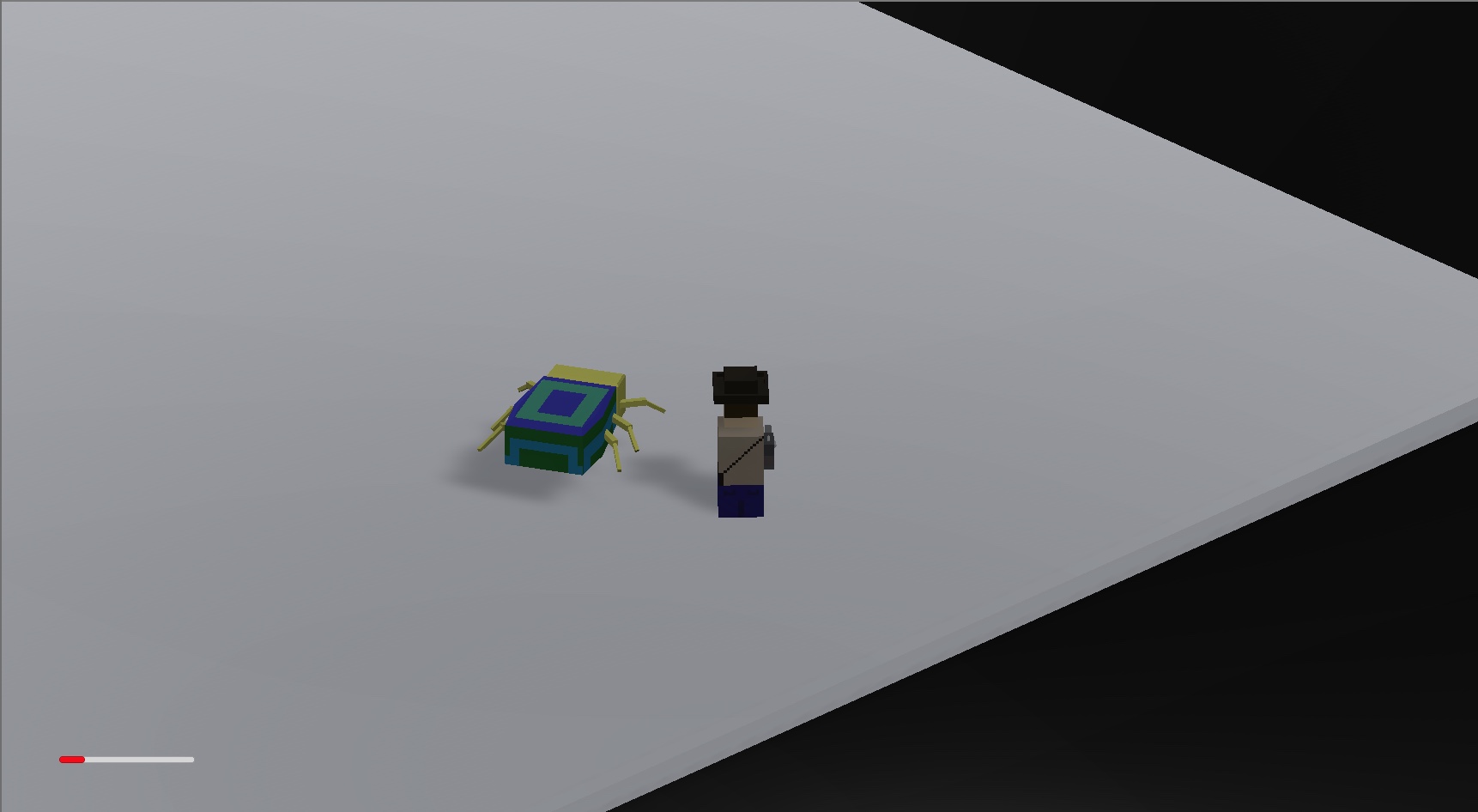
alt text


fullsizeoutput-a51.jpeg (115.0 kB)
Comment
Add comment · Show 3 · Share
10 |3000 characters needed characters left characters exceeded
▼
  • Viewable by all users
  • Viewable by moderators
  • Viewable by moderators and the original poster
  • Advanced visibility
Viewable by all users
avatar image unity_ek98vnTRplGj8Q · Feb 14, 2020 at 12:38 AM 0
Share

I tried for about 20 $$anonymous$$utes with your script to recreate the issue you are seeing but can't seem to get it to happen. Is there some other script that could be messing with the rotation or the bug? Is the bug a child of some game object? Is there a set of steps you can take to reproduce the problem reliably?

avatar image M_Lentz · Feb 14, 2020 at 09:55 PM 0
Share

There's a few other parts that interact with FixedUpdate(), so I'm posting the whole script (170 lines). The character limit forbids me from putting the whole thing here, and Unity won't let me upload any files for some reason, so I'm including a link to a GitHub repository with the full script.

https://github.com/$$anonymous$$AL341/code-bin/blob/master/ScarabController.cs

avatar image unity_ek98vnTRplGj8Q M_Lentz · Feb 17, 2020 at 12:20 AM 0
Share

Hmmm I don't see anything immediately wrong with it. I can help you debug if you want and we can figure it out, but this is not the place for that. Email me at bdoobie01@gmail.com and I can help you figure it out

Your answer

Hint: You can notify a user about this post by typing @username

Up to 2 attachments (including images) can be used with a maximum of 524.3 kB each and 1.0 MB total.

Follow this Question

Answers Answers and Comments

123 People are following this question.

avatar image avatar image avatar image avatar image avatar image avatar image avatar image avatar image avatar image avatar image avatar image avatar image avatar image avatar image avatar image avatar image avatar image avatar image avatar image avatar image avatar image avatar image avatar image avatar image avatar image avatar image avatar image avatar image avatar image avatar image avatar image avatar image avatar image avatar image avatar image avatar image avatar image avatar image avatar image avatar image avatar image avatar image avatar image avatar image avatar image avatar image avatar image avatar image avatar image avatar image avatar image avatar image avatar image avatar image avatar image avatar image avatar image avatar image avatar image avatar image avatar image avatar image avatar image avatar image avatar image avatar image avatar image avatar image avatar image avatar image avatar image avatar image avatar image avatar image avatar image avatar image avatar image avatar image avatar image avatar image avatar image avatar image avatar image avatar image avatar image avatar image avatar image avatar image avatar image avatar image avatar image avatar image avatar image avatar image avatar image avatar image avatar image avatar image avatar image avatar image avatar image avatar image avatar image avatar image avatar image avatar image avatar image avatar image avatar image avatar image avatar image avatar image avatar image avatar image avatar image avatar image avatar image avatar image avatar image avatar image avatar image avatar image avatar image

Related Questions

How to make character rotate in the direction of movement and direction of the camera? 1 Answer

Help with Quaternion.FromToRotation 1 Answer

Rotating gameObject to aim at target using Quaternion 1 Answer

Rotating an object in relation to its endpoints 1 Answer

Making Player Rotation Smoother 0 Answers


Enterprise
Social Q&A

Social
Subscribe on YouTube social-youtube Follow on LinkedIn social-linkedin Follow on Twitter social-twitter Follow on Facebook social-facebook Follow on Instagram social-instagram

Footer

  • Purchase
    • Products
    • Subscription
    • Asset Store
    • Unity Gear
    • Resellers
  • Education
    • Students
    • Educators
    • Certification
    • Learn
    • Center of Excellence
  • Download
    • Unity
    • Beta Program
  • Unity Labs
    • Labs
    • Publications
  • Resources
    • Learn platform
    • Community
    • Documentation
    • Unity QA
    • FAQ
    • Services Status
    • Connect
  • About Unity
    • About Us
    • Blog
    • Events
    • Careers
    • Contact
    • Press
    • Partners
    • Affiliates
    • Security
Copyright © 2020 Unity Technologies
  • Legal
  • Privacy Policy
  • Cookies
  • Do Not Sell My Personal Information
  • Cookies Settings
"Unity", Unity logos, and other Unity trademarks are trademarks or registered trademarks of Unity Technologies or its affiliates in the U.S. and elsewhere (more info here). Other names or brands are trademarks of their respective owners.
  • Anonymous
  • Sign in
  • Create
  • Ask a question
  • Spaces
  • Default
  • Help Room
  • META
  • Moderators
  • Explore
  • Topics
  • Questions
  • Users
  • Badges
