 koobas.hobune.stream


Change the origin point position
Hello friends. Please, I need to change the origin position of a DayNightCycle to correctly cast the shadow as an emulation to the movement of the sun. This involves moving the point of origin on the x-axis but I can't find a way to achieve it in the script. Could you give me some clue?

This would certainly not involve moving the entire world, though if you want to do that, it's exactly equivalent to moving the camera, or moving an object containing the world.
To get moving shadows, rotating a directional light along with the skybox is usually enough.
Directional lights do not care about their position, so you can simply use a script that calls transform.Rotate every frame.
Thanks for your answer, but I think I didn't explain myself well. I share you some grafics, please take a look. 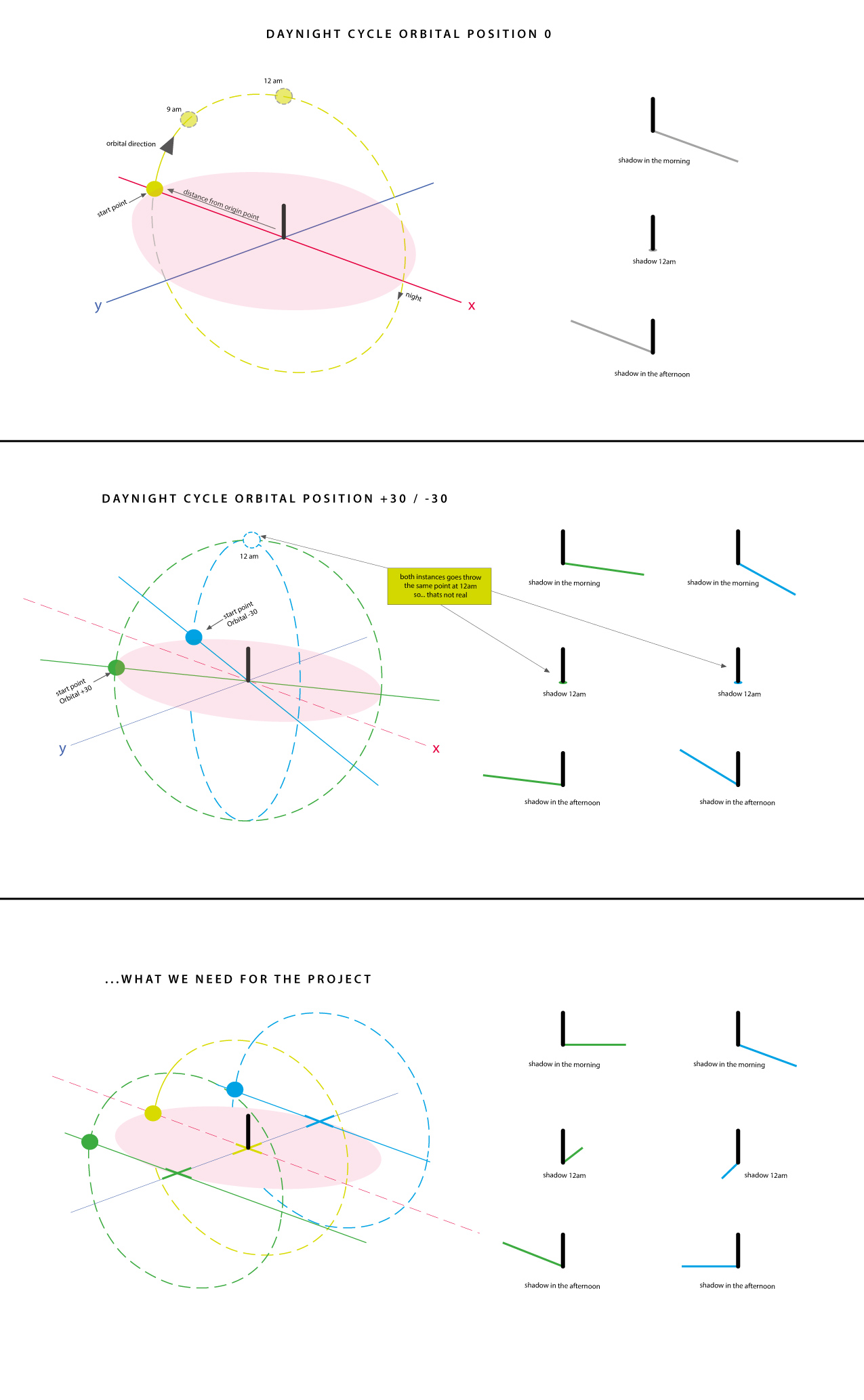

You are mistaken. When a light is that far away, there is no such thing as it's position relative to you in your calculations, only its angle matters.
You can move a directional light as far as you want on the X axis, it will not change the shadows.
You can simulate a Winter sun simply adding another rotation to your directional light. Assu$$anonymous$$g the sun rises on Z, and sets on -Z, you will need a rotation on the X axis that cycles throughout the day, and one on the Y axis that depends on seasons and latitude.

Thanks again! Excuse my redaction, please, I'm not good enough with english! Well, I think the distance is not so far. We want to show how ancient comunities measure the time in Equator ...they use columns and marks on the ground. The project name is The cross of time and I need to resolve the question to move forward. Here is the code...
Vector3 distanceFromOriginVector = new Vector3(distanceFromOrigin, 200, 0);
     sun.position = distanceFromOriginVector;
     sun.rotation = Quaternion.Euler(0, -90, 0);
//..so....actually we're using aditional variables to perform the shadows with angles (orbital angle)... but after 12am the shadow is projected on he wrong side because is not realistic.//
transform.rotation = Quaternion.Euler(orbitalAngle, sunrisePosition, dayProgress);
Again, the position of the sun doesn't matter here. It might affect your shadows by millimeters, if your lights were point lights. But a directional light DOES NOT USE the position AT ALL, and it is likely what you are using now.
The 12am problem is a bit weird, and you will need to describe it more. It can be caused by a Euler lock, which can be solved by simply using a series of multiplications of AngleAxis results. For example this should work:
 transform.rotation =
     Quaternion.AngleAxis( sunrisePosition, Vector3.up)
     * Quaternion.AngleAxis(orbitalAngle, Vector3.forward)
     * Quaternion.AngleAxis(dayProgress, Vector3.right) ;
If it doesn't, mess around with the order of the multiplication.
If you meant 12am as midnight, which is the actual meaning, then you might be complaining about seeing light despite the directional light being underground. You need to enable shadows to fix this easily, but you could also dim the sun depending on the distance from the apex, which can be calculated using
Quaternions.Angle



