
Wayback Machinekoobas.hobune.stream
May JUN Jul
Previous capture 13 Next capture
2021 2022 2023
2 captures
13 Jun 22 - 14 Jun 22
sparklines
Close Help
  • Products
  • Solutions
  • Made with Unity
  • Learning
  • Support & Services
  • Community
  • Asset Store
  • Get Unity

UNITY ACCOUNT

You need a Unity Account to shop in the Online and Asset Stores, participate in the Unity Community and manage your license portfolio. Login Create account
  • Blog
  • Forums
  • Answers
  • Evangelists
  • User Groups
  • Beta Program
  • Advisory Panel

Navigation

  • Home
  • Products
  • Solutions
  • Made with Unity
  • Learning
  • Support & Services
  • Community
    • Blog
    • Forums
    • Answers
    • Evangelists
    • User Groups
    • Beta Program
    • Advisory Panel

Unity account

You need a Unity Account to shop in the Online and Asset Stores, participate in the Unity Community and manage your license portfolio. Login Create account

Language

  • Chinese
  • Spanish
  • Japanese
  • Korean
  • Portuguese
  • Ask a question
  • Spaces
    • Default
    • Help Room
    • META
    • Moderators
    • Topics
    • Questions
    • Users
    • Badges
  • Home /
avatar image
0
Question by slushieboy99 · Dec 19, 2020 at 04:43 AM · physicsrigidbodyrigidbody.addforcefrictionphysics material

RigidBody.AddForce causes capsule collider to trip on a surface with friction

When I add force to an object with a capsule collider and friction, it tips over. I've tried using AddForceAtPosition at the bottom of the object, but I find this really hard to balance and the object tends to rotate in the opposite direction.

Does anyone know if there's a way to apply force evenly over the entire object instead of the center of mass? Thanks!

Comment
Add comment
10 |3000 characters needed characters left characters exceeded
▼
  • Viewable by all users
  • Viewable by moderators
  • Viewable by moderators and the original poster
  • Advanced visibility
Viewable by all users

2 Replies

· Add your reply
  • Sort: 
avatar image
0
Best Answer

Answer by slushieboy99 · Dec 19, 2020 at 05:32 PM

Okay so I've tried a lot of things, I'll list here what I've tried, why I didn't like those solutions, and finally the solution that worked for me.


Firstly, I tried applying force just at the base of my object, this didn't work and caused the object to tip in the opposite direction do to the torque applied.


Secondly, I tried writing a 'keep upright' script to apply torque against the rotation of the object. This didn't quite work and became very difficult to balance. I noticed a lot of oscillation and unexpected behavior when the object would get in strange positions. Balancing this with the friction seemed to be a nightmare and would have to be redone for every object using this script of different mass. It seemed like a good idea but I wouldn't recommend this to counteract frictional tipping.


Thirdly I tried applying force at 3 different points along the object, one at the center of mass, one at the base of the object, and one at the top of the object. Surprisingly, this didn't work at all and led to a lot of unexpected behavior. You may be able to get this to work by calculating the force required to overcome friction on the bottom point, but I think this would be a lot more work and still result in unexpected behavior.


The Solution: I ended up removing friction completely on my object and writing a movement dampening function that runs only when the object is on the ground. This basically allows friction to be applied at the center of mass instead of at the contact point. Here is the script I wrote for that:

 //Movement Dampening:
         Vector3 forceVector;
         if (physics.velocity.y < 0) {
             forceVector = new Vector3(-physics.velocity.x, Physics.gravity.magnitude/movementDampeningFactor, -physics.velocity.z);
         }
         else {
             forceVector = new Vector3(-physics.velocity.x, 0, -physics.velocity.z);
         }
         physics.AddForce(forceVector * movementDampeningFactor, ForceMode.Acceleration);


Comment
Add comment · Share
10 |3000 characters needed characters left characters exceeded
▼
  • Viewable by all users
  • Viewable by moderators
  • Viewable by moderators and the original poster
  • Advanced visibility
Viewable by all users
avatar image
0

Answer by CmdrZin · Dec 19, 2020 at 05:44 AM

You can set the Freeze Rotation flags in the Rigidbody Constraints section. alt text
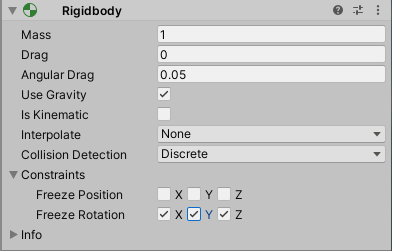

rbnorotation.png (12.5 kB)
Comment
Add comment · Show 3 · Share
10 |3000 characters needed characters left characters exceeded
▼
  • Viewable by all users
  • Viewable by moderators
  • Viewable by moderators and the original poster
  • Advanced visibility
Viewable by all users
avatar image slushieboy99 · Dec 19, 2020 at 04:25 PM 0
Share

No I still want the object to be able to tip, I just want AddForce to be evenly applied.

avatar image Pokedlg3 slushieboy99 · Dec 19, 2020 at 05:22 PM 0
Share

Could you send me your script?

avatar image slushieboy99 Pokedlg3 · Dec 19, 2020 at 05:33 PM 0
Share

I have written my solution in a separate answer.

Your answer

Hint: You can notify a user about this post by typing @username

Up to 2 attachments (including images) can be used with a maximum of 524.3 kB each and 1.0 MB total.

Follow this Question

Answers Answers and Comments

214 People are following this question.

avatar image avatar image avatar image avatar image avatar image avatar image avatar image avatar image avatar image avatar image avatar image avatar image avatar image avatar image avatar image avatar image avatar image avatar image avatar image avatar image avatar image avatar image avatar image avatar image avatar image avatar image avatar image avatar image avatar image avatar image avatar image avatar image avatar image avatar image avatar image avatar image avatar image avatar image avatar image avatar image avatar image avatar image avatar image avatar image avatar image avatar image avatar image avatar image avatar image avatar image avatar image avatar image avatar image avatar image avatar image avatar image avatar image avatar image avatar image avatar image avatar image avatar image avatar image avatar image avatar image avatar image avatar image avatar image avatar image avatar image avatar image avatar image avatar image avatar image avatar image avatar image avatar image avatar image avatar image avatar image avatar image avatar image avatar image avatar image avatar image avatar image avatar image avatar image avatar image avatar image avatar image avatar image avatar image avatar image avatar image avatar image avatar image avatar image avatar image avatar image avatar image avatar image avatar image avatar image avatar image avatar image avatar image avatar image avatar image avatar image avatar image avatar image avatar image avatar image avatar image avatar image avatar image avatar image avatar image avatar image avatar image avatar image avatar image avatar image avatar image avatar image avatar image avatar image avatar image avatar image avatar image avatar image avatar image avatar image avatar image avatar image avatar image avatar image avatar image avatar image avatar image avatar image avatar image avatar image avatar image avatar image avatar image avatar image avatar image avatar image avatar image avatar image avatar image avatar image avatar image avatar image avatar image avatar image avatar image avatar image avatar image avatar image avatar image avatar image avatar image avatar image avatar image avatar image avatar image avatar image avatar image avatar image avatar image avatar image avatar image avatar image avatar image avatar image avatar image avatar image avatar image avatar image avatar image avatar image avatar image avatar image avatar image avatar image avatar image avatar image avatar image avatar image avatar image avatar image avatar image avatar image avatar image avatar image avatar image avatar image avatar image avatar image avatar image avatar image avatar image avatar image avatar image avatar image avatar image avatar image avatar image avatar image avatar image avatar image

Related Questions

add force to object that has 2 different rigid bodies 0 Answers

Rigidbody.velocity seems to be breaking jumping physics 0 Answers

Moving rigidbody (Player) with addForce or Velocity ? 1 Answer

Why Physics Material Max Friction is not really Max? 2 Answers

VR Sword Physics, how to add force or velocity to the sword for impact when it hits an object 1 Answer


Enterprise
Social Q&A

Social
Subscribe on YouTube social-youtube Follow on LinkedIn social-linkedin Follow on Twitter social-twitter Follow on Facebook social-facebook Follow on Instagram social-instagram

Footer

  • Purchase
    • Products
    • Subscription
    • Asset Store
    • Unity Gear
    • Resellers
  • Education
    • Students
    • Educators
    • Certification
    • Learn
    • Center of Excellence
  • Download
    • Unity
    • Beta Program
  • Unity Labs
    • Labs
    • Publications
  • Resources
    • Learn platform
    • Community
    • Documentation
    • Unity QA
    • FAQ
    • Services Status
    • Connect
  • About Unity
    • About Us
    • Blog
    • Events
    • Careers
    • Contact
    • Press
    • Partners
    • Affiliates
    • Security
Copyright © 2020 Unity Technologies
  • Legal
  • Privacy Policy
  • Cookies
  • Do Not Sell My Personal Information
  • Cookies Settings
"Unity", Unity logos, and other Unity trademarks are trademarks or registered trademarks of Unity Technologies or its affiliates in the U.S. and elsewhere (more info here). Other names or brands are trademarks of their respective owners.
  • Anonymous
  • Sign in
  • Create
  • Ask a question
  • Spaces
  • Default
  • Help Room
  • META
  • Moderators
  • Explore
  • Topics
  • Questions
  • Users
  • Badges