Wayback Machinekoobas.hobune.stream
May JUN Jul
Previous capture 12 Next capture
2021 2022 2023
1 capture
12 Jun 22 - 12 Jun 22
sparklines
Close Help
  • Products
  • Solutions
  • Made with Unity
  • Learning
  • Support & Services
  • Community
  • Asset Store
  • Get Unity

UNITY ACCOUNT

You need a Unity Account to shop in the Online and Asset Stores, participate in the Unity Community and manage your license portfolio. Login Create account
  • Blog
  • Forums
  • Answers
  • Evangelists
  • User Groups
  • Beta Program
  • Advisory Panel

Navigation

  • Home
  • Products
  • Solutions
  • Made with Unity
  • Learning
  • Support & Services
  • Community
    • Blog
    • Forums
    • Answers
    • Evangelists
    • User Groups
    • Beta Program
    • Advisory Panel

Unity account

You need a Unity Account to shop in the Online and Asset Stores, participate in the Unity Community and manage your license portfolio. Login Create account

Language

  • Chinese
  • Spanish
  • Japanese
  • Korean
  • Portuguese
  • Ask a question
  • Spaces
    • Default
    • Help Room
    • META
    • Moderators
    • Topics
    • Questions
    • Users
    • Badges
  • Home /
  • Help Room /
avatar image
3
Question by Theodus · Aug 27, 2016 at 05:49 PM · windowsstandalonelogging

output_log.txt not being created in 5.4.0f3 standalone builds

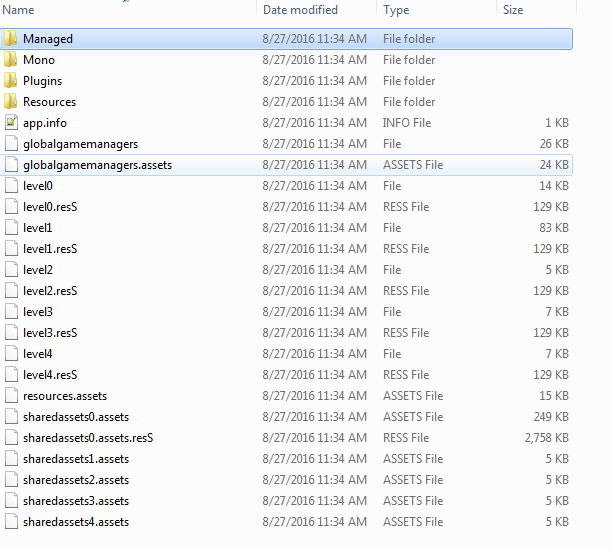
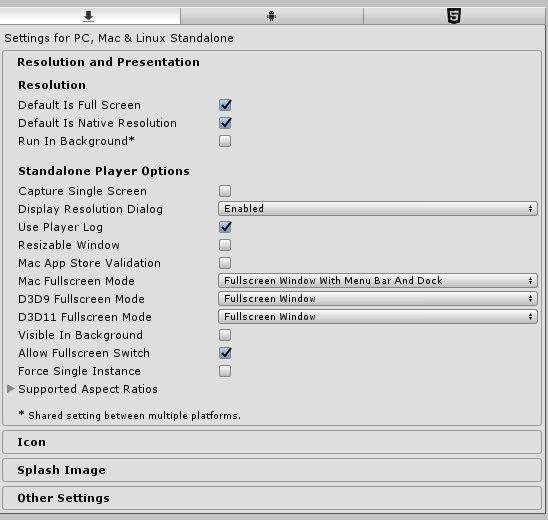
I've recently discovered that every time I build a standalone Windows project with Unity 5.4.0f3, it never creates the output_log.txt file when run. The project setting Use Player Log is definitely checked. I've tested this issue with a separate project in the same Unity version and can reproduce it every time. Unity 5.3.5 does not have this issue - it creates the log file with no problem. I've even tried the latest patch version 5.4.0p3 even though the release notes mention nothing about logs and that made no difference.

I tried both the 32 and 64 bit versions of the 5.4 editor to no avail. The *_Data folder is not read-only, so it doesn't appear to be a permissions issue. I can't think of anything else to test. This is a significant issue for me since I'm trying to diagnose a completely separate issue in a project where it's not progressing past a certain point in the built game but works fine in the editor.

Any insight into my issue would be greatly appreciated!
Project Settings*_Data folder

logfileissue01.png (35.2 kB)
logfileissue02.png (46.1 kB)
Comment
Add comment
10 |3000 characters needed characters left characters exceeded
▼
  • Viewable by all users
  • Viewable by moderators
  • Viewable by moderators and the original poster
  • Advanced visibility
Viewable by all users

4 Replies

· Add your reply
  • Sort: 
avatar image
10

Answer by ray1fr · Oct 24, 2017 at 11:05 AM

Hello,

I faced the same issue and I learned that the location of the output_log.txt file has now changed in Unity 2017.

In Unity 5, it used to be in the game _Data folder (see Unity 5 documentation ) Now, it is stored in C:\Users\username\AppData\Local\CompanyName\ProductName\output_log.txt (see Unity 2017 documentation)

I find this quite an annoying change, so I added a suggestion to let developpers choose the destination folder. If you're interested, please support this feature here.

Comment
Add comment · Show 2 · Share
10 |3000 characters needed characters left characters exceeded
▼
  • Viewable by all users
  • Viewable by moderators
  • Viewable by moderators and the original poster
  • Advanced visibility
Viewable by all users
avatar image tombey12 · Jun 02, 2018 at 02:52 AM 1
Share

For everyone still not finding output.log in the Local folder:

It's in my LocalLow folder, not Local

avatar image hacky97 · Aug 15, 2018 at 08:08 AM 1
Share

it is in the following folder: C:\Users\username\AppData\LocalLow\CompanyName\ProductName\output_log.txt

not in appdata\Local

avatar image
4

Answer by skylorder · Oct 27, 2016 at 02:16 AM

https://forum.unity3d.com/threads/no-output_log-since-5-4.419879/

Comment
Add comment · Share
10 |3000 characters needed characters left characters exceeded
▼
  • Viewable by all users
  • Viewable by moderators
  • Viewable by moderators and the original poster
  • Advanced visibility
Viewable by all users
avatar image
1

Answer by ownself · Nov 04, 2016 at 03:27 AM

having the same issue here, why they change the folder to storing log for player suddenly..... damn it.

Comment
Add comment · Share
10 |3000 characters needed characters left characters exceeded
▼
  • Viewable by all users
  • Viewable by moderators
  • Viewable by moderators and the original poster
  • Advanced visibility
Viewable by all users
avatar image
0

Answer by mairendecarmena · Feb 13, 2018 at 08:39 AM

@Theodus Have you tried running the .exe as Administrator?

In my case (standalone Win app built with Unity 5.6.1) did make a difference. Don't know if it's a bug but AFAIK an app installed in "Programs Folder" should have accesss to its own folder, the rest of the folders that belong to others apps are protected. So, in theory, we shouldn't need to use "run as administrator"for the app to be able to write the log.

Comment
Add comment · Share
10 |3000 characters needed characters left characters exceeded
▼
  • Viewable by all users
  • Viewable by moderators
  • Viewable by moderators and the original poster
  • Advanced visibility
Viewable by all users

Your answer

Hint: You can notify a user about this post by typing @username

Up to 2 attachments (including images) can be used with a maximum of 524.3 kB each and 1.0 MB total.

Follow this Question

Answers Answers and Comments

73 People are following this question.

avatar image avatar image avatar image avatar image avatar image avatar image avatar image avatar image avatar image avatar image avatar image avatar image avatar image avatar image avatar image avatar image avatar image avatar image avatar image avatar image avatar image avatar image avatar image avatar image avatar image avatar image avatar image avatar image avatar image avatar image avatar image avatar image avatar image avatar image avatar image avatar image avatar image avatar image avatar image avatar image avatar image avatar image avatar image avatar image avatar image avatar image avatar image avatar image avatar image avatar image avatar image avatar image avatar image avatar image avatar image avatar image avatar image avatar image avatar image avatar image avatar image avatar image avatar image avatar image avatar image avatar image avatar image avatar image avatar image avatar image avatar image avatar image avatar image

Related Questions

Unity windows standalone build crashes on opening output_log.txt if built on a different machine 0 Answers

How to detect when a standalone build is minimized? (Windows) 0 Answers

Windows Standalone and MySQL: NotSupportedException 0 Answers

windows Build Smartscreen Error 0 Answers

Unity windowed mode size is different on different screen resolutions 1 Answer


Enterprise
Social Q&A

Social
Subscribe on YouTube social-youtube Follow on LinkedIn social-linkedin Follow on Twitter social-twitter Follow on Facebook social-facebook Follow on Instagram social-instagram

Footer

  • Purchase
    • Products
    • Subscription
    • Asset Store
    • Unity Gear
    • Resellers
  • Education
    • Students
    • Educators
    • Certification
    • Learn
    • Center of Excellence
  • Download
    • Unity
    • Beta Program
  • Unity Labs
    • Labs
    • Publications
  • Resources
    • Learn platform
    • Community
    • Documentation
    • Unity QA
    • FAQ
    • Services Status
    • Connect
  • About Unity
    • About Us
    • Blog
    • Events
    • Careers
    • Contact
    • Press
    • Partners
    • Affiliates
    • Security
Copyright © 2020 Unity Technologies
  • Legal
  • Privacy Policy
  • Cookies
  • Do Not Sell My Personal Information
  • Cookies Settings
"Unity", Unity logos, and other Unity trademarks are trademarks or registered trademarks of Unity Technologies or its affiliates in the U.S. and elsewhere (more info here). Other names or brands are trademarks of their respective owners.
  • Anonymous
  • Sign in
  • Create
  • Ask a question
  • Spaces
  • Default
  • Help Room
  • META
  • Moderators
  • Explore
  • Topics
  • Questions
  • Users
  • Badges