
Wayback Machinekoobas.hobune.stream
May JUN Jul
Previous capture 13 Next capture
2021 2022 2023
1 capture
13 Jun 22 - 13 Jun 22
sparklines
Close Help
  • Products
  • Solutions
  • Made with Unity
  • Learning
  • Support & Services
  • Community
  • Asset Store
  • Get Unity

UNITY ACCOUNT

You need a Unity Account to shop in the Online and Asset Stores, participate in the Unity Community and manage your license portfolio. Login Create account
  • Blog
  • Forums
  • Answers
  • Evangelists
  • User Groups
  • Beta Program
  • Advisory Panel

Navigation

  • Home
  • Products
  • Solutions
  • Made with Unity
  • Learning
  • Support & Services
  • Community
    • Blog
    • Forums
    • Answers
    • Evangelists
    • User Groups
    • Beta Program
    • Advisory Panel

Unity account

You need a Unity Account to shop in the Online and Asset Stores, participate in the Unity Community and manage your license portfolio. Login Create account

Language

  • Chinese
  • Spanish
  • Japanese
  • Korean
  • Portuguese
  • Ask a question
  • Spaces
    • Default
    • Help Room
    • META
    • Moderators
    • Topics
    • Questions
    • Users
    • Badges
  • Home /
avatar image
0
Question by NemesisII · Dec 31, 2014 at 02:57 AM · iosrendering

Survival Shooter Graphic Problem on iPhone 6

Hello everyone.

I'm learning the Project Survival Shooter on Unity Website. Everything works perfectly on my MAC. So, I try to do an extended assignment porting the project to iPhone with two virtual joysticks. everything works fine for me. However, there are some problem with rendering on my iPhone 6.

First, There are some yellow glow on the floor, This is a screenshot from my iPhone 6: alt text
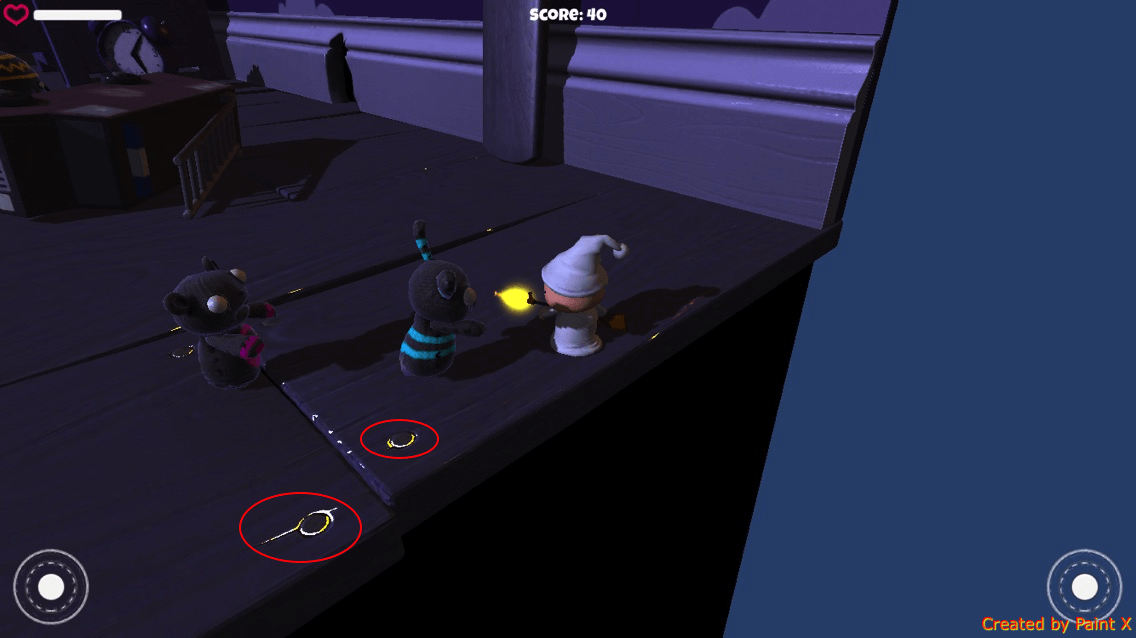
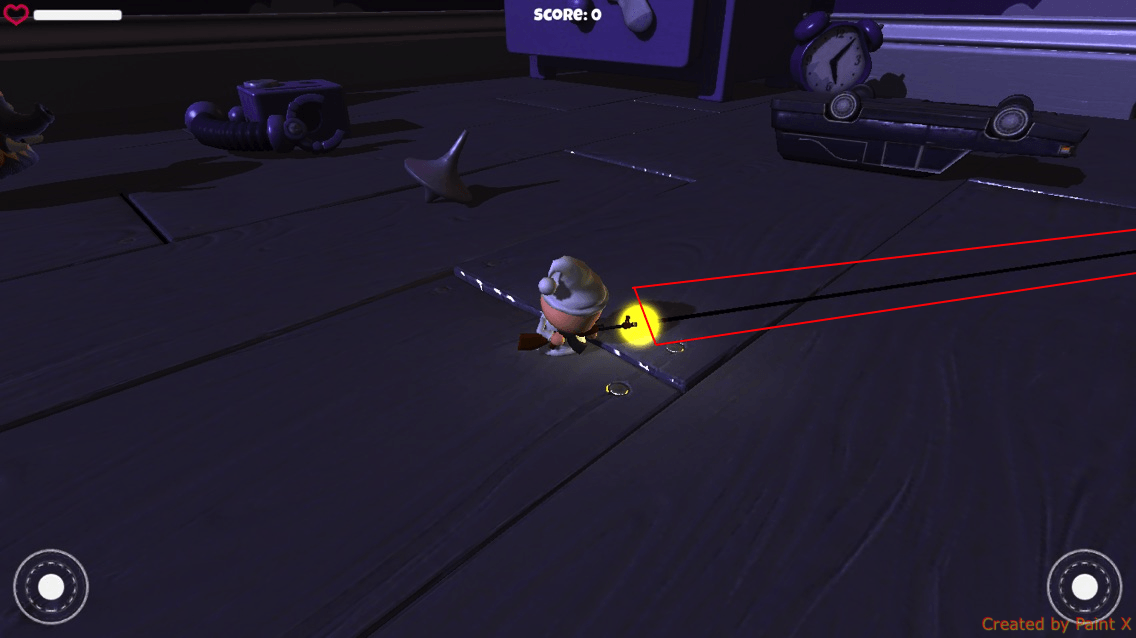
Second, My gun fire line render has no color (I'm sure that I've picked up the color in Line Rendering Material): alt text
Does anyone try Survival Shooter on iOS or know how to fix that ?

Thank you for reading.

img_2569.png (173.6 kB)
img_2570.png (260.2 kB)
Comment
Add comment
10 |3000 characters needed characters left characters exceeded
▼
  • Viewable by all users
  • Viewable by moderators
  • Viewable by moderators and the original poster
  • Advanced visibility
Viewable by all users

1 Reply

· Add your reply
  • Sort: 
avatar image
0
Best Answer

Answer by Thom Denick · Dec 31, 2014 at 02:58 AM

Mobile graphics have different shader requirements than desktop. These are both likely because you are using desktop shaders. Look at the meshes in the scene and make sure the materials are all using a Mobile friendly shader. For instance, your gun fire line needs to probably use Mobile -> Unlit.

Comment
Add comment · Show 4 · Share
10 |3000 characters needed characters left characters exceeded
▼
  • Viewable by all users
  • Viewable by moderators
  • Viewable by moderators and the original poster
  • Advanced visibility
Viewable by all users
avatar image NemesisII · Dec 31, 2014 at 03:51 AM 0
Share

Thank you, Thom Denick. That works for my gun fire line. However, $$anonymous$$obile/Unlit doesn't allow me pick color so I tried $$anonymous$$obile/Particle/VertexLit Blend and It works great.

I still have the problem with the floor ?!

avatar image Thom Denick · Dec 31, 2014 at 04:03 AM 0
Share

If I had to guess, you have some kind of Bumped or Specular shader on there now. So, you just need to change that to $$anonymous$$obile -> Diffuse or $$anonymous$$obile -> Bumped Specular.

avatar image NemesisII · Dec 31, 2014 at 04:14 AM 0
Share

I tried all Shader in $$anonymous$$obile Section. Only thing work is Bumped Diffuse. However, It makes the floor become flat (Although it still uses normal texture). I guess the light reflection rate of the shader is too high, especially on the faces/pixels that completely opposite camera . But do not know to to change it.

avatar image Thom Denick · Dec 31, 2014 at 04:33 AM 0
Share

I find the default Unity mobile shaders don't do Specularity too well. Luckily there are a bunch in the asset store if it's must-have for your game. You can also bake right into the texture with lightmaps or in $$anonymous$$aya.

Your answer

Hint: You can notify a user about this post by typing @username

Up to 2 attachments (including images) can be used with a maximum of 524.3 kB each and 1.0 MB total.

Follow this Question

Answers Answers and Comments

3 People are following this question.

avatar image avatar image avatar image

Related Questions

Transparent dots on edges on iOs 1 Answer

Screen is distort on some old iOS devices 0 Answers

Negative Render Time for iPhone Internal Profiler 2 Answers

Problem rendering particles in ios 1 Answer

Why does my application crash at start IOS and Android using LWRP 2 Answers


Enterprise
Social Q&A

Social
Subscribe on YouTube social-youtube Follow on LinkedIn social-linkedin Follow on Twitter social-twitter Follow on Facebook social-facebook Follow on Instagram social-instagram

Footer

  • Purchase
    • Products
    • Subscription
    • Asset Store
    • Unity Gear
    • Resellers
  • Education
    • Students
    • Educators
    • Certification
    • Learn
    • Center of Excellence
  • Download
    • Unity
    • Beta Program
  • Unity Labs
    • Labs
    • Publications
  • Resources
    • Learn platform
    • Community
    • Documentation
    • Unity QA
    • FAQ
    • Services Status
    • Connect
  • About Unity
    • About Us
    • Blog
    • Events
    • Careers
    • Contact
    • Press
    • Partners
    • Affiliates
    • Security
Copyright © 2020 Unity Technologies
  • Legal
  • Privacy Policy
  • Cookies
  • Do Not Sell My Personal Information
  • Cookies Settings
"Unity", Unity logos, and other Unity trademarks are trademarks or registered trademarks of Unity Technologies or its affiliates in the U.S. and elsewhere (more info here). Other names or brands are trademarks of their respective owners.
  • Anonymous
  • Sign in
  • Create
  • Ask a question
  • Spaces
  • Default
  • Help Room
  • META
  • Moderators
  • Explore
  • Topics
  • Questions
  • Users
  • Badges
