 koobas.hobune.stream


90's film look
So we're trying to create a game that's inspired by 90's games and movies. An effect we want to try out is for things to look pleasantly yellow, like in the pics below:

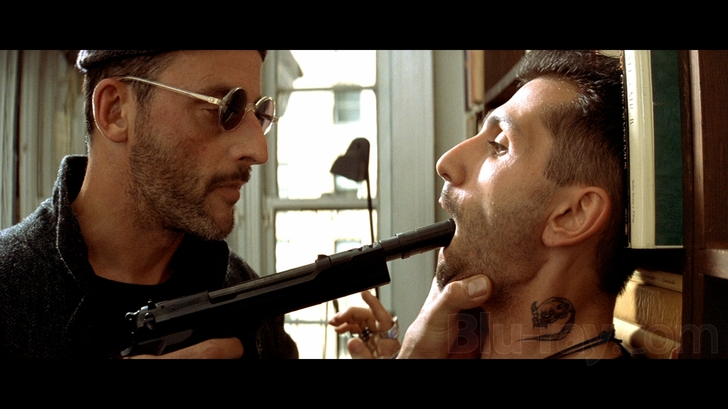 I've tried adjusting the lighting so far, but it seems to me that what they did in the 90's was to use some sort of post-processing effect. So I wonder if anyone of you knows of any such effect that could be used.

Use an Image Effect with a Color Correction Lookup Texture.

Looks interresting... However, I have no idea how to use it.

Add this script to your camera:
 using System;
 using UnityEngine;

 namespace UnityStandardAssets.ImageEffects
 {
     [ExecuteInEditMode]
     [AddComponentMenu ("Image Effects/Color Adjustments/Color Correction (3D Lookup Texture)")]
     public class ColorCorrectionLookup : PostEffectsBase
     {
         public Shader shader;
         private Material material;
         public Texture2D texture2D;

         // serialize this instead of having another 2d texture ref'ed
         public Texture3D converted3DLut = null;
         public string basedOnTempTex = "";

         void Start() {
             colorCorrectionLookup.Convert(colorCorrectionLookup.texture2D, "");
         }

         public override bool CheckResources () {
             CheckSupport (false);

             material = CheckShaderAndCreateMaterial (shader, material);

             if (!isSupported || !SystemInfo.supports3DTextures)
                 ReportAutoDisable ();
             return isSupported;
         }

         void OnDisable () {
             if (material) {
                 DestroyImmediate (material);
                 material = null;
             }
         }

         void OnDestroy () {
             if (converted3DLut)
                 DestroyImmediate (converted3DLut);
             converted3DLut = null;
         }

         public void SetIdentityLut () {
             int dim = 16;
             var newC = new Color[dim*dim*dim];
             float oneOverDim = 1.0f / (1.0f * dim - 1.0f);

             for(int i = 0; i < dim; i++) {
                 for(int j = 0; j < dim; j++) {
                     for(int k = 0; k < dim; k++) {
                         newC[i + (j*dim) + (k*dim*dim)] = new Color((i*1.0f)*oneOverDim, (j*1.0f)*oneOverDim, (k*1.0f)*oneOverDim, 1.0f);
                     }
                 }
             }

             if (converted3DLut)
                 DestroyImmediate (converted3DLut);
             converted3DLut = new Texture3D (dim, dim, dim, TextureFormat.ARGB32, false);
             converted3DLut.SetPixels (newC);
             converted3DLut.Apply ();
             basedOnTempTex = "";
         }

         public bool ValidDimensions ( Texture2D tex2d) {
             if (!tex2d) return false;
             int h = tex2d.height;
             if (h != Mathf.FloorToInt(Mathf.Sqrt(tex2d.width))) {
                 return false;
             }
             return true;
         }

         public void Convert ( Texture2D temp2DTex, string path) {

             // conversion fun: the given 2D texture needs to be of the format
             //  w * h, wheras h is the 'depth' (or 3d dimension 'dim') and w = dim * dim

             if (temp2DTex) {
                 int dim = temp2DTex.width * temp2DTex.height;
                 dim = temp2DTex.height;

                 if (!ValidDimensions(temp2DTex)) {
                     Debug.LogWarning ("The given 2D texture " + temp2DTex.name + " cannot be used as a 3D LUT.");
                     basedOnTempTex = "";
                     return;
                 }

                 var c = temp2DTex.GetPixels();
                 var newC = new Color[c.Length];

                 for(int i = 0; i < dim; i++) {
                     for(int j = 0; j < dim; j++) {
                         for(int k = 0; k < dim; k++) {
                             int j_ = dim-j-1;
                             newC[i + (j*dim) + (k*dim*dim)] = c[k*dim+i+j_*dim*dim];
                         }
                     }
                 }

                 if (converted3DLut)
                     DestroyImmediate (converted3DLut);
                 converted3DLut = new Texture3D (dim, dim, dim, TextureFormat.ARGB32, false);
                 converted3DLut.SetPixels (newC);
                 converted3DLut.Apply ();
                 basedOnTempTex = path;
             }
             else {
                 // error, something went terribly wrong
                 Debug.LogError ("Couldn't color correct with 3D LUT texture. Image Effect will be disabled.");
             }
         }

         void OnRenderImage (RenderTexture source, RenderTexture destination) {

             if (CheckResources () == false || !SystemInfo.supports3DTextures) {
                 Graphics.Blit (source, destination);
                 return;
             }

             if (converted3DLut == null) {
                 SetIdentityLut ();
             }

             int lutSize = converted3DLut.width;
             converted3DLut.wrapMode = TextureWrapMode.Clamp;
             material.SetFloat("_Scale", (lutSize - 1) / (1.0f*lutSize));
             material.SetFloat("_Offset", 1.0f / (2.0f * lutSize));
             material.SetTexture("_ClutTex", converted3DLut);

             Graphics.Blit (source, destination, material, QualitySettings.activeColorSpace == ColorSpace.Linear ? 1 : 0);
         }
     }
 }
Make a screenshot of a typical camera view in your game; what the player would often see while playing the game. Open this screenshot in your image editing program, and change the colors to whatever your want. Make a note of the editing your did. Now open the sample Lookup Texture from Standard Assets (the name should be "Neutral3D16.png"), and do the same edits to it. Save the modified LookUp Texture under a new name. In Unity, set the import settings of the image file so it is read/write enabled. In the Unity inspector, drag this image into the Texture2D variable slot of the ColorCorrectionLookup script. That is all. At the start of the game, the script will convert the 2D Texture into a 3D texture that will be used to change the colors the camera renders.
Here is one sample lookup texture I made for you. It is a rather extreme yellowing effect. 


