Wayback Machinekoobas.hobune.stream
May JUN Jul
Previous capture 12 Next capture
2021 2022 2023
1 capture
12 Jun 22 - 12 Jun 22
sparklines
Close Help
  • Products
  • Solutions
  • Made with Unity
  • Learning
  • Support & Services
  • Community
  • Asset Store
  • Get Unity

UNITY ACCOUNT

You need a Unity Account to shop in the Online and Asset Stores, participate in the Unity Community and manage your license portfolio. Login Create account
  • Blog
  • Forums
  • Answers
  • Evangelists
  • User Groups
  • Beta Program
  • Advisory Panel

Navigation

  • Home
  • Products
  • Solutions
  • Made with Unity
  • Learning
  • Support & Services
  • Community
    • Blog
    • Forums
    • Answers
    • Evangelists
    • User Groups
    • Beta Program
    • Advisory Panel

Unity account

You need a Unity Account to shop in the Online and Asset Stores, participate in the Unity Community and manage your license portfolio. Login Create account

Language

  • Chinese
  • Spanish
  • Japanese
  • Korean
  • Portuguese
  • Ask a question
  • Spaces
    • Default
    • Help Room
    • META
    • Moderators
    • Topics
    • Questions
    • Users
    • Badges
  • Home /
avatar image
1
Question by ngbernard · Oct 11, 2015 at 03:08 PM · button2d gamegraphicsapk

Installed (NOT Unity Remote) 2D game's grapics are very low-res on Android

Hello,

I've started building a 2D game, and wasn't running into any problems until very recently, I suspect about two or three days ago . I say 'suspect' because in order to see the problem, I had to install and test the game on my android device.

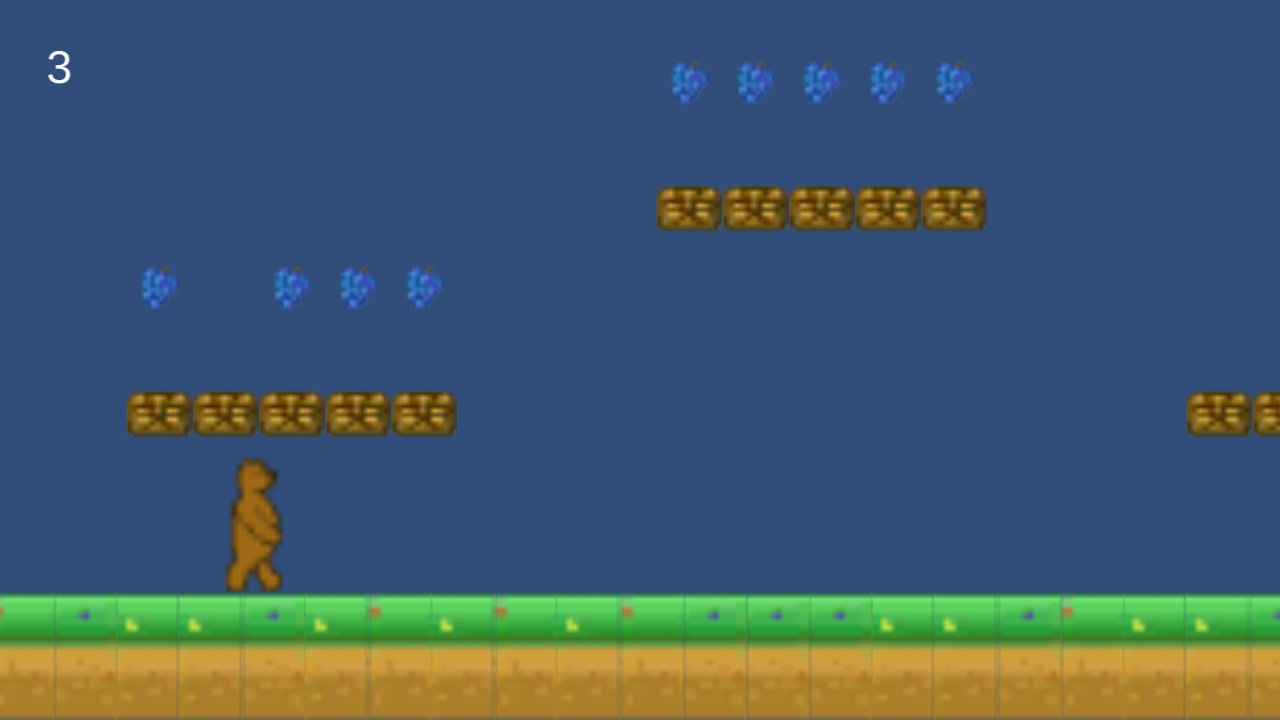
The problem is when running the game in the Unity IDE, everything looks fine (see the first screnshot), but after building an apk and installing it, the graphics look terrible (see the second screenshot).

Not that the Text UI element displaying the lifecount (the '3') looks fine in both examples.
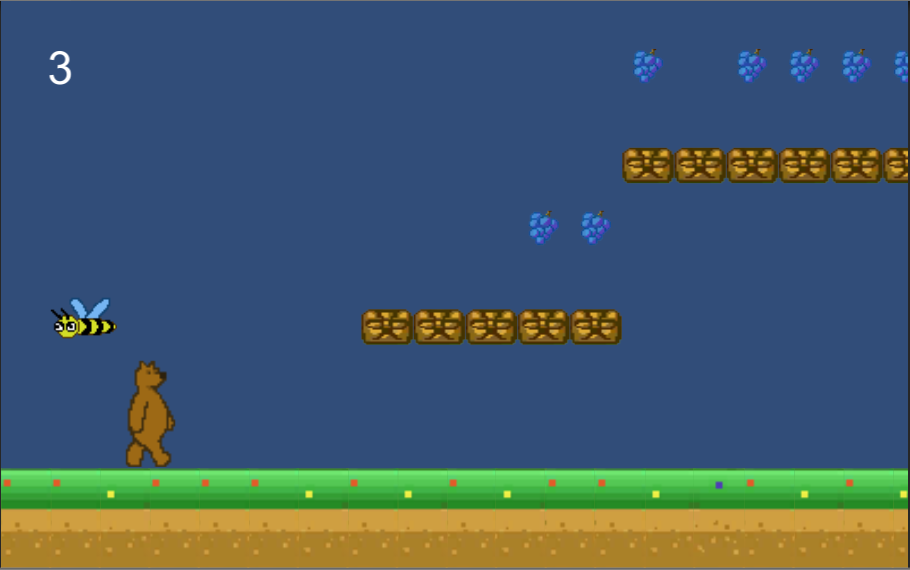
alt text

alt text

What's going on here?

If I to revert to an old version of the apk (I'm using BitBucket for source control) and install it, everything looks fine, but I can't figure out what changed between then and now. The odd thing is if I revert to the old code that built that old apk and then rebuild the apk, I get the same graphic problem.

Now I wasn't checking in what's in the Libraries and Temp folder to source control anymore at that point, it was only the Project Settings and Assets folders, and files in the root folder. So, I revert all the way back to a time when I was checking in everything, and THEN when I build the apk, the graphics look fine. I've looked through the player build settings and cannot figure out what the difference is!

What have I done to get my project in this state?

capture.png (96.0 kB)
capture2.png (198.9 kB)
Comment
Add comment
10 |3000 characters needed characters left characters exceeded
▼
  • Viewable by all users
  • Viewable by moderators
  • Viewable by moderators and the original poster
  • Advanced visibility
Viewable by all users

2 Replies

· Add your reply
  • Sort: 
avatar image
1
Best Answer

Answer by Kali2048 · Oct 12, 2015 at 01:23 AM

Have you tried setting your textures to "Truecolor" ?

Also, check project settings -> quality to set the graphics quality on Android

Comment
Add comment · Show 1 · Share
10 |3000 characters needed characters left characters exceeded
▼
  • Viewable by all users
  • Viewable by moderators
  • Viewable by moderators and the original poster
  • Advanced visibility
Viewable by all users
avatar image ngbernard · Oct 12, 2015 at 01:38 AM 0
Share

JUST before you replied, I found the exact commit where the issue started, and saw that was changed was the QualitySettings.asset file in the ProjectSettings folder. Copying that over to my last commit worked, but also simply going to the place you specified in the GUI and setting the Android from Simple to Good seemed to work as well. It strange, though, because I never changed this setting before and setting it back to Simple again didn't break anything. I guess just touching the setting made Unity fix itself? In any case, thanks!

avatar image
0

Answer by malialis · Oct 12, 2015 at 02:48 AM

Hello. I also had the same trouble. I found for me, turning generate mip maps off. Fixed it.

Comment
Add comment · Share
10 |3000 characters needed characters left characters exceeded
▼
  • Viewable by all users
  • Viewable by moderators
  • Viewable by moderators and the original poster
  • Advanced visibility
Viewable by all users

Your answer

Hint: You can notify a user about this post by typing @username

Up to 2 attachments (including images) can be used with a maximum of 524.3 kB each and 1.0 MB total.

Follow this Question

Answers Answers and Comments

5 People are following this question.

avatar image avatar image avatar image avatar image avatar image

Related Questions

2D graphic problem with tilemap and resolution 0 Answers

Checking if Button is not pressed 1 Answer

Clicking a button will display that buttons text in a seperate text-field 1 Answer

How can I declare instanced properties in ShaderGraph? 0 Answers

Quick Question. 2 Answers


Enterprise
Social Q&A

Social
Subscribe on YouTube social-youtube Follow on LinkedIn social-linkedin Follow on Twitter social-twitter Follow on Facebook social-facebook Follow on Instagram social-instagram

Footer

  • Purchase
    • Products
    • Subscription
    • Asset Store
    • Unity Gear
    • Resellers
  • Education
    • Students
    • Educators
    • Certification
    • Learn
    • Center of Excellence
  • Download
    • Unity
    • Beta Program
  • Unity Labs
    • Labs
    • Publications
  • Resources
    • Learn platform
    • Community
    • Documentation
    • Unity QA
    • FAQ
    • Services Status
    • Connect
  • About Unity
    • About Us
    • Blog
    • Events
    • Careers
    • Contact
    • Press
    • Partners
    • Affiliates
    • Security
Copyright © 2020 Unity Technologies
  • Legal
  • Privacy Policy
  • Cookies
  • Do Not Sell My Personal Information
  • Cookies Settings
"Unity", Unity logos, and other Unity trademarks are trademarks or registered trademarks of Unity Technologies or its affiliates in the U.S. and elsewhere (more info here). Other names or brands are trademarks of their respective owners.
  • Anonymous
  • Sign in
  • Create
  • Ask a question
  • Spaces
  • Default
  • Help Room
  • META
  • Moderators
  • Explore
  • Topics
  • Questions
  • Users
  • Badges