Wayback Machinekoobas.hobune.stream
May JUN Jul
Previous capture 13 Next capture
2021 2022 2023
1 capture
13 Jun 22 - 13 Jun 22
sparklines
Close Help
  • Products
  • Solutions
  • Made with Unity
  • Learning
  • Support & Services
  • Community
  • Asset Store
  • Get Unity

UNITY ACCOUNT

You need a Unity Account to shop in the Online and Asset Stores, participate in the Unity Community and manage your license portfolio. Login Create account
  • Blog
  • Forums
  • Answers
  • Evangelists
  • User Groups
  • Beta Program
  • Advisory Panel

Navigation

  • Home
  • Products
  • Solutions
  • Made with Unity
  • Learning
  • Support & Services
  • Community
    • Blog
    • Forums
    • Answers
    • Evangelists
    • User Groups
    • Beta Program
    • Advisory Panel

Unity account

You need a Unity Account to shop in the Online and Asset Stores, participate in the Unity Community and manage your license portfolio. Login Create account

Language

  • Chinese
  • Spanish
  • Japanese
  • Korean
  • Portuguese
  • Ask a question
  • Spaces
    • Default
    • Help Room
    • META
    • Moderators
    • Topics
    • Questions
    • Users
    • Badges
  • Home /
avatar image
1
Question by MightyRabbit · Mar 07, 2013 at 07:01 PM · resolutionsizelightmaplightmapping

All lightmaps are 1024 x 1024

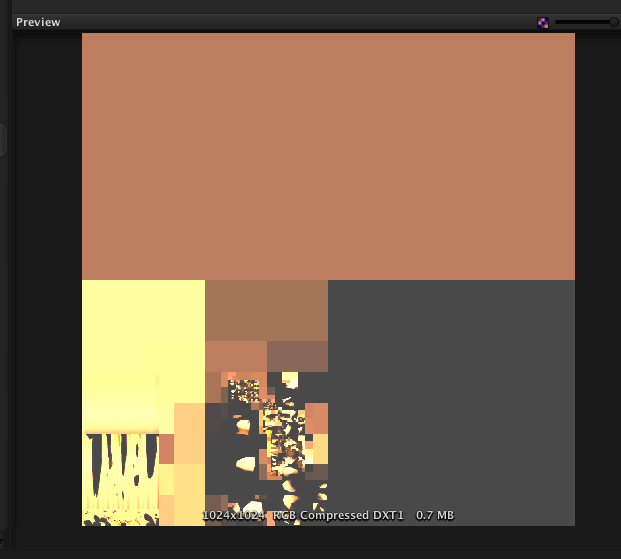
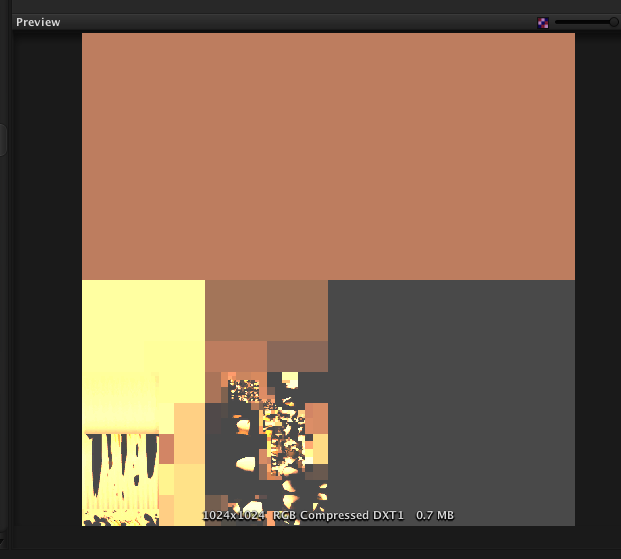
Hi - I can't seem to find an answer to this anywhere else online so I figured I'd ask here. Ever since I upgraded to Unity 4, I have not been able to generate lightmaps any smaller than 1024 x 1024. Is there a reason for this?

The pictures I've attached show a lightmap for a small scene at 8 texels and 16 texels. The empty orange areas seem to just be ambient light (I can assure you that the empty area is not an object that is being lightmapped). This issue occurs in all 80 of my game's scenes.

If anyone can explain how I might be able to fix this, I would totally appreciate it.

Some information about the project: It was upgraded from Unity 3 to Unity 4 - when we did this all of the objects in our scenes were much smaller than they were supposed to be due to mesh compression. We fixed that by mass modifying all of our object files' mesh compression settings. Is it possible that that somehow broke lightmapping? I'm really at a complete loss here. 8 texel resolution lightmap
16 texel resolution lightmap

lightmap8texels.png (29.5 kB)
lightmap16texels.png (41.9 kB)
Comment
Add comment
10 |3000 characters needed characters left characters exceeded
▼
  • Viewable by all users
  • Viewable by moderators
  • Viewable by moderators and the original poster
  • Advanced visibility
Viewable by all users

1 Reply

· Add your reply
  • Sort: 
avatar image
0

Answer by Starwalker · Dec 11, 2013 at 02:15 AM

Your Texel count is lower than that is required, bump it up and it will take the whole space, suggest going in multiples of 2, if the current is 30, increase it to 60 and re-bake, see if you like, and then continue. Ambient can be lowered to 0 in Render settings and cranked it up later after the bake is complete.

Comment
Add comment · Share
10 |3000 characters needed characters left characters exceeded
▼
  • Viewable by all users
  • Viewable by moderators
  • Viewable by moderators and the original poster
  • Advanced visibility
Viewable by all users

Your answer

Hint: You can notify a user about this post by typing @username

Up to 2 attachments (including images) can be used with a maximum of 524.3 kB each and 1.0 MB total.

Follow this Question

Answers Answers and Comments

12 People are following this question.

avatar image avatar image avatar image avatar image avatar image avatar image avatar image avatar image avatar image avatar image avatar image avatar image

Related Questions

How much data is it too much in lightmapping for Mobile? 0 Answers

Calculating lightmap texel per unit size 0 Answers

Beast will not bake terrain lightmaps above 1024x 0 Answers

iOS GUIText size issue 1 Answer

Lightmapping Issues 0 Answers


Enterprise
Social Q&A

Social
Subscribe on YouTube social-youtube Follow on LinkedIn social-linkedin Follow on Twitter social-twitter Follow on Facebook social-facebook Follow on Instagram social-instagram

Footer

  • Purchase
    • Products
    • Subscription
    • Asset Store
    • Unity Gear
    • Resellers
  • Education
    • Students
    • Educators
    • Certification
    • Learn
    • Center of Excellence
  • Download
    • Unity
    • Beta Program
  • Unity Labs
    • Labs
    • Publications
  • Resources
    • Learn platform
    • Community
    • Documentation
    • Unity QA
    • FAQ
    • Services Status
    • Connect
  • About Unity
    • About Us
    • Blog
    • Events
    • Careers
    • Contact
    • Press
    • Partners
    • Affiliates
    • Security
Copyright © 2020 Unity Technologies
  • Legal
  • Privacy Policy
  • Cookies
  • Do Not Sell My Personal Information
  • Cookies Settings
"Unity", Unity logos, and other Unity trademarks are trademarks or registered trademarks of Unity Technologies or its affiliates in the U.S. and elsewhere (more info here). Other names or brands are trademarks of their respective owners.
  • Anonymous
  • Sign in
  • Create
  • Ask a question
  • Spaces
  • Default
  • Help Room
  • META
  • Moderators
  • Explore
  • Topics
  • Questions
  • Users
  • Badges