
Wayback Machinekoobas.hobune.stream
May JUN Jul
Previous capture 12 Next capture
2021 2022 2023
1 capture
12 Jun 22 - 12 Jun 22
sparklines
Close Help
  • Products
  • Solutions
  • Made with Unity
  • Learning
  • Support & Services
  • Community
  • Asset Store
  • Get Unity

UNITY ACCOUNT

You need a Unity Account to shop in the Online and Asset Stores, participate in the Unity Community and manage your license portfolio. Login Create account
  • Blog
  • Forums
  • Answers
  • Evangelists
  • User Groups
  • Beta Program
  • Advisory Panel

Navigation

  • Home
  • Products
  • Solutions
  • Made with Unity
  • Learning
  • Support & Services
  • Community
    • Blog
    • Forums
    • Answers
    • Evangelists
    • User Groups
    • Beta Program
    • Advisory Panel

Unity account

You need a Unity Account to shop in the Online and Asset Stores, participate in the Unity Community and manage your license portfolio. Login Create account

Language

  • Chinese
  • Spanish
  • Japanese
  • Korean
  • Portuguese
  • Ask a question
  • Spaces
    • Default
    • Help Room
    • META
    • Moderators
    • Topics
    • Questions
    • Users
    • Badges
  • Home /
avatar image
0
Question by theness_ · Sep 22, 2015 at 12:45 PM · animationanimatoravatarrig

animated rig - why aren't the joints limited in movement?

ok so first let me say I'm VERY new to animations etc in Unity. I come from software development background.

With that said, I downloaded some basic animations pack (https://www.assetstore.unity3d.com/en/#!/content/26680), created an instance of the character given with the pack, created an animator controller of my own for it, and used the imported animations.

So far so good, everything works.

Now I'm trying to add my own animations on the model. I see there's the character model, which is a single mesh, and a node called Root under which there's an hierarchy of nodes which I presume is the avatar of the character.

So I created a new animation, but when I move the different parts of the character, for example the hand, it doesn't act like its connected to any skeleton at all. moving the avatar nodes just more the mesh parts connected to it, but it does not limit my movement like with a skeleton and it doesn't affect any other parts. And its really hard to animate anything like that.
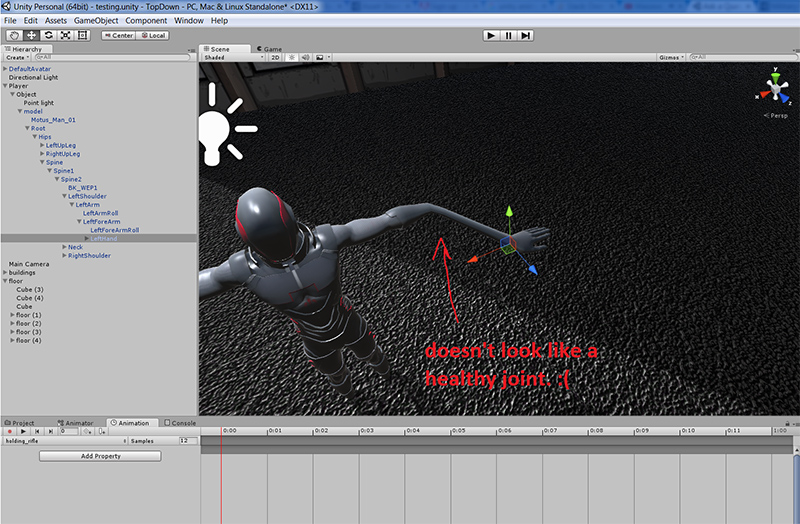
alt text

What I expect to happen is that if I pull the hand forward, the entire arm will be pull and rotated with it, based on joints. But I'm not even sure this model comes with such a thing.

Anyway can someone give me a hint or directions to what I'm doing wrong and how I'm suppose to do it?

Thanks!

animations-and-joints.jpg (250.8 kB)
Comment
Add comment
10 |3000 characters needed characters left characters exceeded
▼
  • Viewable by all users
  • Viewable by moderators
  • Viewable by moderators and the original poster
  • Advanced visibility
Viewable by all users

0 Replies

· Add your reply
  • Sort: 

Your answer

Hint: You can notify a user about this post by typing @username

Up to 2 attachments (including images) can be used with a maximum of 524.3 kB each and 1.0 MB total.

Follow this Question

Answers Answers and Comments

2 People are following this question.

avatar image avatar image

Related Questions

Animation resetting to the muscle pose 0 Answers

I can preview the animation but in scene it doesn't work 0 Answers

Why is my Avatar not connected to my mesh? 0 Answers

Either assign an existing skinnedmeshrenderer to another compatible rig, or controlling 2 instances of the same rig with 1 animator 0 Answers

Avatar mask not working 1 Answer


Enterprise
Social Q&A

Social
Subscribe on YouTube social-youtube Follow on LinkedIn social-linkedin Follow on Twitter social-twitter Follow on Facebook social-facebook Follow on Instagram social-instagram

Footer

  • Purchase
    • Products
    • Subscription
    • Asset Store
    • Unity Gear
    • Resellers
  • Education
    • Students
    • Educators
    • Certification
    • Learn
    • Center of Excellence
  • Download
    • Unity
    • Beta Program
  • Unity Labs
    • Labs
    • Publications
  • Resources
    • Learn platform
    • Community
    • Documentation
    • Unity QA
    • FAQ
    • Services Status
    • Connect
  • About Unity
    • About Us
    • Blog
    • Events
    • Careers
    • Contact
    • Press
    • Partners
    • Affiliates
    • Security
Copyright © 2020 Unity Technologies
  • Legal
  • Privacy Policy
  • Cookies
  • Do Not Sell My Personal Information
  • Cookies Settings
"Unity", Unity logos, and other Unity trademarks are trademarks or registered trademarks of Unity Technologies or its affiliates in the U.S. and elsewhere (more info here). Other names or brands are trademarks of their respective owners.
  • Anonymous
  • Sign in
  • Create
  • Ask a question
  • Spaces
  • Default
  • Help Room
  • META
  • Moderators
  • Explore
  • Topics
  • Questions
  • Users
  • Badges
