
Wayback Machinekoobas.hobune.stream
May JUN Jul
Previous capture 12 Next capture
2021 2022 2023
1 capture
12 Jun 22 - 12 Jun 22
sparklines
Close Help
  • Products
  • Solutions
  • Made with Unity
  • Learning
  • Support & Services
  • Community
  • Asset Store
  • Get Unity

UNITY ACCOUNT

You need a Unity Account to shop in the Online and Asset Stores, participate in the Unity Community and manage your license portfolio. Login Create account
  • Blog
  • Forums
  • Answers
  • Evangelists
  • User Groups
  • Beta Program
  • Advisory Panel

Navigation

  • Home
  • Products
  • Solutions
  • Made with Unity
  • Learning
  • Support & Services
  • Community
    • Blog
    • Forums
    • Answers
    • Evangelists
    • User Groups
    • Beta Program
    • Advisory Panel

Unity account

You need a Unity Account to shop in the Online and Asset Stores, participate in the Unity Community and manage your license portfolio. Login Create account

Language

  • Chinese
  • Spanish
  • Japanese
  • Korean
  • Portuguese
  • Ask a question
  • Spaces
    • Default
    • Help Room
    • META
    • Moderators
    • Topics
    • Questions
    • Users
    • Badges
  • Home /
  • Help Room /
avatar image
0
Question by unity_YLgwEIY-r4ABEA · Nov 28, 2019 at 10:36 AM · physicsrigidbody

RigidBody MovePosition lags behind another RigidBody

I'm doing a VR game and the camera is controlled through a RigidBody:

 private void FixedUpdate() {
     Vector2 primaryAxis = OVRInput.Get(OVRInput.Axis2D.PrimaryThumbstick);
     ...
     rigidbody.AddForce(velocityChange, ForceMode.VelocityChange);
 }

Now I want to move the hand of the player, that also has a RigidBody so I do:

 private void FixedUpdate() {
     GetComponent<Rigidbody>().MovePosition(mainPlayer.transform.TransformPoint(controller));
     GetComponent<Rigidbody>().MoveRotation(mainPlayer.transform.rotation * rot);
 }

When I use the thumbstick to move the main character the hand does move along with it but it visibly lags behind. I'm aware of the difference between the run loop of the game engine and physics engine but still can't wrap my head around it.
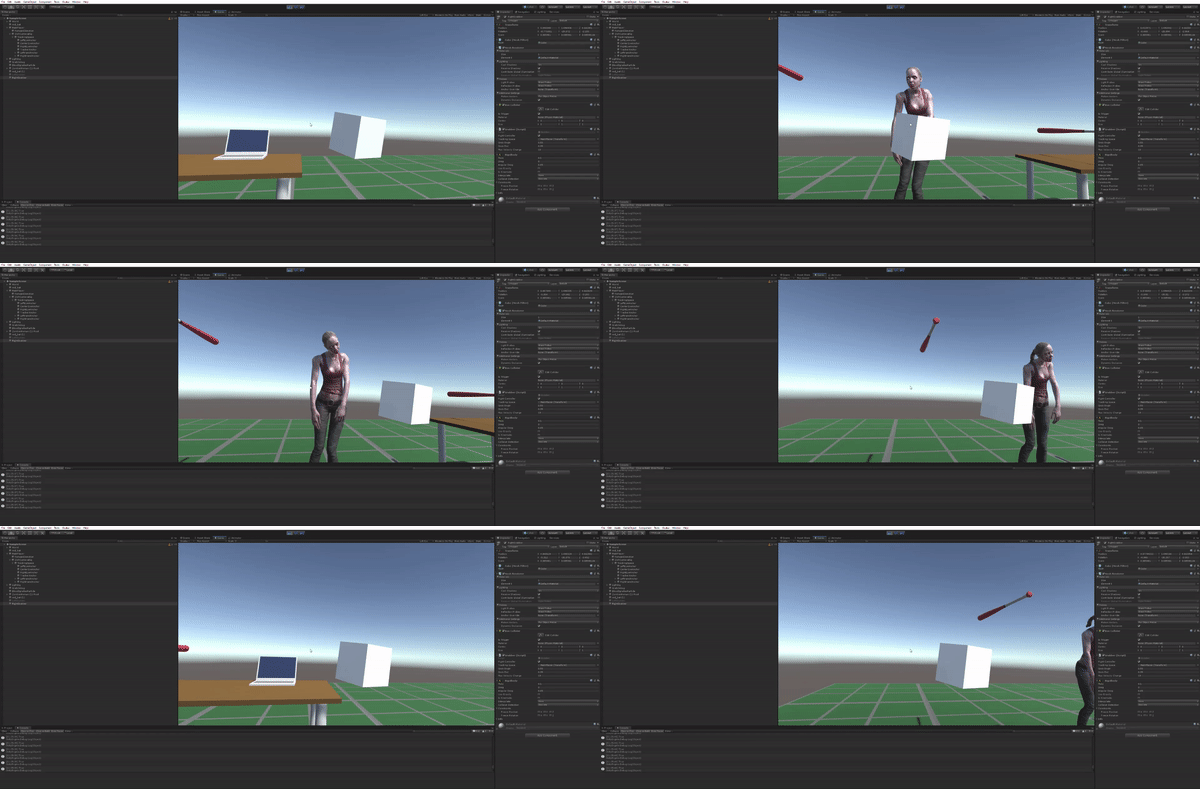
alt text

Comment
Add comment
10 |3000 characters needed characters left characters exceeded
▼
  • Viewable by all users
  • Viewable by moderators
  • Viewable by moderators and the original poster
  • Advanced visibility
Viewable by all users

1 Reply

· Add your reply
  • Sort: 
avatar image
1
Best Answer

Answer by lgarczyn · Nov 29, 2019 at 01:59 AM

Basically, FixedUpdate happens before physics simulation, which happens before either another FixedUpdate, or an Update and render.


So here your player controller will have moved from position A to B at the end of the physics update, while your cube just moved finally to A, the controller's position at the start of the update.


Since you don't appear to care much about the physics of the object while it is handled (use of MovePosition), simply set it to kinematic, and set its position to the controller's position on Update. That way, even the possible interpolation of the camera rigidbody will not add a lag. Interpolations are another mess entirely.


Now if you care about the physics of the object, it needs to be dynamic. You basically need either a simple joint, or to set its velocity to your controller's velocity, which you can calculate through transforms. Make sure the object and the camera rigidbody have the same interpolation. Or you can use a kinematic camera rigidbody, and use the camera rigidbody's next position to calculate the next position of your cube.


Script order may affect some of these solutions, make sure that the script of your camera is run before the script of your cube.


Another possibly controversial solution would be to make the cube a child of the controller. Usually you shouldn't make rigidbodies children of each other, but if you have a recent version of unity, the parent will simply apply its own motion to the children, which are still free to move according to physics. Simply make the object a child of the controller, zero its velocity every frame, and drop it if it gets too far from the controller due to collisions. A breakable joint might also be used here.

Comment
Add comment · Show 3 · Share
10 |3000 characters needed characters left characters exceeded
▼
  • Viewable by all users
  • Viewable by moderators
  • Viewable by moderators and the original poster
  • Advanced visibility
Viewable by all users
avatar image unity_YLgwEIY-r4ABEA · Nov 29, 2019 at 10:23 AM 0
Share

This is exactly what I've been trying to figure out for weeks now! Thanks!

I fixed it by pseudo-simulating the position of the hand based on the velocity.

 //Get the camera velocity after `AddForce`
 cameraVelocity = cameraVelocity * Time.fixedDeltaTime;

 //I know the velocity so I know where the camera will end up once the physics engine sets all the transforms
 //I'm pseudo-simulating the current physics step

 mainPlayer.transform.position += vel;

 GetComponent<Rigidbody>().$$anonymous$$ovePosition(mainPlayer.transform.TransformPoint(controller));
 GetComponent<Rigidbody>().$$anonymous$$oveRotation(mainPlayer.transform.rotation * rot);

 mainPlayer.transform.position -= vel;
avatar image lgarczyn unity_YLgwEIY-r4ABEA · Nov 29, 2019 at 07:40 PM 1
Share

The only issue you will have will be if the player collides with an object during the physics tick, in which case the object will continue a bit further even if the player has stopped.

The easiest option to mitigate this is to increase the physics tickrate.

avatar image unity_YLgwEIY-r4ABEA lgarczyn · Nov 29, 2019 at 08:56 PM 0
Share

You’re really far-sighted :) That’s exactly what happened. I used a configurable joint and change its connected anchor to controllers position ins$$anonymous$$d and it works great! Finally

Your answer

Hint: You can notify a user about this post by typing @username

Up to 2 attachments (including images) can be used with a maximum of 524.3 kB each and 1.0 MB total.

Follow this Question

Answers Answers and Comments

287 People are following this question.

avatar image avatar image avatar image avatar image avatar image avatar image avatar image avatar image avatar image avatar image avatar image avatar image avatar image avatar image avatar image avatar image avatar image avatar image avatar image avatar image avatar image avatar image avatar image avatar image avatar image avatar image avatar image avatar image avatar image avatar image avatar image avatar image avatar image avatar image avatar image avatar image avatar image avatar image avatar image avatar image avatar image avatar image avatar image avatar image avatar image avatar image avatar image avatar image avatar image avatar image avatar image avatar image avatar image avatar image avatar image avatar image avatar image avatar image avatar image avatar image avatar image avatar image avatar image avatar image avatar image avatar image avatar image avatar image avatar image avatar image avatar image avatar image avatar image avatar image avatar image avatar image avatar image avatar image avatar image avatar image avatar image avatar image avatar image avatar image avatar image avatar image avatar image avatar image avatar image avatar image avatar image avatar image avatar image avatar image avatar image avatar image avatar image avatar image avatar image avatar image avatar image avatar image avatar image avatar image avatar image avatar image avatar image avatar image avatar image avatar image avatar image avatar image avatar image avatar image avatar image avatar image avatar image avatar image avatar image avatar image avatar image avatar image avatar image avatar image avatar image avatar image avatar image avatar image avatar image avatar image avatar image avatar image avatar image avatar image avatar image avatar image avatar image avatar image avatar image avatar image avatar image avatar image avatar image avatar image avatar image avatar image avatar image avatar image avatar image avatar image avatar image avatar image avatar image avatar image avatar image avatar image avatar image avatar image avatar image avatar image avatar image avatar image avatar image avatar image avatar image avatar image avatar image avatar image avatar image avatar image avatar image avatar image avatar image avatar image avatar image avatar image avatar image avatar image avatar image avatar image avatar image avatar image avatar image avatar image avatar image avatar image avatar image avatar image avatar image avatar image avatar image avatar image avatar image avatar image avatar image avatar image avatar image avatar image avatar image avatar image avatar image avatar image avatar image avatar image avatar image avatar image avatar image avatar image avatar image avatar image avatar image avatar image avatar image avatar image avatar image avatar image avatar image avatar image avatar image avatar image avatar image avatar image avatar image avatar image avatar image avatar image avatar image avatar image avatar image avatar image avatar image avatar image avatar image avatar image avatar image avatar image avatar image avatar image avatar image avatar image avatar image avatar image avatar image avatar image avatar image avatar image avatar image avatar image avatar image avatar image avatar image avatar image avatar image avatar image avatar image avatar image avatar image avatar image avatar image avatar image avatar image avatar image avatar image avatar image avatar image avatar image avatar image avatar image avatar image avatar image avatar image avatar image avatar image avatar image avatar image avatar image avatar image avatar image avatar image avatar image avatar image avatar image avatar image avatar image avatar image avatar image avatar image

Related Questions

Virtual accelerometer/gyro 0 Answers

AddForce in Coroutine 1 Answer

Issues With Using Rigidbodies and Hinge Joints in a Tube 0 Answers

Pushing/pulling a 3D object using physics 0 Answers

Pick Up and Drop Script not functioning due to loophole 1 Answer


Enterprise
Social Q&A

Social
Subscribe on YouTube social-youtube Follow on LinkedIn social-linkedin Follow on Twitter social-twitter Follow on Facebook social-facebook Follow on Instagram social-instagram

Footer

  • Purchase
    • Products
    • Subscription
    • Asset Store
    • Unity Gear
    • Resellers
  • Education
    • Students
    • Educators
    • Certification
    • Learn
    • Center of Excellence
  • Download
    • Unity
    • Beta Program
  • Unity Labs
    • Labs
    • Publications
  • Resources
    • Learn platform
    • Community
    • Documentation
    • Unity QA
    • FAQ
    • Services Status
    • Connect
  • About Unity
    • About Us
    • Blog
    • Events
    • Careers
    • Contact
    • Press
    • Partners
    • Affiliates
    • Security
Copyright © 2020 Unity Technologies
  • Legal
  • Privacy Policy
  • Cookies
  • Do Not Sell My Personal Information
  • Cookies Settings
"Unity", Unity logos, and other Unity trademarks are trademarks or registered trademarks of Unity Technologies or its affiliates in the U.S. and elsewhere (more info here). Other names or brands are trademarks of their respective owners.
  • Anonymous
  • Sign in
  • Create
  • Ask a question
  • Spaces
  • Default
  • Help Room
  • META
  • Moderators
  • Explore
  • Topics
  • Questions
  • Users
  • Badges
