
Wayback Machinekoobas.hobune.stream
May JUN Jul
Previous capture 13 Next capture
2021 2022 2023
1 capture
13 Jun 22 - 13 Jun 22
sparklines
Close Help
  • Products
  • Solutions
  • Made with Unity
  • Learning
  • Support & Services
  • Community
  • Asset Store
  • Get Unity

UNITY ACCOUNT

You need a Unity Account to shop in the Online and Asset Stores, participate in the Unity Community and manage your license portfolio. Login Create account
  • Blog
  • Forums
  • Answers
  • Evangelists
  • User Groups
  • Beta Program
  • Advisory Panel

Navigation

  • Home
  • Products
  • Solutions
  • Made with Unity
  • Learning
  • Support & Services
  • Community
    • Blog
    • Forums
    • Answers
    • Evangelists
    • User Groups
    • Beta Program
    • Advisory Panel

Unity account

You need a Unity Account to shop in the Online and Asset Stores, participate in the Unity Community and manage your license portfolio. Login Create account

Language

  • Chinese
  • Spanish
  • Japanese
  • Korean
  • Portuguese
  • Ask a question
  • Spaces
    • Default
    • Help Room
    • META
    • Moderators
    • Topics
    • Questions
    • Users
    • Badges
  • Home /
avatar image
1
Question by qazwazza72 · Jun 18, 2013 at 07:21 AM · physicsrigidbodycapsuleisgrounded

Physics.CheckCapsule() not working.

OK so i've been trying to get this right for a while now and its just not happening. I have a rigidbody as a player and i want to user the CheckCapsule function to detect whether the player is grounded. My understanding of the function was that if I specify 2 points, a point just below the player and a point in the center of the player, and then specify a radius, it would return true only if those points had come in contact with another object. Here's my code.

 centerOfPlayer = transform.position;
 bottomOfPlayer = new Vector3(transform.position.x, transform.position.y - (ColliderComponent.radius + 0.01f), transform.position.z);

I then plug these 2 vectors into the function.

 bool isGrounded = Physics.CheckCapsule(centerOfPlayer,bottomOfPlayer,ColliderComponent.radius/2);\

For some reason this always returns true. I do have GUI components over the top of my player, could it be that somehow the function thinks its colliding with them?

Any help would be much appreciated. Thanks.

Comment
Add comment
10 |3000 characters needed characters left characters exceeded
▼
  • Viewable by all users
  • Viewable by moderators
  • Viewable by moderators and the original poster
  • Advanced visibility
Viewable by all users

2 Replies

· Add your reply
  • Sort: 
avatar image
1

Answer by qazwazza72 · Jun 18, 2013 at 10:27 AM

The CapsuleCheck() was returning true because it was hitting the players collider (duh). I fixed this by adding a Layermask mask variable to my player controller script, setting that to default and moving my player into another layer "Player". Then added the mask to the end of the CheckCapsule() function.

 bool isGrounded()
     {
           return (Physics.CheckCapsule(centerOfPlayer,bottomOfPlayer,ColliderComponent.radius - 0.05f, 

 mask.value));     
     }
Comment
Add comment · Share
10 |3000 characters needed characters left characters exceeded
▼
  • Viewable by all users
  • Viewable by moderators
  • Viewable by moderators and the original poster
  • Advanced visibility
Viewable by all users
avatar image
0

Answer by robertbu · Jun 18, 2013 at 07:34 AM

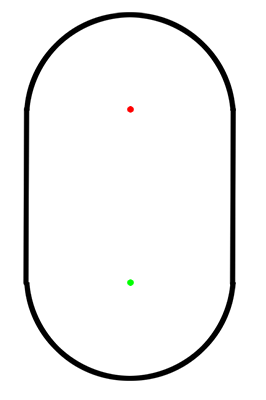
The points you are defining are the axis of the capsule. From a side view:
alt text

Your two points are the red and green points below. The radius is the radius of the half spheres at the ends. So if you place one of the points just below your character, you are covering a 'radius' distance below the point you specify.


capsule.png (13.0 kB)
Comment
Add comment · Show 4 · Share
10 |3000 characters needed characters left characters exceeded
▼
  • Viewable by all users
  • Viewable by moderators
  • Viewable by moderators and the original poster
  • Advanced visibility
Viewable by all users
avatar image qazwazza72 · Jun 18, 2013 at 07:53 AM 0
Share

Ok so after taking that in this is what I've got:

 centerOfPlayer = transform.position;
         centerOfBottomSphere = new Vector3(transform.position.x, transform.position.y - ColliderComponent.radius, transform.position.z);//ColliderComponent = GetComponent<CapsuleCollider>();

 bool isGrounded = Physics.CheckCapsule(centerOfPlayer,centerOfBottomSphere ,ColliderComponent.radius +0.01f);

It still just returns true every time.

avatar image robertbu · Jun 18, 2013 at 08:05 AM 0
Share

Do an Physics.OverlapSphere at the center of the second (bottom) point using the same radius. Output the name/tag of all colliders it finds.
avatar image qazwazza72 · Jun 18, 2013 at 08:07 AM 0
Share

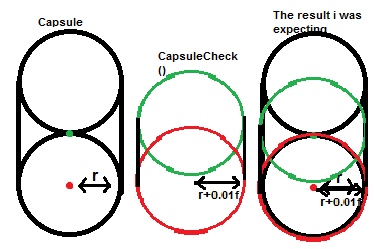
If u can make out my hastily drawn diagram, this was the expectation of the above code.

expectations.png (10.4 kB)
avatar image qazwazza72 · Jun 18, 2013 at 08:45 AM 0
Share

AHH, the SphereOverlay came back with the Players collider being hit. That makes sense. Feel dumb not to have thought of that haha. If there's a quick fix to this situation id love to hear it, otherwise ill look it up myself. Thanks heaps!

Your answer

Hint: You can notify a user about this post by typing @username

Up to 2 attachments (including images) can be used with a maximum of 524.3 kB each and 1.0 MB total.

Follow this Question

Answers Answers and Comments

14 People are following this question.

avatar image avatar image avatar image avatar image avatar image avatar image avatar image avatar image avatar image avatar image avatar image avatar image avatar image avatar image

Related Questions

Physics - Capsule, Rigidbody - Falls over 1 Answer

RigidBody controller - Where to start? 0 Answers

Softbodies in Unity 3D 1 Answer

Throwing knife doesn't throw correctly 0 Answers

Question on Physic Materials, Rigibodies, and Acelleration 0 Answers


Enterprise
Social Q&A

Social
Subscribe on YouTube social-youtube Follow on LinkedIn social-linkedin Follow on Twitter social-twitter Follow on Facebook social-facebook Follow on Instagram social-instagram

Footer

  • Purchase
    • Products
    • Subscription
    • Asset Store
    • Unity Gear
    • Resellers
  • Education
    • Students
    • Educators
    • Certification
    • Learn
    • Center of Excellence
  • Download
    • Unity
    • Beta Program
  • Unity Labs
    • Labs
    • Publications
  • Resources
    • Learn platform
    • Community
    • Documentation
    • Unity QA
    • FAQ
    • Services Status
    • Connect
  • About Unity
    • About Us
    • Blog
    • Events
    • Careers
    • Contact
    • Press
    • Partners
    • Affiliates
    • Security
Copyright © 2020 Unity Technologies
  • Legal
  • Privacy Policy
  • Cookies
  • Do Not Sell My Personal Information
  • Cookies Settings
"Unity", Unity logos, and other Unity trademarks are trademarks or registered trademarks of Unity Technologies or its affiliates in the U.S. and elsewhere (more info here). Other names or brands are trademarks of their respective owners.
  • Anonymous
  • Sign in
  • Create
  • Ask a question
  • Spaces
  • Default
  • Help Room
  • META
  • Moderators
  • Explore
  • Topics
  • Questions
  • Users
  • Badges
