 koobas.hobune.stream


Chraracter Selection
Hello,
I am trying to do a Character Selection System for my game. Currently, I have 2 Scenes, a Map-scene and a ChooseCharacter-scene. I am using 4 buttons (1 button for each character) with an Event Trigger (Pointer Click) and I have GameController with 2 Scripts. My problem is that the selected character is still spawning on the ChooseCharacter-scene and not on the map-scene.
The GameController: 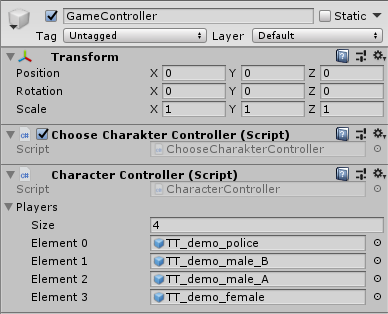
Policeman button: 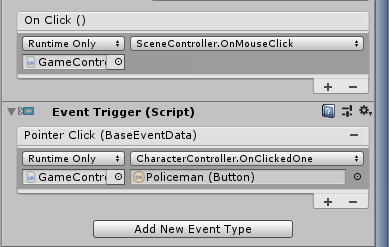
The Spawncharacterscript:
 public class CharacterController : MonoBehaviour
 {
     public GameObject[] Players;

     public void OnClickedOne(Button button)
     {
         SceneManager.LoadScene(1); // Load Scene 1
         // yield return new WaitForSeconds(5); didn´t work
         Vector3 pos = new Vector3(0.0f, 1.0f, 0.0f); // coords of the Player
         GameObject player = Instantiate(Players[0], pos, Quaternion.identity) as GameObject; // Instantiate the first Character
     }

     public void OnClickedTwo(Button button)
     {
         SceneManager.LoadScene(1); // Load Scene 1
         Vector3 pos = new Vector3(0.0f, 1.0f, 0.0f); // coords of the Player
         GameObject player = Instantiate(Players[1], pos, Quaternion.identity) as GameObject; // Instantiate the second Character
     }

     public void OnClickedThree(Button button)
     {
         SceneManager.LoadScene(1); // Load Scene 1
         Vector3 pos = new Vector3(0.0f, 1.0f, 0.0f); // coords of the Player
         GameObject player = Instantiate(Players[2], pos, Quaternion.identity) as GameObject; // Instantiate the third Character
     }

     public void OnClickedFour(Button button)
     {
         SceneManager.LoadScene(1); // Load Scene 1
         Vector3 pos = new Vector3(0.0f, 1.0f, 0.0f); // coords of the Player
         GameObject player = Instantiate(Players[3], pos, Quaternion.identity) as GameObject; // Instantiate the fourth Character
     }
 }
The Scenecontroller:
 public class SceneController : MonoBehaviour
 {
     public void OnMouseClick()
     {
         SceneManager.LoadScene(1);
     }
 }

Your character controller exists in the character selection scene, so anything in it will spawn in the character selection scene. I recommend either spawning your character before you call LoadScene() and then calling DontDestroyOnLoad() to make it persist into the next scene, or at least setting some variables in a persistent script so that the character can be loaded in the new scene by a script that exists in that scene. This can be accomplished either by setting some static variable values or by making a component instance (like a characterSpawnManager class or something) that you call DontDestroyOnLoad on.
A couple other notes - You call LoadScene from two different scripts. Are these both called when a button is clicked? This will likely cause the scene to load twice. Also, unless you are trying to load multiple scenes at once, don't put code after a LoadScene call

I tried it with the DontDestroyOnLoad, but it did not work. I also tried to make a GameObject with a Script that Instantiates every Character and after the character selection the other three characters should despawn, but this didn´t work as well. Yes, I was accidentally calling the LoadScene two times... Thanks for the tip :) Do you know any other option I could try? Tanks in advance!


