
Wayback Machinekoobas.hobune.stream
May JUN Jul
Previous capture 12 Next capture
2021 2022 2023
1 capture
12 Jun 22 - 12 Jun 22
sparklines
Close Help
  • Products
  • Solutions
  • Made with Unity
  • Learning
  • Support & Services
  • Community
  • Asset Store
  • Get Unity

UNITY ACCOUNT

You need a Unity Account to shop in the Online and Asset Stores, participate in the Unity Community and manage your license portfolio. Login Create account
  • Blog
  • Forums
  • Answers
  • Evangelists
  • User Groups
  • Beta Program
  • Advisory Panel

Navigation

  • Home
  • Products
  • Solutions
  • Made with Unity
  • Learning
  • Support & Services
  • Community
    • Blog
    • Forums
    • Answers
    • Evangelists
    • User Groups
    • Beta Program
    • Advisory Panel

Unity account

You need a Unity Account to shop in the Online and Asset Stores, participate in the Unity Community and manage your license portfolio. Login Create account

Language

  • Chinese
  • Spanish
  • Japanese
  • Korean
  • Portuguese
  • Ask a question
  • Spaces
    • Default
    • Help Room
    • META
    • Moderators
    • Topics
    • Questions
    • Users
    • Badges
  • Home /
avatar image
0
Question by t-s61 · Feb 10, 2020 at 09:36 AM · script.destroyjump

Endless Staircase

Hey people, I want to make a 3D Video Game in which a Object go the Stairs up. alt text
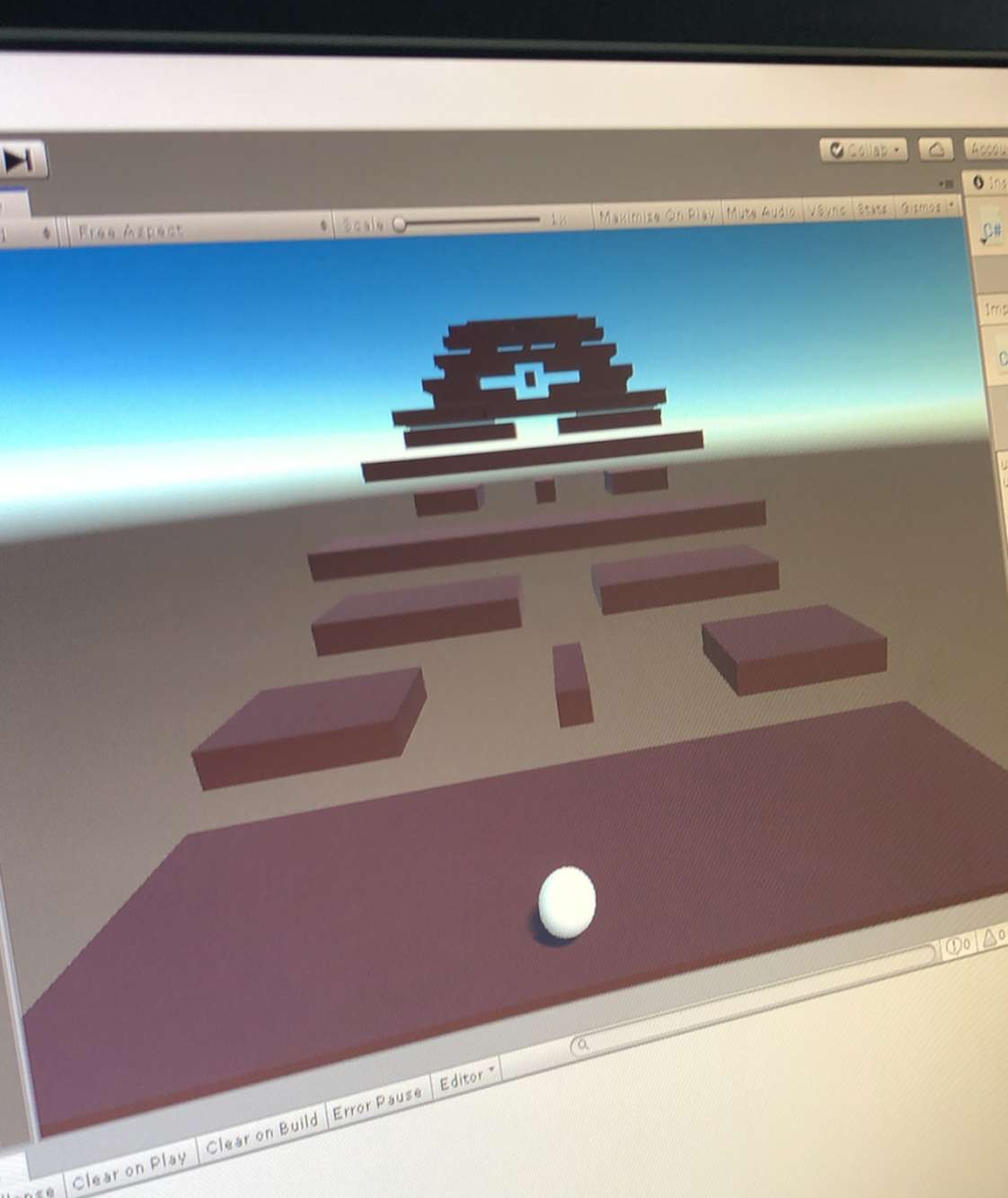
But my Problem now is that i don’t know how i can make these stairs in the same order endless as in the picture. Also when i’m going up the Stairs behind me have to deleted byself. I hope anybody can help me. I really don’t know how the Script have to look.

0b1ee107-24d1-47ef-a57e-8cacdb410ea5.jpeg (946.5 kB)
Comment
Add comment
10 |3000 characters needed characters left characters exceeded
▼
  • Viewable by all users
  • Viewable by moderators
  • Viewable by moderators and the original poster
  • Advanced visibility
Viewable by all users

1 Reply

· Add your reply
  • Sort: 
avatar image
0

Answer by Klarax · Feb 10, 2020 at 09:42 AM

make the stairs, or any number of variations of the stairs you want.

put an empty gameobect at the top center where the next stair would spawn.

create a script that generates random prefab of a stair at the empty node location.

make sense?

Comment
Add comment · Show 2 · Share
10 |3000 characters needed characters left characters exceeded
▼
  • Viewable by all users
  • Viewable by moderators
  • Viewable by moderators and the original poster
  • Advanced visibility
Viewable by all users
avatar image t-s61 · Feb 10, 2020 at 09:53 AM 0
Share

i‘ll try it thx. but do i have to put the first order in one folder and the following order in a other folder that i can say in my script that he have to generate a random folder?

avatar image Bonfire-Boy t-s61 · Feb 10, 2020 at 04:27 PM 1
Share

Folders don't come into it.
$$anonymous$$larax's ter$$anonymous$$ology is slightly confusing. You only actually need one prefab - of a single stair (it could have multiple stairs if you want a larger unit, the procedure would be the same).

That prefab could contain 2 empty gameobject children - one that's in the position that the stair above should be placed, and one that's in the position that the stair below should be placed. It would have a "Stair" script on it with fields like "public Transform abovePosition" and "public Transform below position" to give you easy access to those gameobjects' positions.

Then, you start your staircase by creating an instance of that prefab.

Subsequently, you can extend your staircase upwards by instantiating the prefab again, and placing that new instance at the position of the top stair's "above position" gameobject.

Or you can extend it downwards by instantiating the prefab again, and placing that new instance at the position of the bottom stair's "below position" gameobject.

Similarly, you could remove stairs from the top/bottom by destroying them as required.

You don't actually need those 2 "positioning" gameobjects - you could just store the relative pose of the above/below stairs - but doing it by using gameobjects in the prefab makes it easy to tweak the positions.

You'd need some way of getting hold of references to the top or bottom stair. Depending on what your requirements are, you could do this

  1. with a "Staircase" object which is responsible for the whole thing, keeping references to the stairs in a List, adding to the start or end of the List as it creates new stairs (or removing from the List as it destroys them)

    or

  2. by giving all the responsibility to the "Stair" class on the stair prefab, which would be responsible for keep track of references to the above/below stairs, and creating/destroying them as required (effectively treating the staircase as a "linked list" of stairs)

    $$anonymous$$y recommendation would be to start by getting something like that working, and then think about how to randomly pick from a list of different stair prefabs ins$$anonymous$$d of always using the same one. They could all use the same stair script.

Your answer

Hint: You can notify a user about this post by typing @username

Up to 2 attachments (including images) can be used with a maximum of 524.3 kB each and 1.0 MB total.

Follow this Question

Answers Answers and Comments

149 People are following this question.

avatar image avatar image avatar image avatar image avatar image avatar image avatar image avatar image avatar image avatar image avatar image avatar image avatar image avatar image avatar image avatar image avatar image avatar image avatar image avatar image avatar image avatar image avatar image avatar image avatar image avatar image avatar image avatar image avatar image avatar image avatar image avatar image avatar image avatar image avatar image avatar image avatar image avatar image avatar image avatar image avatar image avatar image avatar image avatar image avatar image avatar image avatar image avatar image avatar image avatar image avatar image avatar image avatar image avatar image avatar image avatar image avatar image avatar image avatar image avatar image avatar image avatar image avatar image avatar image avatar image avatar image avatar image avatar image avatar image avatar image avatar image avatar image avatar image avatar image avatar image avatar image avatar image avatar image avatar image avatar image avatar image avatar image avatar image avatar image avatar image avatar image avatar image avatar image avatar image avatar image avatar image avatar image avatar image avatar image avatar image avatar image avatar image avatar image avatar image avatar image avatar image avatar image avatar image avatar image avatar image avatar image avatar image avatar image avatar image avatar image avatar image avatar image avatar image avatar image avatar image avatar image avatar image avatar image avatar image avatar image avatar image avatar image avatar image avatar image avatar image avatar image avatar image avatar image avatar image avatar image avatar image avatar image avatar image avatar image avatar image avatar image avatar image avatar image avatar image avatar image avatar image avatar image avatar image avatar image avatar image avatar image avatar image avatar image avatar image

Related Questions

"Your script should either check if it is null or you should not destroy the object."...what am i doing wrong sorry im a noobie 1 Answer

How to destroy a script on loadlevel? 1 Answer

Jump on Enemy heads to destroy enemy? 1 Answer

Character won't jump. 0 Answers

How to change the BoxCollider 2D Xoffset and Y offset by script ? 2 Answers


Enterprise
Social Q&A

Social
Subscribe on YouTube social-youtube Follow on LinkedIn social-linkedin Follow on Twitter social-twitter Follow on Facebook social-facebook Follow on Instagram social-instagram

Footer

  • Purchase
    • Products
    • Subscription
    • Asset Store
    • Unity Gear
    • Resellers
  • Education
    • Students
    • Educators
    • Certification
    • Learn
    • Center of Excellence
  • Download
    • Unity
    • Beta Program
  • Unity Labs
    • Labs
    • Publications
  • Resources
    • Learn platform
    • Community
    • Documentation
    • Unity QA
    • FAQ
    • Services Status
    • Connect
  • About Unity
    • About Us
    • Blog
    • Events
    • Careers
    • Contact
    • Press
    • Partners
    • Affiliates
    • Security
Copyright © 2020 Unity Technologies
  • Legal
  • Privacy Policy
  • Cookies
  • Do Not Sell My Personal Information
  • Cookies Settings
"Unity", Unity logos, and other Unity trademarks are trademarks or registered trademarks of Unity Technologies or its affiliates in the U.S. and elsewhere (more info here). Other names or brands are trademarks of their respective owners.
  • Anonymous
  • Sign in
  • Create
  • Ask a question
  • Spaces
  • Default
  • Help Room
  • META
  • Moderators
  • Explore
  • Topics
  • Questions
  • Users
  • Badges