
Wayback Machinekoobas.hobune.stream
May JUN Jul
Previous capture 13 Next capture
2021 2022 2023
1 capture
13 Jun 22 - 13 Jun 22
sparklines
Close Help
  • Products
  • Solutions
  • Made with Unity
  • Learning
  • Support & Services
  • Community
  • Asset Store
  • Get Unity

UNITY ACCOUNT

You need a Unity Account to shop in the Online and Asset Stores, participate in the Unity Community and manage your license portfolio. Login Create account
  • Blog
  • Forums
  • Answers
  • Evangelists
  • User Groups
  • Beta Program
  • Advisory Panel

Navigation

  • Home
  • Products
  • Solutions
  • Made with Unity
  • Learning
  • Support & Services
  • Community
    • Blog
    • Forums
    • Answers
    • Evangelists
    • User Groups
    • Beta Program
    • Advisory Panel

Unity account

You need a Unity Account to shop in the Online and Asset Stores, participate in the Unity Community and manage your license portfolio. Login Create account

Language

  • Chinese
  • Spanish
  • Japanese
  • Korean
  • Portuguese
  • Ask a question
  • Spaces
    • Default
    • Help Room
    • META
    • Moderators
    • Topics
    • Questions
    • Users
    • Badges
  • Home /
avatar image
0
Question by Kromleck · Mar 27, 2014 at 10:06 PM · quaternionrotatelookat

Merge a rotation(vector3) to a lookAt(quaternion) ?

Hi,

I'm trying to resolve an issue in a game prototype but so far all my attempts are useless :/ I'll try to explain the problem with my poor english.

What I want to do : I have an object moving in space. In parallel, a script instantiate 1 out of 8 "different" objects ; the only difference between each of them are rotations (x/y/z), because each object have a starting rotation which is predefined. So : when my object is moving backward in space, it "drops" randomly up to 8 objects, the same prefab but with different rotations informations. The idea is to create a "tunnel".
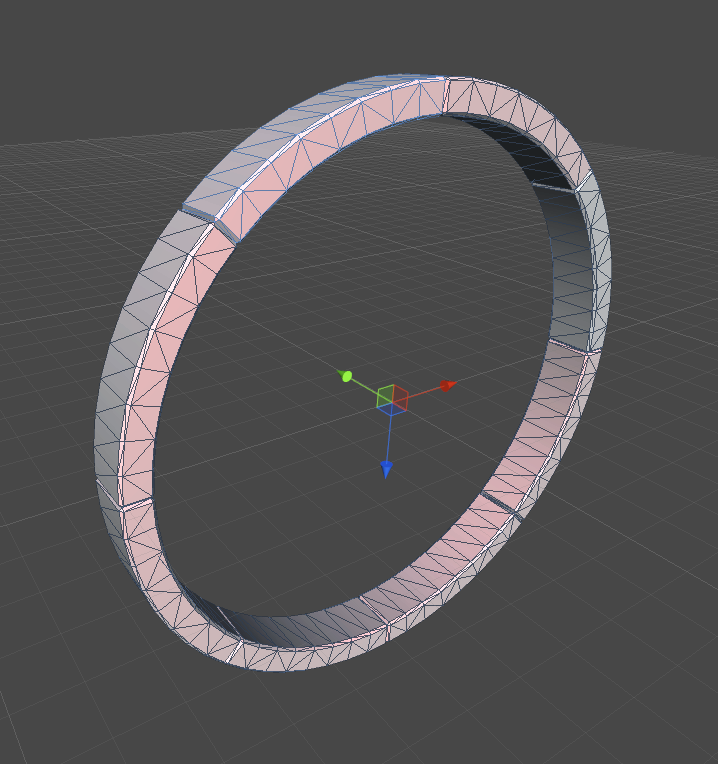
alt text

What's the problem : Now I want to let my object (which is instantiating objects) move in every directions (up, down, right, left...). Problem is that the predefined rotation informations can't follow my moving object anymore. So I'm trying to merge this vector3 with the command LookAt.. but it's a mess. The goal would be to use LookAt first when the object is instantiate, and then use the predefined vector3 to rotate it.
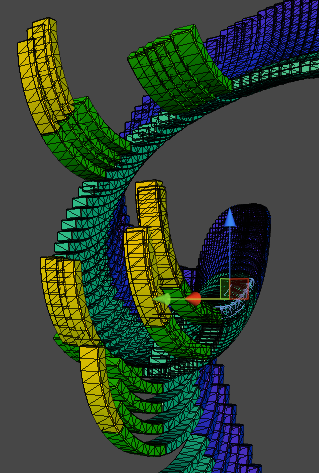
alt text

What I've tried : Since I'm using Vector3 as predefined rotation, and that LookAt returns a quaternion, I've tried to merge these 2 things together .. with weird results, for example : - (vector3.x + Quaternion.eulerAngle.x)/2 - vector3.x*Quaternion.eulerAngle.x - and so on...

capture.png (114.5 kB)
capture.png (71.6 kB)
Comment
Add comment
10 |3000 characters needed characters left characters exceeded
▼
  • Viewable by all users
  • Viewable by moderators
  • Viewable by moderators and the original poster
  • Advanced visibility
Viewable by all users

1 Reply

· Add your reply
  • Sort: 
avatar image
0

Answer by Gruffy · Mar 27, 2014 at 10:14 PM

Hey bud, you might be able to replace those with

 //make a Quaternion in your variable list
 private Quaternion desiredRotation = new Quaternion();
 
 
 //then where you need to rotate instead of using the LookAt function
 
 // Calculate and set rotation
 desiredRotation = Quaternion.LookRotation(this.yourTargetGameObject.position - this.transform.position, this.yourTargetGameObject.up);
 
 //cache it back to your transform
 this.transform.rotation = desiredRotation;


Im not sure though, it may be best to see your controlling code as this may not suffice and your problem might be down to optimization for execution at run-time n all that as LookAt() can be an expensive method to run, so i understand. (happy to be proved otherwise here)

Take care bud and hope it helps some way. Cheers Gruffy

Comment
Add comment · Share
10 |3000 characters needed characters left characters exceeded
▼
  • Viewable by all users
  • Viewable by moderators
  • Viewable by moderators and the original poster
  • Advanced visibility
Viewable by all users

Your answer

Hint: You can notify a user about this post by typing @username

Up to 2 attachments (including images) can be used with a maximum of 524.3 kB each and 1.0 MB total.

Follow this Question

Answers Answers and Comments

21 People are following this question.

avatar image avatar image avatar image avatar image avatar image avatar image avatar image avatar image avatar image avatar image avatar image avatar image avatar image avatar image avatar image avatar image avatar image avatar image avatar image avatar image avatar image

Related Questions

2D look at 1 Answer

rotate camera to face a specific object? 1 Answer

How to rotate an object depending on the rotation of an other Object 3 Answers

LookAt() rotation difference from rotating the object(position does not change) 1 Answer

How to rotate ? 2 Answers


Enterprise
Social Q&A

Social
Subscribe on YouTube social-youtube Follow on LinkedIn social-linkedin Follow on Twitter social-twitter Follow on Facebook social-facebook Follow on Instagram social-instagram

Footer

  • Purchase
    • Products
    • Subscription
    • Asset Store
    • Unity Gear
    • Resellers
  • Education
    • Students
    • Educators
    • Certification
    • Learn
    • Center of Excellence
  • Download
    • Unity
    • Beta Program
  • Unity Labs
    • Labs
    • Publications
  • Resources
    • Learn platform
    • Community
    • Documentation
    • Unity QA
    • FAQ
    • Services Status
    • Connect
  • About Unity
    • About Us
    • Blog
    • Events
    • Careers
    • Contact
    • Press
    • Partners
    • Affiliates
    • Security
Copyright © 2020 Unity Technologies
  • Legal
  • Privacy Policy
  • Cookies
  • Do Not Sell My Personal Information
  • Cookies Settings
"Unity", Unity logos, and other Unity trademarks are trademarks or registered trademarks of Unity Technologies or its affiliates in the U.S. and elsewhere (more info here). Other names or brands are trademarks of their respective owners.
  • Anonymous
  • Sign in
  • Create
  • Ask a question
  • Spaces
  • Default
  • Help Room
  • META
  • Moderators
  • Explore
  • Topics
  • Questions
  • Users
  • Badges
