
Wayback Machinekoobas.hobune.stream
May JUN Jul
Previous capture 12 Next capture
2021 2022 2023
1 capture
12 Jun 22 - 12 Jun 22
sparklines
Close Help
  • Products
  • Solutions
  • Made with Unity
  • Learning
  • Support & Services
  • Community
  • Asset Store
  • Get Unity

UNITY ACCOUNT

You need a Unity Account to shop in the Online and Asset Stores, participate in the Unity Community and manage your license portfolio. Login Create account
  • Blog
  • Forums
  • Answers
  • Evangelists
  • User Groups
  • Beta Program
  • Advisory Panel

Navigation

  • Home
  • Products
  • Solutions
  • Made with Unity
  • Learning
  • Support & Services
  • Community
    • Blog
    • Forums
    • Answers
    • Evangelists
    • User Groups
    • Beta Program
    • Advisory Panel

Unity account

You need a Unity Account to shop in the Online and Asset Stores, participate in the Unity Community and manage your license portfolio. Login Create account

Language

  • Chinese
  • Spanish
  • Japanese
  • Korean
  • Portuguese
  • Ask a question
  • Spaces
    • Default
    • Help Room
    • META
    • Moderators
    • Topics
    • Questions
    • Users
    • Badges
  • Home /
avatar image
0
Question by Sevalux · Jan 09, 2020 at 06:39 PM · inventoryequipment

How is equipping items normally handled?

So imagine a character with multiple possible shirts, accessories, etc. Are these items seperate from the character and just get moved into position, or is there several character models one for each possible combination then rendered depending on which is equipped. I can understand a sword or gun is put into the hand slot, then rotated etc. but shirts and pants, i mean the body shape moves so then that would have to make the shirt model move in the same way. Seems very complicated. Can someone explain in short how this is normally done?

Comment
Add comment
10 |3000 characters needed characters left characters exceeded
▼
  • Viewable by all users
  • Viewable by moderators
  • Viewable by moderators and the original poster
  • Advanced visibility
Viewable by all users

1 Reply

· Add your reply
  • Sort: 
avatar image
1
Best Answer

Answer by RendrWyre · Jan 09, 2020 at 11:06 PM

I'm going to assume you are talking about 3D (not sure if it's the same for 2D). The most common method is binding each mesh to the skeleton. For example, let's say you create a basic character with separated body parts (a head, a body, left arm, right arm, etc). You would parent each mesh to the skeleton and then weight paint... all pretty standard stuff.


but now you want to model a helmet that the player can equip. Well you would simply take the existing "head" model and add a helmet (you could join them into a single mesh). You would then parent this new item to the existing skeleton structure and weight paint.


In-game, you would simply destroy the "current" head and instantiate the "new" head.


Again, this is in regards to blender, but when you model a character (again, let's say separate parts. a head, left leg, right leg, etc) when you export it you should get a parent container, and as children of this parent, the actual player meshes (head, arms, legs) and the rig. You would simply delete the current head mesh model, and instantiate the new head model as a child of the parent container or as a child of the associated empty gameobject placeholder.


There's probably a more efficient way to do this but I've used it many times for RPG prototypes where the player can equip things like armour, gloves, helmets, hats, etc (even works for stuff like beards, eyes, etc)


So you have a rigged model imported into Unity. The basic setup is like this. Right click the Head > create empty gameobject > unparent the empty game object from the Head mesh (parent it to the OG parent... in this case it's BasePlayer) and rename it "Head Slot". Now you can delete the child of Head Slot and instantiate a new head model as a child of Head Slot.


So when you create a new head model (let's say an iron helmet) you parent it to the skeleton rig and weight paint (in blender or Maya). When you instantiate the iron helmet as a child of the Head Slot, it will be correctly animated and follow any bone constraints etc.
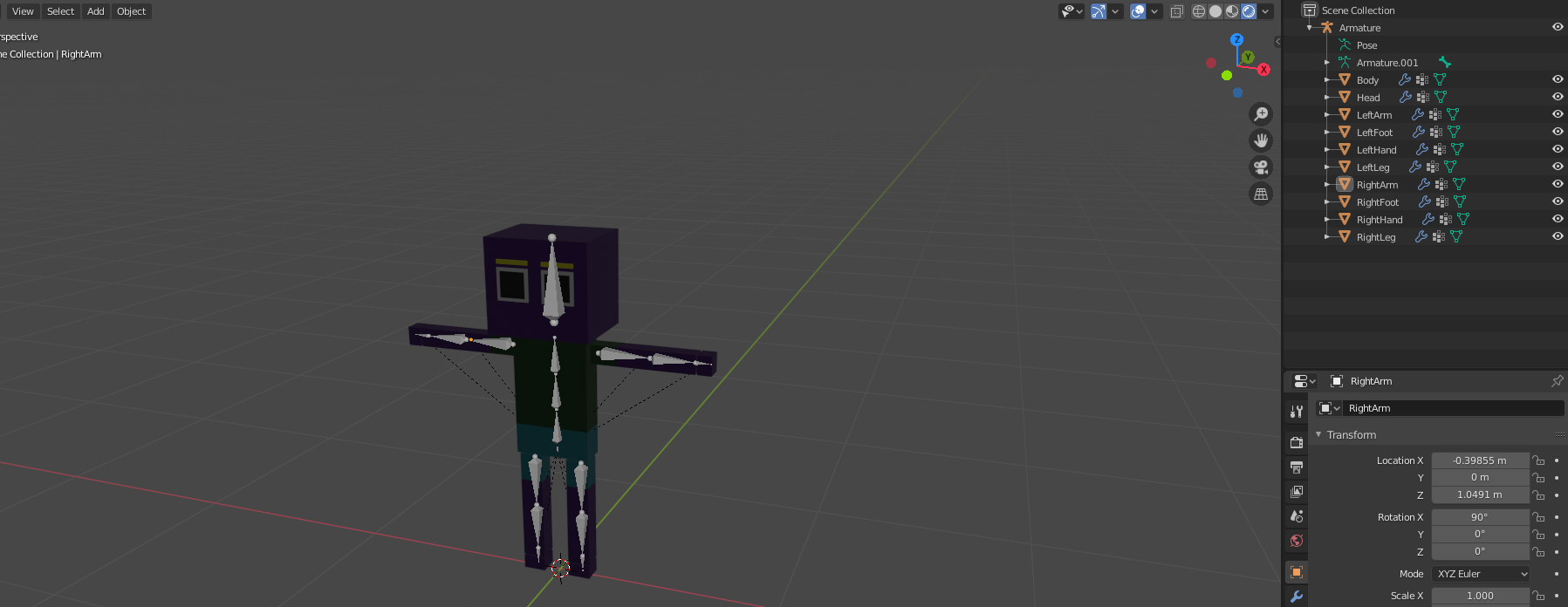
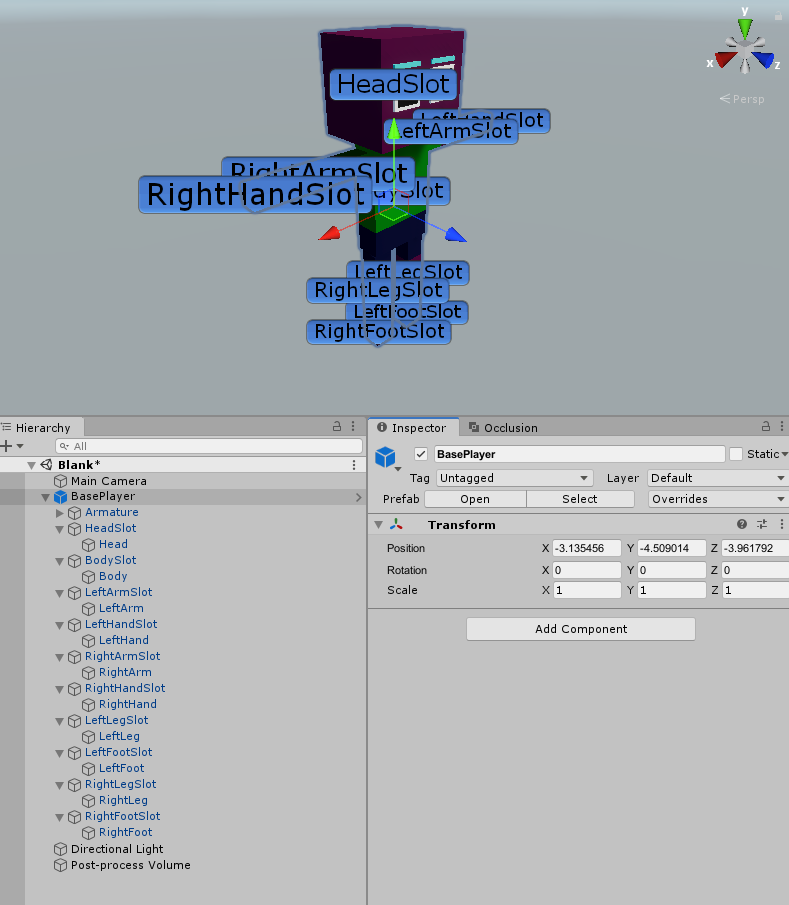
alt text alt text


ex1.png (496.3 kB)
ex2.png (95.8 kB)
Comment
Add comment · Show 1 · Share
10 |3000 characters needed characters left characters exceeded
▼
  • Viewable by all users
  • Viewable by moderators
  • Viewable by moderators and the original poster
  • Advanced visibility
Viewable by all users
avatar image Sevalux · Jan 11, 2020 at 07:18 AM 0
Share

This is exactly what I was looking for. Thank you for taking the time to explain. 10/10

Your answer

Hint: You can notify a user about this post by typing @username

Up to 2 attachments (including images) can be used with a maximum of 524.3 kB each and 1.0 MB total.

Follow this Question

Answers Answers and Comments

120 People are following this question.

avatar image avatar image avatar image avatar image avatar image avatar image avatar image avatar image avatar image avatar image avatar image avatar image avatar image avatar image avatar image avatar image avatar image avatar image avatar image avatar image avatar image avatar image avatar image avatar image avatar image avatar image avatar image avatar image avatar image avatar image avatar image avatar image avatar image avatar image avatar image avatar image avatar image avatar image avatar image avatar image avatar image avatar image avatar image avatar image avatar image avatar image avatar image avatar image avatar image avatar image avatar image avatar image avatar image avatar image avatar image avatar image avatar image avatar image avatar image avatar image avatar image avatar image avatar image avatar image avatar image avatar image avatar image avatar image avatar image avatar image avatar image avatar image avatar image avatar image avatar image avatar image avatar image avatar image avatar image avatar image avatar image avatar image avatar image avatar image avatar image avatar image avatar image avatar image avatar image avatar image avatar image avatar image avatar image avatar image avatar image avatar image avatar image avatar image avatar image avatar image avatar image avatar image avatar image avatar image avatar image avatar image avatar image avatar image avatar image avatar image avatar image avatar image avatar image avatar image avatar image avatar image avatar image avatar image avatar image avatar image

Related Questions

Access Inventory from player 1 Answer

Alternative methods to equip items 1 Answer

Inventory, Items and Equipment: is there a good way to make them? 3 Answers

How to create a 2D equipment system? 2 Answers

What is the best way for saving Scriptable Objects (With random stats when created)? 0 Answers


Enterprise
Social Q&A

Social
Subscribe on YouTube social-youtube Follow on LinkedIn social-linkedin Follow on Twitter social-twitter Follow on Facebook social-facebook Follow on Instagram social-instagram

Footer

  • Purchase
    • Products
    • Subscription
    • Asset Store
    • Unity Gear
    • Resellers
  • Education
    • Students
    • Educators
    • Certification
    • Learn
    • Center of Excellence
  • Download
    • Unity
    • Beta Program
  • Unity Labs
    • Labs
    • Publications
  • Resources
    • Learn platform
    • Community
    • Documentation
    • Unity QA
    • FAQ
    • Services Status
    • Connect
  • About Unity
    • About Us
    • Blog
    • Events
    • Careers
    • Contact
    • Press
    • Partners
    • Affiliates
    • Security
Copyright © 2020 Unity Technologies
  • Legal
  • Privacy Policy
  • Cookies
  • Do Not Sell My Personal Information
  • Cookies Settings
"Unity", Unity logos, and other Unity trademarks are trademarks or registered trademarks of Unity Technologies or its affiliates in the U.S. and elsewhere (more info here). Other names or brands are trademarks of their respective owners.
  • Anonymous
  • Sign in
  • Create
  • Ask a question
  • Spaces
  • Default
  • Help Room
  • META
  • Moderators
  • Explore
  • Topics
  • Questions
  • Users
  • Badges
