
Wayback Machinekoobas.hobune.stream
May JUN Jul
Previous capture 12 Next capture
2021 2022 2023
1 capture
12 Jun 22 - 12 Jun 22
sparklines
Close Help
  • Products
  • Solutions
  • Made with Unity
  • Learning
  • Support & Services
  • Community
  • Asset Store
  • Get Unity

UNITY ACCOUNT

You need a Unity Account to shop in the Online and Asset Stores, participate in the Unity Community and manage your license portfolio. Login Create account
  • Blog
  • Forums
  • Answers
  • Evangelists
  • User Groups
  • Beta Program
  • Advisory Panel

Navigation

  • Home
  • Products
  • Solutions
  • Made with Unity
  • Learning
  • Support & Services
  • Community
    • Blog
    • Forums
    • Answers
    • Evangelists
    • User Groups
    • Beta Program
    • Advisory Panel

Unity account

You need a Unity Account to shop in the Online and Asset Stores, participate in the Unity Community and manage your license portfolio. Login Create account

Language

  • Chinese
  • Spanish
  • Japanese
  • Korean
  • Portuguese
  • Ask a question
  • Spaces
    • Default
    • Help Room
    • META
    • Moderators
    • Topics
    • Questions
    • Users
    • Badges
  • Home /
This question was closed Mar 25, 2017 at 04:13 AM by MurderousPotato for the following reason:

Found the solution! Higher reference resolution fixed it.

avatar image
0
Question by MurderousPotato · Mar 27, 2017 at 03:56 PM · unity 5textcharacters

Half the letters in my text don't show up at higher resolutions.

EDIT: Deactivating and reactivating the panel seems to shuffle which words are missing letters, and which letters are missing. I have no idea what's causing this. EDIT 2: No fonts work if best fit is enabled. If there isn't a way to fix this, a suggestion for a better way to scale text would be much appreciated! EDIT 3: Even without 'best fit', the text doesn't work. And with values set in the editor. It seems that no combination of settings, sizes, or fonts seems to make it work.

I am working on a project in which I am using a custom font. Problem is, with resolutions higher than 1280x720, half the characters in the text don't show up! Pictures attached:
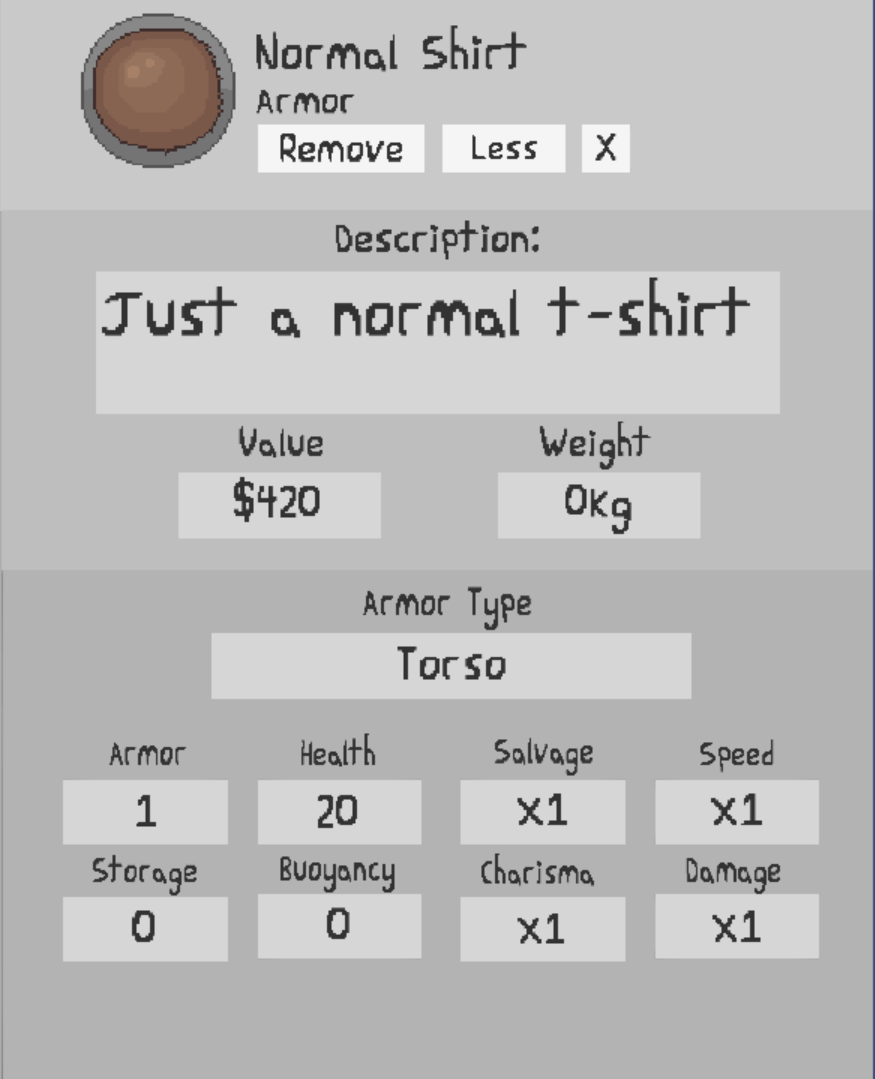
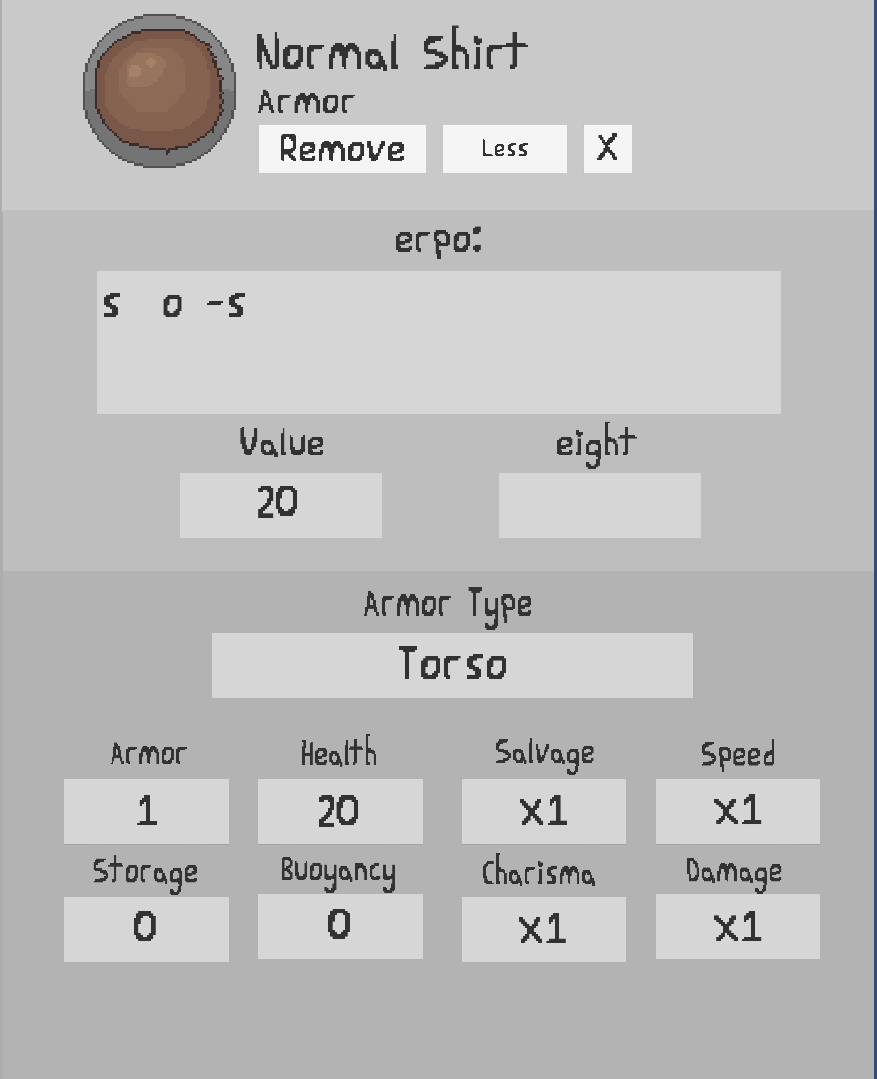
alt text alt text Note: Don't know if this helps, but I have it set to best fit. Also, to avoid blurry text, I have the font size very high and the GameObject scaled down to fit.

highresdoesnt.png (33.2 kB)
lowresworks.png (72.4 kB)
Comment
Add comment
10 |3000 characters needed characters left characters exceeded
▼
  • Viewable by all users
  • Viewable by moderators
  • Viewable by moderators and the original poster
  • Advanced visibility
Viewable by all users

0 Replies

  • Sort: 

Follow this Question

Answers Answers and Comments

3 People are following this question.

avatar image avatar image avatar image

Related Questions

Need help in typing project 0 Answers

Fit textfield size 1 Answer

Display Hit Text On Collition 1 Answer

Create interactable "hotspots" with dialog boxes in steamVR 1 Answer

Reference text files after unity build (on MacOS) 0 Answers


Enterprise
Social Q&A

Social
Subscribe on YouTube social-youtube Follow on LinkedIn social-linkedin Follow on Twitter social-twitter Follow on Facebook social-facebook Follow on Instagram social-instagram

Footer

  • Purchase
    • Products
    • Subscription
    • Asset Store
    • Unity Gear
    • Resellers
  • Education
    • Students
    • Educators
    • Certification
    • Learn
    • Center of Excellence
  • Download
    • Unity
    • Beta Program
  • Unity Labs
    • Labs
    • Publications
  • Resources
    • Learn platform
    • Community
    • Documentation
    • Unity QA
    • FAQ
    • Services Status
    • Connect
  • About Unity
    • About Us
    • Blog
    • Events
    • Careers
    • Contact
    • Press
    • Partners
    • Affiliates
    • Security
Copyright © 2020 Unity Technologies
  • Legal
  • Privacy Policy
  • Cookies
  • Do Not Sell My Personal Information
  • Cookies Settings
"Unity", Unity logos, and other Unity trademarks are trademarks or registered trademarks of Unity Technologies or its affiliates in the U.S. and elsewhere (more info here). Other names or brands are trademarks of their respective owners.
  • Anonymous
  • Sign in
  • Create
  • Ask a question
  • Spaces
  • Default
  • Help Room
  • META
  • Moderators
  • Explore
  • Topics
  • Questions
  • Users
  • Badges