
Wayback Machinekoobas.hobune.stream
May JUN Jul
Previous capture 12 Next capture
2021 2022 2023
2 captures
12 Jun 22 - 14 Jun 22
sparklines
Close Help
  • Products
  • Solutions
  • Made with Unity
  • Learning
  • Support & Services
  • Community
  • Asset Store
  • Get Unity

UNITY ACCOUNT

You need a Unity Account to shop in the Online and Asset Stores, participate in the Unity Community and manage your license portfolio. Login Create account
  • Blog
  • Forums
  • Answers
  • Evangelists
  • User Groups
  • Beta Program
  • Advisory Panel

Navigation

  • Home
  • Products
  • Solutions
  • Made with Unity
  • Learning
  • Support & Services
  • Community
    • Blog
    • Forums
    • Answers
    • Evangelists
    • User Groups
    • Beta Program
    • Advisory Panel

Unity account

You need a Unity Account to shop in the Online and Asset Stores, participate in the Unity Community and manage your license portfolio. Login Create account

Language

  • Chinese
  • Spanish
  • Japanese
  • Korean
  • Portuguese
  • Ask a question
  • Spaces
    • Default
    • Help Room
    • META
    • Moderators
    • Topics
    • Questions
    • Users
    • Badges
  • Home /
  • Help Room /
avatar image
0
Question by adscomics · Dec 01, 2017 at 10:45 PM · spritestexturestilemap

Sprite tearing and bleeding on sprite sheet (Automated fix for this issue?)

So I've been having this issue for a while involving the sprite sheets on a 2D game I'm developing. Sometimes, and it often depends on my camera's position, I'll get small little lines between sprites. alt text
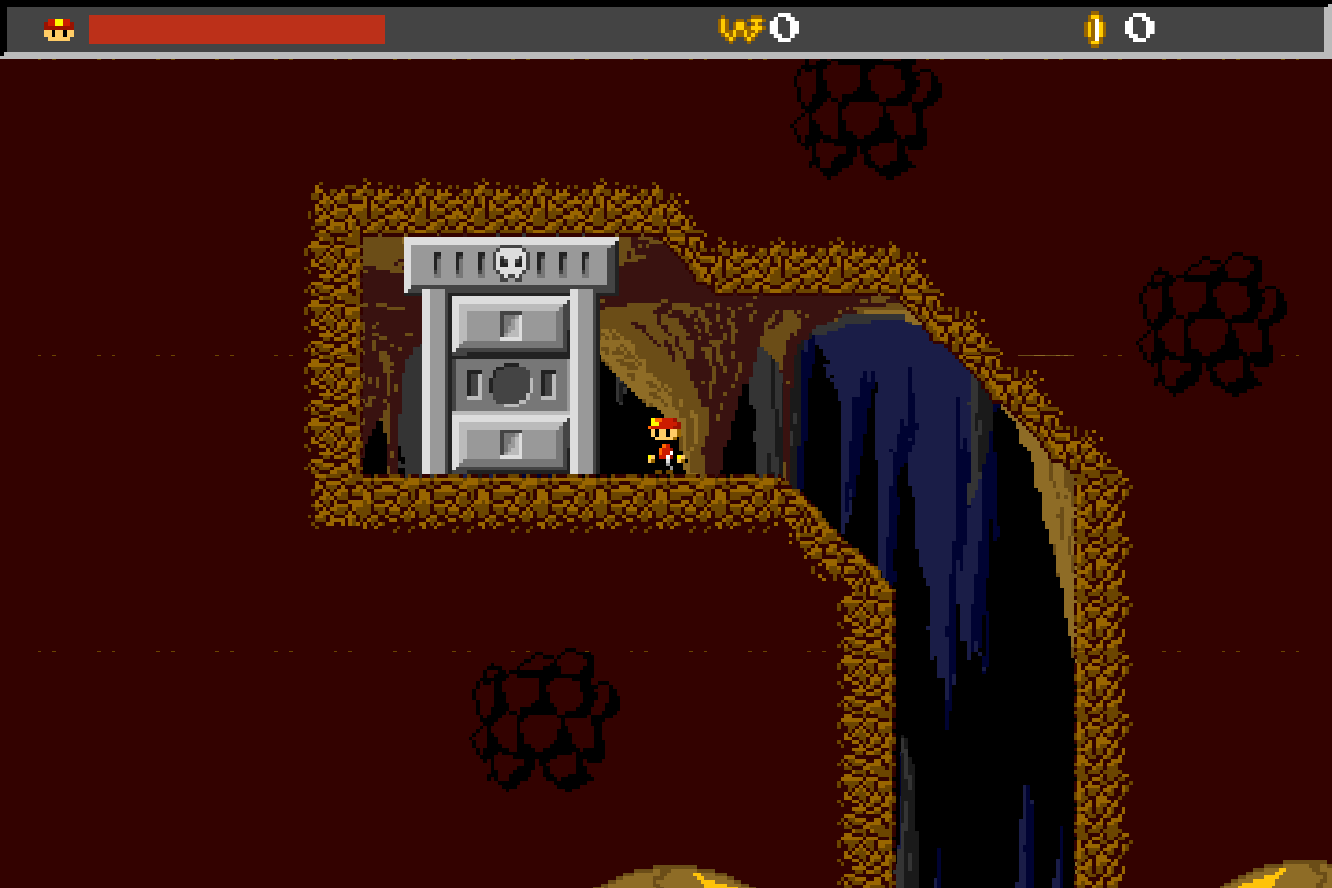
After doing a fair amount of research, I learned that it's due to texture bleeding where adjacent sprites on a sprite sheet leak into the edges of one another. As of now, the tiles in my sprite sheet (really a tile sheet but they're kinda the same thing so whatever) are all adjacent to each other with no sort of padding between them. However, I've come to the conclusion that padding alone will not be the only thing I'd have to do since there would still be lines and gaps between sprites (albeit just transparent lines and not textures bleeding in from other tiles), so I'd have to make some sort of bleed zone (repeating the border pixels around each sprite) in the padding in order to remove the issue with these gaps altogether. However, adding padding between sprites, along with making a bleed zone manually is sort of a pain in the ass. Basically, the question I am asking is if there is a software out there that can automate this process? If I can avoid doing this manually, that'd really be nice since I have a lot of tiles I'd have to do this to. I hope I made sense, and if I need to clarify anything and/or be more specific, I'll be happy to. Thanks in advance!

lc-screenshot-17-12-01-172549.png (45.0 kB)
Comment
Add comment
10 |3000 characters needed characters left characters exceeded
▼
  • Viewable by all users
  • Viewable by moderators
  • Viewable by moderators and the original poster
  • Advanced visibility
Viewable by all users

3 Replies

· Add your reply
  • Sort: 
avatar image
3
Best Answer

Answer by HenriqueSabino · Dec 01, 2017 at 11:20 PM

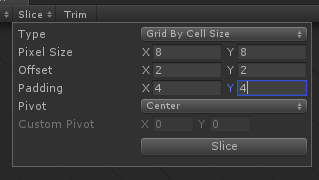
I've had this problem, too. I've fixed redoing the spritesheet with 2px of margin, for example if you sprite is 8x8, you resize it to 12x12 and cut it on the sprite editor. Hint: use the Slice type "Grid by cell size" and put this way: pixel size: (your resolution without margin, 8x8 in the example) Offset: x: 2 y: 2 Padding: x: 4 y: 4.alt text

captura-de-tela-15.png (6.7 kB)
Comment
Add comment · Show 5 · Share
10 |3000 characters needed characters left characters exceeded
▼
  • Viewable by all users
  • Viewable by moderators
  • Viewable by moderators and the original poster
  • Advanced visibility
Viewable by all users
avatar image adscomics · Dec 02, 2017 at 12:26 AM 0
Share

Oh, well I know how to technically fix the issue with adding spacing between the individual sprites, I was just wondering if there was perhaps a program that would automate this process since doing it manually would take a long time.

avatar image HenriqueSabino · Dec 02, 2017 at 01:08 AM 0
Share

Well, since it's a pixel art, you can you the site/program Piskel. This will help you with resizing the spritesheets. It's just do the following:

  • import your spritesheet in the "import" tab

  • select browse images

  • mark "import as spritesheet"

  • List item

  • set the frame size with your current size (8x8 for instance)

  • click on replace

  • Go to the resize tab

  • set the anchor to the middle

  • set the new resolution (12x12 for instance) and click on resize and you're done!

avatar image adscomics HenriqueSabino · Dec 03, 2017 at 02:05 AM 0
Share

Just tried it earlier today. Thank you so much! I still had to add the bleed zone manually but that was relatively easy.

avatar image Nith666 · May 24, 2018 at 09:42 AM 0
Share

Thanks for the link to Piskel, very helpful tool!

avatar image VaporAnomaly · Jul 21, 2020 at 12:29 PM 0
Share

Thank you very much :) I was struggling with this math for a while

avatar image
8

Answer by KayvonX · Jul 13, 2018 at 01:31 AM

@adscomics I hit the same problem, but found the solution. It's caused by the sprite filtering. Go to your spliced sprite and change Filter Mode to Point (no filter).

Comment
Add comment · Show 1 · Share
10 |3000 characters needed characters left characters exceeded
▼
  • Viewable by all users
  • Viewable by moderators
  • Viewable by moderators and the original poster
  • Advanced visibility
Viewable by all users
avatar image rcabot · Mar 30, 2020 at 03:15 PM 0
Share

this worked for me perfectly! thanks.

avatar image
0

Answer by cjonasw · Jun 29, 2018 at 12:01 PM

This should speed up the bleed zone task:

https://charliejwalter.net/spritesheet-bleed/

Comment
Add comment · Share
10 |3000 characters needed characters left characters exceeded
▼
  • Viewable by all users
  • Viewable by moderators
  • Viewable by moderators and the original poster
  • Advanced visibility
Viewable by all users

Your answer

Hint: You can notify a user about this post by typing @username

Up to 2 attachments (including images) can be used with a maximum of 524.3 kB each and 1.0 MB total.

Follow this Question

Answers Answers and Comments

129 People are following this question.

avatar image avatar image avatar image avatar image avatar image avatar image avatar image avatar image avatar image avatar image avatar image avatar image avatar image avatar image avatar image avatar image avatar image avatar image avatar image avatar image avatar image avatar image avatar image avatar image avatar image avatar image avatar image avatar image avatar image avatar image avatar image avatar image avatar image avatar image avatar image avatar image avatar image avatar image avatar image avatar image avatar image avatar image avatar image avatar image avatar image avatar image avatar image avatar image avatar image avatar image avatar image avatar image avatar image avatar image avatar image avatar image avatar image avatar image avatar image avatar image avatar image avatar image avatar image avatar image avatar image avatar image avatar image avatar image avatar image avatar image avatar image avatar image avatar image avatar image avatar image avatar image avatar image avatar image avatar image avatar image avatar image avatar image avatar image avatar image avatar image avatar image avatar image avatar image avatar image avatar image avatar image avatar image avatar image avatar image avatar image avatar image avatar image avatar image avatar image avatar image avatar image avatar image avatar image avatar image avatar image avatar image avatar image avatar image avatar image avatar image avatar image avatar image avatar image avatar image avatar image avatar image avatar image avatar image avatar image avatar image avatar image avatar image avatar image avatar image avatar image avatar image avatar image avatar image avatar image

Related Questions

Sprites Showing up Behind Tilemap??? 3 Answers

Sprite slice missing part of the image 0 Answers

Updating tilemap tile sprites? 0 Answers

How to replace sprite assets with a sheet made with TexturePacker? 0 Answers

Tilemap sprites not scaling even though sprites are at 100 units 0 Answers


Enterprise
Social Q&A

Social
Subscribe on YouTube social-youtube Follow on LinkedIn social-linkedin Follow on Twitter social-twitter Follow on Facebook social-facebook Follow on Instagram social-instagram

Footer

  • Purchase
    • Products
    • Subscription
    • Asset Store
    • Unity Gear
    • Resellers
  • Education
    • Students
    • Educators
    • Certification
    • Learn
    • Center of Excellence
  • Download
    • Unity
    • Beta Program
  • Unity Labs
    • Labs
    • Publications
  • Resources
    • Learn platform
    • Community
    • Documentation
    • Unity QA
    • FAQ
    • Services Status
    • Connect
  • About Unity
    • About Us
    • Blog
    • Events
    • Careers
    • Contact
    • Press
    • Partners
    • Affiliates
    • Security
Copyright © 2020 Unity Technologies
  • Legal
  • Privacy Policy
  • Cookies
  • Do Not Sell My Personal Information
  • Cookies Settings
"Unity", Unity logos, and other Unity trademarks are trademarks or registered trademarks of Unity Technologies or its affiliates in the U.S. and elsewhere (more info here). Other names or brands are trademarks of their respective owners.
  • Anonymous
  • Sign in
  • Create
  • Ask a question
  • Spaces
  • Default
  • Help Room
  • META
  • Moderators
  • Explore
  • Topics
  • Questions
  • Users
  • Badges
