 koobas.hobune.stream


Rotation of enemies
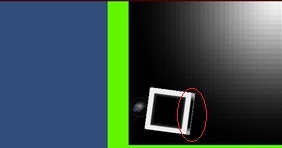
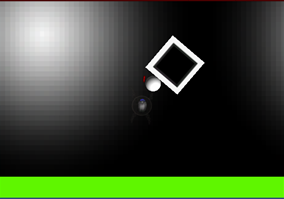
Hi all - quick question on rotation. Firstly, I am using an Orthographic camera to achieve that 2d look and feel. My question is on the rotation of the enemies in my game. I have enemies set to chase the player. These enemies are just graphics (right now just a square texture) thrown onto a cube game object. When the enemy collides with the player, its like it pushes itself upwards, and I can see the side of the cube. Because I want that 2d look, I don't want this to happen. I've attached 2 pictures. The first one shows the side of the cube that I don't want to see and the 2'nd one shows what it should look like.
That being said, I thought I could modify this by setting the x and z of the cube's transform.rotation to always be 0 - but it seems I can't directly modify transform.rotation. It's worth mentioning that my prefabs are setup with a rotation of 0 in the inspector, but this of course changes at run time when velocity is applied and it is pushing against another object. How can I achieve this? I'm hoping to NOT have to take away velocity on collision.

I'm assuming that your camera is at negative 'z' looking towards positive 'z' and that you are the side of the box that faces positive 'Z' as the 'front' that faces the camera. One fix for your problem is to add this line of code to your enemy script to be executed each frame:
transform.rotation = Quaternion.FromToRotation(transform.forward, Vector3.back) * transform.rotation;




