
Wayback Machinekoobas.hobune.stream
May JUN Jul
Previous capture 12 Next capture
2021 2022 2023
2 captures
12 Jun 22 - 14 Jun 22
sparklines
Close Help
  • Products
  • Solutions
  • Made with Unity
  • Learning
  • Support & Services
  • Community
  • Asset Store
  • Get Unity

UNITY ACCOUNT

You need a Unity Account to shop in the Online and Asset Stores, participate in the Unity Community and manage your license portfolio. Login Create account
  • Blog
  • Forums
  • Answers
  • Evangelists
  • User Groups
  • Beta Program
  • Advisory Panel

Navigation

  • Home
  • Products
  • Solutions
  • Made with Unity
  • Learning
  • Support & Services
  • Community
    • Blog
    • Forums
    • Answers
    • Evangelists
    • User Groups
    • Beta Program
    • Advisory Panel

Unity account

You need a Unity Account to shop in the Online and Asset Stores, participate in the Unity Community and manage your license portfolio. Login Create account

Language

  • Chinese
  • Spanish
  • Japanese
  • Korean
  • Portuguese
  • Ask a question
  • Spaces
    • Default
    • Help Room
    • META
    • Moderators
    • Topics
    • Questions
    • Users
    • Badges
  • Home /
  • Help Room /
avatar image
0
Question by AliCollinsJSY · Apr 11, 2016 at 02:00 PM · renderingperformanceprofilergpu

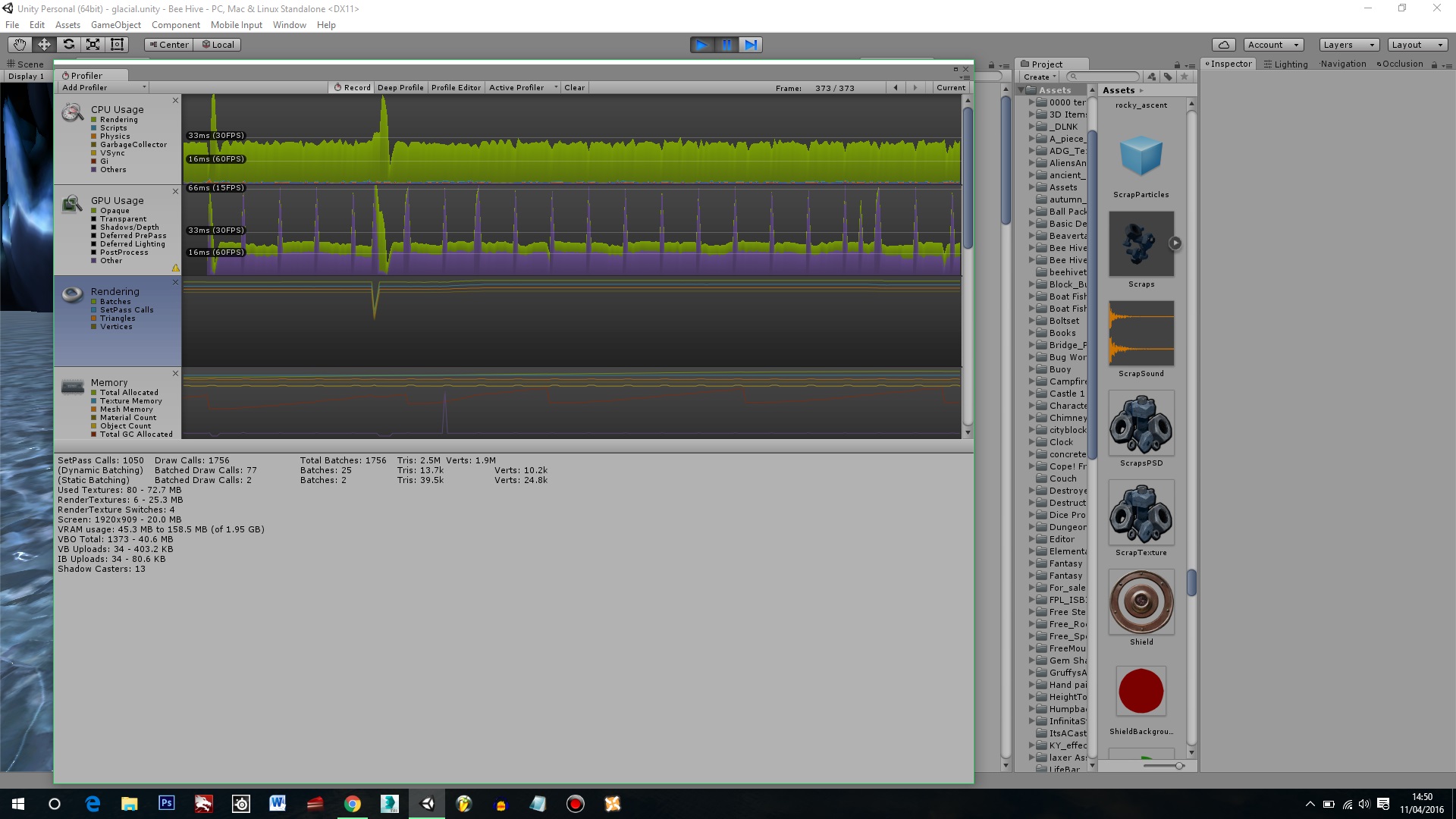
GPU spikes in profiler - used to be 100fps, now 30fps?

I have a question - I'm currently making a game and I'm getting pretty consistent spikes in the GPU according to the profiler. Now when I've opened the level previously, it used to average around 100fps without these spikes. I haven't changed anything in the level since then but when I restart the editor, I get these GPU spikes and it's killing my performance.

I've tried running it in both DX9 and DX11, enabling/disabling vsync, running it with "High performance NVIDIA processor" and tinkering with the resolution/AA/shadows... nothing has worked so far. No errors in the console either.

Does anyone have any ideas? I'm running a pretty high spec machine.

i7-4710HQ Quad core nVidia GTX 850M 8GB RAM

Any help will be very much appreciated!
alt text

glacial1.jpg (372.8 kB)
Comment
Add comment
10 |3000 characters needed characters left characters exceeded
▼
  • Viewable by all users
  • Viewable by moderators
  • Viewable by moderators and the original poster
  • Advanced visibility
Viewable by all users

1 Reply

· Add your reply
  • Sort: 
avatar image
2
Best Answer

Answer by AliCollinsJSY · Apr 11, 2016 at 02:05 PM

Just a bit of extra info, even when there are no objects in front of the main camera (just terrain and my character model), it still averages 30 fps ... the main cause of the performance drop is "Gfx.WaitForPresent" - I've investigated this issue before using the search but haven't found a solution - I believe Gfx.WaitForPresent is the issue here but I still don't know how to fix this.

Comment
Add comment · Show 1 · Share
10 |3000 characters needed characters left characters exceeded
▼
  • Viewable by all users
  • Viewable by moderators
  • Viewable by moderators and the original poster
  • Advanced visibility
Viewable by all users
avatar image AliCollinsJSY · Apr 11, 2016 at 02:09 PM 1
Share

SOLVED: If you're running into this issue and you're using an $$anonymous$$SI Laptop with an nVidia Graphics card, I've found the solution.

I've plugged my laptop into the mains and now the frame rate is back to 100 average. When your laptop is unplugged from the mains and depending on which nVidia card you have, sometimes the GPU goes into battery saving mode and Unity won't use it properly. When it is plugged in, it uses the entire GPU as nVidia detects it doesn't need to limit its power.

Your answer

Hint: You can notify a user about this post by typing @username

Up to 2 attachments (including images) can be used with a maximum of 524.3 kB each and 1.0 MB total.

Follow this Question

Answers Answers and Comments

73 People are following this question.

avatar image avatar image avatar image avatar image avatar image avatar image avatar image avatar image avatar image avatar image avatar image avatar image avatar image avatar image avatar image avatar image avatar image avatar image avatar image avatar image avatar image avatar image avatar image avatar image avatar image avatar image avatar image avatar image avatar image avatar image avatar image avatar image avatar image avatar image avatar image avatar image avatar image avatar image avatar image avatar image avatar image avatar image avatar image avatar image avatar image avatar image avatar image avatar image avatar image avatar image avatar image avatar image avatar image avatar image avatar image avatar image avatar image avatar image avatar image avatar image avatar image avatar image avatar image avatar image avatar image avatar image avatar image avatar image avatar image avatar image avatar image avatar image avatar image

Related Questions

Massive Rendering spike in profiler when unloading the scene 0 Answers

GPU spike from RenderTexture.SetActive 0 Answers

Intermittent unexplained frame rate drops due to Gfx.WaitForPresentOnGfxThread and Semaphore.WaitForSignal. Can someone help me understand what is going on? 1 Answer

DrawMeshInstanced has bad perfomance on some Android devices 0 Answers

Need help profiling first game. Huge GPU spikes? 1 Answer


Enterprise
Social Q&A

Social
Subscribe on YouTube social-youtube Follow on LinkedIn social-linkedin Follow on Twitter social-twitter Follow on Facebook social-facebook Follow on Instagram social-instagram

Footer

  • Purchase
    • Products
    • Subscription
    • Asset Store
    • Unity Gear
    • Resellers
  • Education
    • Students
    • Educators
    • Certification
    • Learn
    • Center of Excellence
  • Download
    • Unity
    • Beta Program
  • Unity Labs
    • Labs
    • Publications
  • Resources
    • Learn platform
    • Community
    • Documentation
    • Unity QA
    • FAQ
    • Services Status
    • Connect
  • About Unity
    • About Us
    • Blog
    • Events
    • Careers
    • Contact
    • Press
    • Partners
    • Affiliates
    • Security
Copyright © 2020 Unity Technologies
  • Legal
  • Privacy Policy
  • Cookies
  • Do Not Sell My Personal Information
  • Cookies Settings
"Unity", Unity logos, and other Unity trademarks are trademarks or registered trademarks of Unity Technologies or its affiliates in the U.S. and elsewhere (more info here). Other names or brands are trademarks of their respective owners.
  • Anonymous
  • Sign in
  • Create
  • Ask a question
  • Spaces
  • Default
  • Help Room
  • META
  • Moderators
  • Explore
  • Topics
  • Questions
  • Users
  • Badges
