 koobas.hobune.stream


How to get the angle of the terrain under de front and back of my object
I need to get the angle of the terrain under my plane, i tried to increment a vector3 to the position of the plane and then use vector3.Angle but the when i rotate the plane the position of the front and back go wrong and the vector3.Angle always return 0. Since my english isn't all that great here's a picture to illustrate. 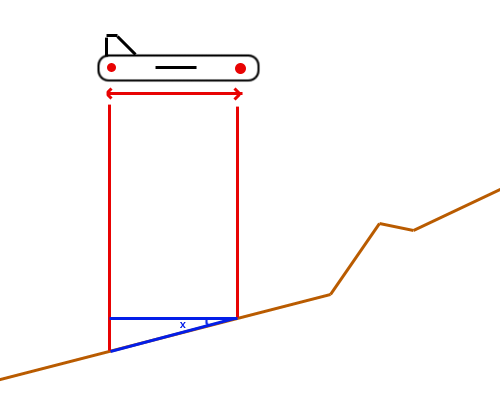
Here is how i tried to do it;
 var vfrontnave: Vector3=Vector3(50,0,0);
 var vbacknave: Vector3=Vector3(-50,0,0);
 if(LockAltura==true){
     transform.position.y  =Terrain.activeTerrain.SampleHeight(transform.position)+MinAltura;
             frontnave.y=Terrain.activeTerrain.SampleHeight(transform.position+vfrontnave)+MinAltura;
             backnave.y=Terrain.activeTerrain.SampleHeight(transform.position+vbacknave)+MinAltura;
 transform.eulerAngles.x = Vector3.Angle(frontnave,backnave);
 }
EDIT: Full code
 //------------------------------------------------------------------- Blobshadow stuff --------------------------------------------------------------------------------
 static var airplaneangley: float=0.0;//This goes to the blob shadow.
 //-------------------------------------------------------------------------------------------------------------------------------------------------------------------------

 static var gameover=0;
 var crashforce = 0; // When gameover we need a force to let the airplane crash

 var speed2: float =1;
 //Rotation und Rotaton and position of our airplane
 static var rotationx=0;
 static var rotationy:float =0.0;
 static var rotationz:float =0.0;
 var positionx: float=100.0;
 static var positiony: float=0.0;
 var positionz: float=0.0;

 static var speed:float =700;// speed variable is the speed
 var uplift:float =0.0;// Uplift to take off
 var pseudogravitation:float=-0.3; //downlift for driving through landscape

 var rightleftsoft:float=0.0; // Variable for soft curveflight
 var rightleftsoftabs:float=0.0; // Positive rightleftsoft Variable

 var divesalto:float =0.0; // blocks the forward salto
 var diveblocker:float=0.0; // blocks sideways stagger flight while dive

 var MinAltura: int;
 var LockAltura: boolean=false;

 var terr = Terrain.activeTerrain;
 var    hmWidth = terr.terrainData.heightmapWidth;
 var    hmHeight = terr.terrainData.heightmapHeight;

 var pitchangle : float;
 var frontnave: Vector3;
 var backnave: Vector3;

 function Update () {

 //-------------------------------------------BlobShadow stuff------------------------------------------------------------------------------------------

         //shadow to the same angle than the airplane
         airplaneangley= transform.eulerAngles.y;

 //-------------------------------------------------------Game over ------------------------------------------------------------------------

     //Restart when gameover = 2
     //Restart wenn gameover = 2
     if ((gameover==2) && (Input.GetKey ("enter"))||(gameover==2) &&(Input.GetKey ("return")))    {
     gameover=0;
     rigidbody.useGravity = false;
     transform.position = Vector3(500, 100, 500    );
     transform.eulerAngles = Vector3(0,0,0);
     }

     // Physics stuff when gameover ==1
     if (gameover==1)    {
     rigidbody.AddRelativeForce (0, 0, crashforce);
     gameover=2;
     }

         //Restart the level
     if (Input.GetKey("f2")){
         //We need to manually reset all important static values too. They are global, and keep their values across the levels
         speed=700;
         gameover=0;
         rigidbody.useGravity = false;
         Application.LoadLevel(0);
         }

 //------------------------#####  Maincode flying      #####--------------------------------------------------------

     // Code is active when gameover = 0
     if(gameover==0){

         //Turn variables to rotation and position of the object
         rotationx=transform.eulerAngles.x;
         rotationy=transform.eulerAngles.y;
         rotationz=transform.eulerAngles.z;
         positionx=transform.position.x;
         positiony=transform.position.y;
         positionz=transform.position.z;

     //------------------------- Rotations of the airplane -------------------------------------------------------------------------

     //Up Down, limited to a minimum speed
     //Up Down, limited to a minimum speed
         if ((Input.GetAxis("Vertical")<=0)&&((speed>595))) {
             transform.Rotate((Input.GetAxis("Vertical")*Time.deltaTime*80),0,0);
         }
         //Special case dive above 90 degrees
         if ((Input.GetAxis("Vertical")>0)&&((speed>595))){
             transform.Rotate((0.8-divesalto)*(Input.GetAxis("Vertical")*Time.deltaTime*80),0,0);
         }

     //Left Right at the ground
         if (groundtrigger.triggered==1) transform.Rotate(0,Input.GetAxis("Horizontal")*Time.deltaTime*30,0,Space.World);
     //Left Right in the air
         if (groundtrigger.triggered==0) transform.Rotate(0,Time.deltaTime*100*rightleftsoft,0,Space.World);

     //Tilt multiplied with minus 1 to go into the right direction
     //Tilt just in the air
         if ((groundtrigger.triggered==0)) transform.Rotate(0,0,Time.deltaTime*100*(1.0-rightleftsoftabs-diveblocker)*Input.GetAxis("Horizontal")*-1.0);

     //------------------------------------------------Pitch and Tilt calculations ------------------------------------------
         //variable rightleftsoft + rightleftsoftabs

         //Soft rotation calculation -----This prevents the airplaine to fly to the left while it is still tilted to the right
         if ((Input.GetAxis ("Horizontal")<=0)&&(rotationz >0)&&(rotationz <90)) rightleftsoft=rotationz*2.2/100*-1;//to the left
         if ((Input.GetAxis ("Horizontal")>=0)&&(rotationz >270)) rightleftsoft=(7.92-rotationz*2.2/100);//to the right

         //Limit rightleftsoft so that the switch isn`t too hard when flying overhead
         if (rightleftsoft>1) rightleftsoft =1;
         if (rightleftsoft<-1) rightleftsoft =-1;

         //Precisionproblem rightleftsoft to zero
         if ((rightleftsoft>-0.01) && (rightleftsoft<0.01)) rightleftsoft=0;

         //Retreives positive rightleftsoft variable
         rightleftsoftabs=Mathf.Abs(rightleftsoft);

         // --------------------Calculations Block salto forward -----------------------------------------------------

         // Variable divesalto
         // dive salto forward blocking
         if (rotationx < 90) divesalto=rotationx/100.0;//Updown
         if (rotationx > 90) divesalto=-0.2;//Updown

         //Variable diveblocker
         //blocks sideways stagger flight while dive
         if (rotationx <90) diveblocker=rotationx/200.0;
         else diveblocker=0;

         //----------------------------everything rotate back ---------------------------------------------------------------------------------

         //rotateback when key wrong direction
         if ((rotationz <180)&&(Input.GetAxis ("Horizontal")>0)) transform.Rotate(0,0,rightleftsoft*Time.deltaTime*80);
         if ((rotationz >180)&&(Input.GetAxis ("Horizontal")<0)) transform.Rotate(0,0,rightleftsoft*Time.deltaTime*80);

         //Rotate back in z axis general, limited by no horizontal button pressed
         if (!Input.GetButton ("Horizontal")){
             if ((rotationz < 135)) transform.Rotate(0,0,rightleftsoftabs*Time.deltaTime*-100);
             if ((rotationz > 225)) transform.Rotate(0,0,rightleftsoftabs*Time.deltaTime*100);
             }

         //Zurückdrehen X Achse || Rotate back X axis
         if ((!Input.GetButton ("Vertical"))&&(groundtrigger.triggered==0)){
             if ((rotationx >0)&&(rotationx < 180)) transform.Rotate(Time.deltaTime*-50,0,0);
             if ((rotationx >0)&&(rotationx > 180)) transform.Rotate(Time.deltaTime*50,0,0);
             }
     //----------------------------Limitações de Altura---------------------------------------------------------------------
         if(Input.GetKeyDown("c")){
             if(LockAltura==false){
                 LockAltura=true;
                 rigidbody.useGravity = false;
                 MinAltura=transform.position.y- Terrain.activeTerrain.SampleHeight(transform.position);
                 }
             else{
                 LockAltura=false;
                 rigidbody.useGravity = true;
                 }
             }
         if(LockAltura==true && transform.position.y-Terrain.activeTerrain.SampleHeight(transform.position)<=MinAltura){
             transform.position.y=(MinAltura+Terrain.activeTerrain.SampleHeight(transform.position))+Time.deltaTime*10;
             }
         if(LockAltura==true){
     var hit: RaycastHit;
     if (Physics.Raycast(transform.position + transform.forward, Vector3.down, hit)){
         var fHit = hit.point; // get the point where the front ray hits the ground
         if (Physics.Raycast(transform.position - transform.forward, Vector3.down, hit)){
             var bHit = hit.point; // get the back hit point
             transform.forward = fHit - bHit; // align the object to these points
         }
     }
 }
     //----------------------------Speed driving and flying ----------------------------------------------------------------

         // Speed
         transform.Translate(0,0,speed/20*Time.deltaTime);

         //We need a minimum speed limit in the air. We limit again with the groundtrigger.triggered variable

         //Input Accellerate and deccellerate at ground
         if ((groundtrigger.triggered==1)&&(Input.GetButton("Fire1"))&&(speed<1300)) speed+=Time.deltaTime*240;
         if ((groundtrigger.triggered==1)&&(Input.GetButton("Fire2"))&&(speed>0)) speed-=Time.deltaTime*240;
                 //Input Accellerate and deccellerate in the air
         if ((groundtrigger.triggered==0)&&(Input.GetButton("Fire1"))&&(speed<1300)) speed+=Time.deltaTime*240;
         if ((groundtrigger.triggered==0)&&(Input.GetButton("Fire2"))&&(speed>600)) speed-=Time.deltaTime*240;

         if (speed<0) speed=0; //floatingpoint calculations makes a fix necessary so that speed cannot be below zero

         //Another speed floatingpoint fix:
         if ((groundtrigger.triggered==0)&&(!Input.GetButton("Fire1"))&&(!Input.GetButton("Fire2"))&&(speed>995)&&(speed<1005)) speed=1000;

         //-----------------------------------------------------Uplift  ----------------------------------------------------------------------

         //When we don`t accellerate or deccellerate we want to go to a neutral speed in the air. With this speed it has to stay at a neutral height.
         //Above this value the airplane has to climb, with a lower speed it has to  sink. That way we are able to takeoff and land then.

         //Neutral speed at 1000
         //This code resets the speed to 1000 when there is no acceleration or deccelleration. Maximum 800, minimum 600
         if((Input.GetButton("Fire1")==false)&&(Input.GetButton("Fire2")==false)&&(speed>595)&&(speed<1000)) speed+=Time.deltaTime*240.0;
         if((Input.GetButton("Fire1")==false)&&(Input.GetButton("Fire2")==false)&&(speed>595)&&(speed>1000)) speed-=Time.deltaTime*240.0;

         //uplift
         transform.Translate(0,uplift*Time.deltaTime/10.0,0);

         //Calculate uplift
         uplift = -1000+speed;

     //We don`t want downlift. So when the uplift value lower zero we set it to 0
         if ((groundtrigger.triggered==1)&&(uplift < 0)) uplift=0;

     // ------------------------------- Rumfahren / driving around  ------------------------------------------------------------

     //special case drive across landscape. We need something like pseudo gravitation.
     //And we align the airplane at the ground.
     //We use sensorobjects for that

     //ground driving is up to Speed 600. Five points security
     if (speed <595){
     if ((sensorfront.sensorfront ==0)&&(sensorrear.sensorrear ==1)) transform.Rotate(Time.deltaTime*20,0,0);
     if ((sensorfront.sensorfront ==1)&&(sensorrear.sensorrear ==0)) transform.Rotate(Time.deltaTime*-20,0,0);
     if (sensorfrontup.sensorfrontup ==1) transform.Rotate(Time.deltaTime*-20,0,0);
     if (groundtrigger.triggered==0) transform.Translate(0,pseudogravitation*Time.deltaTime/10.0,0);
     }

     //--------------------------------------------- Debug ---------------------------------------------------------------------------------
     //With key 1 above the letters you can set the airplane to height 200. With speed 1000. For debug reasons.
     // so that you don`t have to takeoff all the time ...

     if (Input.GetKey ("1")) {
     transform.position.y=-600;
     transform.position.x=200;
     speed=1000;
         }

     }
     //-------------------------------------------------- Limiting to playfield --------------------------------------------------------------------------

     /*Here i wrap the airplane around the playfield so that you cannot fly under the landscape
     if (transform.position.x >= 900.0) transform.position.x = 0;
     else if (transform.position.x <= -900.0) transform.position.x = 900.0;
     else if (transform.position.z >= 900.0) transform.position.z = 0;
     else if (transform.position.z <= -900.0) transform.position.z = 900.0;*/

     //Here i limit the height
     if (positiony > 500) transform.position.y = 500;

 }
 function OnGUI()
 {
     GUILayout.FlexibleSpace();
     GUILayout.BeginVertical("Box");
     GUILayout.Label("LockAltura");
     GUILayout.Label(LockAltura.ToString());
     GUILayout.Label("MinAltura");
     GUILayout.Label(MinAltura.ToString());
     GUILayout.Label("Altura");
     GUILayout.Label(transform.position.y.ToString());
     GUILayout.Label("Altura");
     GUILayout.Label(transform.position.y.ToString());
     GUILayout.Label("Front");
     GUILayout.Label(frontnave.ToString());
     GUILayout.Label("Back");
     GUILayout.Label(backnave.ToString());
      GUILayout.Label("Angle");
     GUILayout.Label(pitchangle.ToString());
     GUILayout.EndVertical();
     GUILayout.FlexibleSpace();
        }
 // ----------------------------------------------  Gameover activating ----------------------------------------------------------------

 //When our airplane is in the air (groundtrigger.triggered=0), and touches the ground with something different than
 //the wheels (groundtrigger primitive) it will count as crash.
 //We need to convert the speed into a force so that we can let our airplane collide

 function OnCollisionEnter(collision : Collision) {
     if (groundtrigger.triggered==0) {
     groundtrigger.triggered=1;
     crashforce= speed*10000;
     speed=0;
     gameover=1;
     rigidbody.useGravity = true;
     }
 }

You can simply use Physics.Raycast and then check the normal of the RacastHit.

If you want to align the object to the terrain, a simple solution is to cast rays to the ground from the front and the back of the object, get the vector between the front and back hit points and assign it to transform.forward, like this:
 if(LockAltura==true){
     var hit: RaycastHit;
     if (Physics.Raycast(transform.position + transform.forward, Vector3.down, hit)){
         var fHit = hit.point; // get the point where the front ray hits the ground
         if (Physics.Raycast(transform.position - transform.forward, Vector3.down, hit)){
             var bHit = hit.point; // get the back hit point
             transform.forward = fHit - bHit; // align the object to these points
         }
     }
 }
Take a look at this question, where @SirGive uses this method and another 4 rays version.

I already been trying to use raycast but it keep making my airplane jumping and changing direction whitout moving, but i will take a look at the other question.

Have you tried this code? It works fine: the object aligns its front and back sides to the ground, while the left and right sides are kept at the same height.
I copied the code but it's kinda jumpy and sometimes the terrain disapear for 1 frame but i'm searching in the code if there is anything trying to overide the position set by the raycast
I tried to desactivate all code that changed the position and it's still jumpy.i will edit the main post with the full code if you are kind enough to take a look.



