
Wayback Machinekoobas.hobune.stream
May JUN Jul
Previous capture 12 Next capture
2021 2022 2023
1 capture
12 Jun 22 - 12 Jun 22
sparklines
Close Help
  • Products
  • Solutions
  • Made with Unity
  • Learning
  • Support & Services
  • Community
  • Asset Store
  • Get Unity

UNITY ACCOUNT

You need a Unity Account to shop in the Online and Asset Stores, participate in the Unity Community and manage your license portfolio. Login Create account
  • Blog
  • Forums
  • Answers
  • Evangelists
  • User Groups
  • Beta Program
  • Advisory Panel

Navigation

  • Home
  • Products
  • Solutions
  • Made with Unity
  • Learning
  • Support & Services
  • Community
    • Blog
    • Forums
    • Answers
    • Evangelists
    • User Groups
    • Beta Program
    • Advisory Panel

Unity account

You need a Unity Account to shop in the Online and Asset Stores, participate in the Unity Community and manage your license portfolio. Login Create account

Language

  • Chinese
  • Spanish
  • Japanese
  • Korean
  • Portuguese
  • Ask a question
  • Spaces
    • Default
    • Help Room
    • META
    • Moderators
    • Topics
    • Questions
    • Users
    • Badges
  • Home /
avatar image
1
Question by Eco-Editor · Jul 02, 2017 at 02:04 PM · multiplayervraimultiplayer-networkingavatar

Custom avatar on HTC Vive CameraRig

Hello all

I'm trying to dress the cameraRig with avatar body for a multi user simulation. All the relevant scripts are on the cameraEye component, as the user is walking in the room. When I place the avatar on the eye component I receive a "flying in the air" character. How can I "ground" my avatar and still be able to have it follow the users body?

picture for how the hierarchy is now: alt text
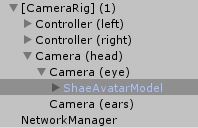
shaiavatarmodel.jpg (14.8 kB)
Comment
Add comment
10 |3000 characters needed characters left characters exceeded
▼
  • Viewable by all users
  • Viewable by moderators
  • Viewable by moderators and the original poster
  • Advanced visibility
Viewable by all users

3 Replies

· Add your reply
  • Sort: 
avatar image
2
Best Answer

Answer by AtGfx · Jul 14, 2017 at 09:53 AM

Hi !

Your problem comes from SteamVR that offset your camera from the ground dsitance.

When you define a CameraRig, you place it on the ground, then the camera is offset by the ground distance that is tracked by the Vive. If you place a ShaeAvatarModel in the Camera eye, it will also take this offset and fly in the air. A solution can be to constantly invert this offset : you put a script in camera eye and reference the avatar, then at each update you modify the position of the avatar according to the position of the camera. Another solution can be to set a script on the avatar that constantly shoot a ray under it to get the distance from the ground, and you have just to offset it corresponding to the distance value.

Comment
Add comment · Show 5 · Share
10 |3000 characters needed characters left characters exceeded
▼
  • Viewable by all users
  • Viewable by moderators
  • Viewable by moderators and the original poster
  • Advanced visibility
Viewable by all users
avatar image emilyVR · Jul 14, 2017 at 11:13 AM 0
Share

@AtGfx The ray method is working really well for me - thank you!

Two quick follow-up questions, however... :)

1) This now means that the avatar (I'm using Unity's Third Person Controller) rotates with the headset. For example, when I angle my head downward, the entire avatar leans forward. How do you recommend I fix that?

2) If I resolve that, I think the avatar will be properly co-located with my camera, but this means that I will see through some parts of the avatar. I would like to shift the avatar so that it is always positioned slightly behind the headset - close enough for the I$$anonymous$$ movement of my hands to look realistic, but far enough away so that I am not looking through the front of the third person controller's head! I have been able to position the avatar before, but it always floats at a certain distance in the world's reference frame, rather than at a certain distance behind the camera.

avatar image AtGfx emilyVR · Jul 14, 2017 at 11:19 AM 1
Share

Oh sure, same problem with rotation...

$$anonymous$$aybe the best way to position your avatar is to remove it from the hierachy of the camera rig, and define a script on it with the camera eye as parameter. Then at each update you can position your avatar exactly as you want according to the camera parameter. You can set same translate in x,z and avoid y for example to position it, you can even rotate only the head of your avatar according to the camera rotation, etc.

For the hands, you can also define 2 avatars : if you are the simulated one, you display the hands, if you are not (so a remote one from multi) you display the ShaeAvater.

PS: if answer is ok for you, you can set it as accepted ;) thanks !

avatar image emilyVR AtGfx · Jul 14, 2017 at 01:48 PM 0
Share

Again, super helpful - thanks so much! I would accept your answer, but I didn't post the original question... :(

Show more comments
avatar image
0

Answer by emilyVR · Jul 14, 2017 at 09:44 AM

Did you ever figure this out? I would love to know the answer, too!

Comment
Add comment · Show 1 · Share
10 |3000 characters needed characters left characters exceeded
▼
  • Viewable by all users
  • Viewable by moderators
  • Viewable by moderators and the original poster
  • Advanced visibility
Viewable by all users
avatar image Eco-Editor · Jul 15, 2017 at 08:36 PM 0
Share

Hi, I didn't get the chance to try it myself yet... it looks like a good practice. Eventually I bought an asset called Instant VR edge, and using this asset going to change to my design avatar.

avatar image
0

Answer by Eco-Editor · Jul 31, 2017 at 03:00 PM

Another thing that is related to this query is adding idle and walking animations to the multiplayer avatar. When the person, cameraEye is moving, than the transform.position is changing. If the position change of x,z axis is bigger than 0.2 than play walk animation. If position doesn't change for a frame play idle animation.

I've tried something like that, it's not currently working:

     private void Update()
     {
         gameObject.transform.position = new Vector3(cameraEyes.position.x, 0, cameraEyes.position.z);
         gameObject.transform.rotation = Quaternion.Lerp(gameObject.transform.rotation, cameraEyes.rotation, 5 * Time.deltaTime);
 
         Vector3 currentPosition = transform.position;
 
         if (currentPosition.x > 0.2 || currentPosition.x < 0.2 && currentPosition.z > 0.2 || currentPosition.z < 0.2) 
         {
             playerAnimator.SetBool("Walk", true);
             lastPosition = currentPosition;
         }
         else
         {
             playerAnimator.SetBool("Walk", false);
         }
 
     }

Comment
Add comment · Show 1 · Share
10 |3000 characters needed characters left characters exceeded
▼
  • Viewable by all users
  • Viewable by moderators
  • Viewable by moderators and the original poster
  • Advanced visibility
Viewable by all users
avatar image ClaudiaKrog · Aug 29, 2019 at 08:54 PM 0
Share

Hello,

I am trying to set the Vive headset position equal to my avatars leftEye position in Update. The script seems to work, as the Unity scene editor shows the camera correctly in the avatar's head. However, in the actual headset AND in the game view, the perspective is not from the eyes of the avatar. It is about 20 feet behind the avatar.

Any ideas what might be causing this, and how it can be fixed? I thought it might have something to do with the FOV, which seems like it cannot be changed.

Thanks

Your answer

Hint: You can notify a user about this post by typing @username

Up to 2 attachments (including images) can be used with a maximum of 524.3 kB each and 1.0 MB total.

Follow this Question

Answers Answers and Comments

158 People are following this question.

avatar image avatar image avatar image avatar image avatar image avatar image avatar image avatar image avatar image avatar image avatar image avatar image avatar image avatar image avatar image avatar image avatar image avatar image avatar image avatar image avatar image avatar image avatar image avatar image avatar image avatar image avatar image avatar image avatar image avatar image avatar image avatar image avatar image avatar image avatar image avatar image avatar image avatar image avatar image avatar image avatar image avatar image avatar image avatar image avatar image avatar image avatar image avatar image avatar image avatar image avatar image avatar image avatar image avatar image avatar image avatar image avatar image avatar image avatar image avatar image avatar image avatar image avatar image avatar image avatar image avatar image avatar image avatar image avatar image avatar image avatar image avatar image avatar image avatar image avatar image avatar image avatar image avatar image avatar image avatar image avatar image avatar image avatar image avatar image avatar image avatar image avatar image avatar image avatar image avatar image avatar image avatar image avatar image avatar image avatar image avatar image avatar image avatar image avatar image avatar image avatar image avatar image avatar image avatar image avatar image avatar image avatar image avatar image avatar image avatar image avatar image avatar image avatar image avatar image avatar image avatar image avatar image avatar image avatar image avatar image avatar image avatar image avatar image avatar image avatar image avatar image avatar image avatar image avatar image avatar image avatar image avatar image avatar image avatar image avatar image avatar image avatar image avatar image avatar image avatar image avatar image avatar image avatar image avatar image avatar image avatar image avatar image avatar image avatar image avatar image avatar image avatar image avatar image avatar image avatar image avatar image avatar image avatar image

Related Questions

Where did the avatars go? Multiplayer spawn prefabs 0 Answers

Oculus Quest Photon Network bugs connecting players 2 Answers

Network game design recommendation 0 Answers

Multiplayer avatar's transform settings 0 Answers

Problems with Scene Change networking Unet 0 Answers


Enterprise
Social Q&A

Social
Subscribe on YouTube social-youtube Follow on LinkedIn social-linkedin Follow on Twitter social-twitter Follow on Facebook social-facebook Follow on Instagram social-instagram

Footer

  • Purchase
    • Products
    • Subscription
    • Asset Store
    • Unity Gear
    • Resellers
  • Education
    • Students
    • Educators
    • Certification
    • Learn
    • Center of Excellence
  • Download
    • Unity
    • Beta Program
  • Unity Labs
    • Labs
    • Publications
  • Resources
    • Learn platform
    • Community
    • Documentation
    • Unity QA
    • FAQ
    • Services Status
    • Connect
  • About Unity
    • About Us
    • Blog
    • Events
    • Careers
    • Contact
    • Press
    • Partners
    • Affiliates
    • Security
Copyright © 2020 Unity Technologies
  • Legal
  • Privacy Policy
  • Cookies
  • Do Not Sell My Personal Information
  • Cookies Settings
"Unity", Unity logos, and other Unity trademarks are trademarks or registered trademarks of Unity Technologies or its affiliates in the U.S. and elsewhere (more info here). Other names or brands are trademarks of their respective owners.
  • Anonymous
  • Sign in
  • Create
  • Ask a question
  • Spaces
  • Default
  • Help Room
  • META
  • Moderators
  • Explore
  • Topics
  • Questions
  • Users
  • Badges
